What this example shows
A KYC / customer-onboarding pipeline rendered as a data-flow architecture diagram, with sensitive-data edges visually distinct from regular flows. The diagram captures where personally identifiable information enters the system, every system that stores or processes it, and where it crosses a trust boundary into a third-party service. Each revision of the scene becomes an audit-evidence snapshot - “here is what the architecture looked like on the day of the audit.”
When to use it
Reach for this when you need GDPR / CCPA / SOC 2 evidence, when a vendor is reviewing your data flows, when a security team is assessing PII exposure, or when a customer’s procurement team asks for a diagram of where their data lives. The diagram is generated from a classified inventory rather than hand-drawn - agents are good at this kind of comprehensive sweep, humans are good at reviewing the result.
What the agent does
The agent ingests a data classification source (compliance inventory, data catalog, or codebase scan tagged with PII annotations), then applies typed operations to the persisted scene: createNode for each system that touches PII, createEdge with sensitive-data styling for each flow, frame containers for trust boundaries (internal / customer-facing / third-party). Every change creates an immutable revision; the agent stores dsp_list_revisions output as part of the audit packet.
When the architecture changes - a vendor swap, a new processor, a deprecated cache - the agent applies the delta and the visual diff highlights exactly what’s different from the prior audit period. The revision history IS the audit trail.
What the output includes
- Frame-grouped diagram with explicit trust boundaries (customer device, application backend, third-party processors).
- Sensitive-data edges visually styled distinctly from regular flows.
- A complete revision history accessible via
dsp_list_revisionswith timestamps and per-revision messages - each revision documents what changed and why. - Visual diff between any two revisions for “what changed since the last audit?” reviews.
- Persistent stable IDs so a system that’s been in the architecture for years has the same
elementIdacross all audit periods, simplifying cross-period comparison.
Rendered diagram
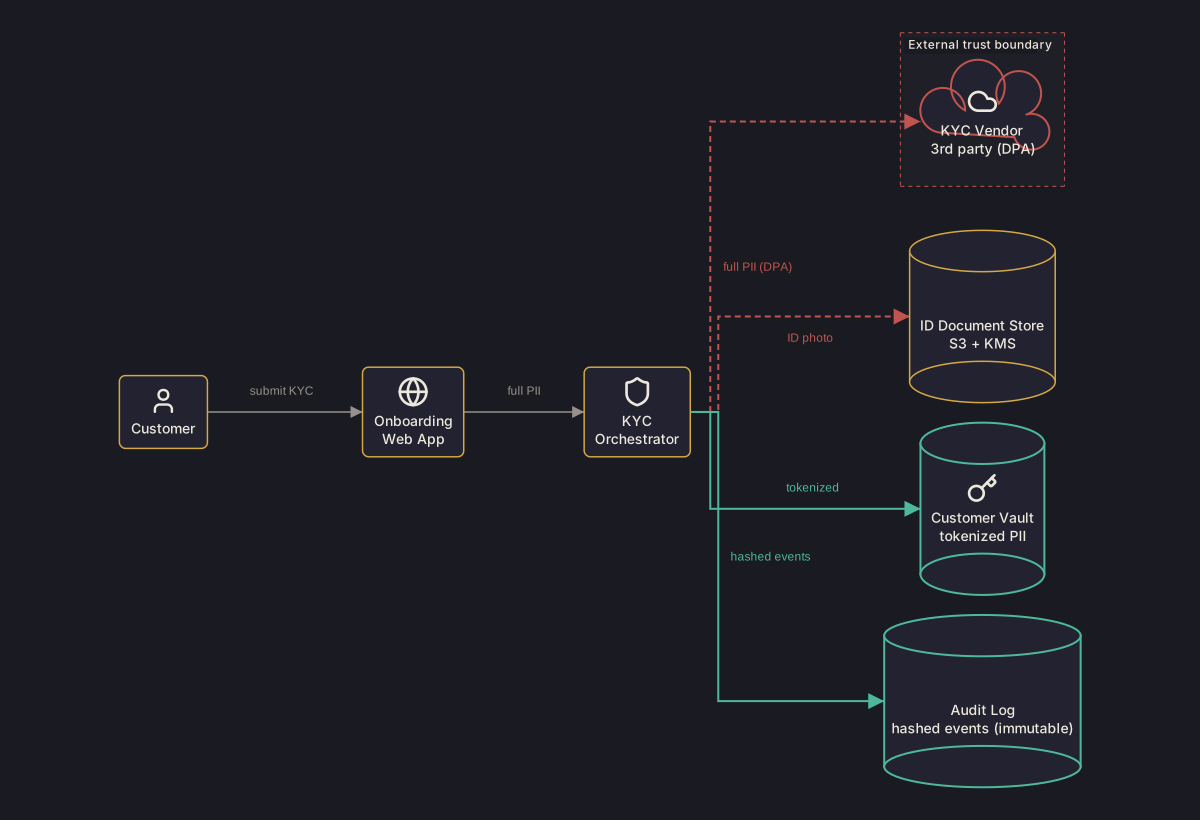
Built by Zindex from the canonical scene below. Open in Playground to swap themes
(clean / dark / blueprint / sketch), or POST the scene to /v1/scenes/render
with format: "png" for a rasterised version.
Scene JSON
Raw
The canonical DSP scene used to render the diagram above. Drop into the
Playground or POST to /v1/scenes/render to
reproduce.
{
  "schemaVersion": "0.1",
  "scene": {
    "id": "compliance-pii-flow",
    "title": "KYC onboarding - PII data flow with trust boundary",
    "units": "px",
    "canvas": {
      "width": 1200,
      "height": 820,
      "background": "#1a1a22"
    }
  },
  "diagramFamily": "architecture",
  "layoutStrategy": {
    "algorithm": "hierarchical",
    "direction": "LR",
    "nodeSpacing": 40,
    "rankSpacing": 120
  },
  "palette": {
    "background": "#1a1a22",
    "foreground": "#ece8dc",
    "nodeFill": "#222230",
    "nodeStroke": "#d4a843",
    "edgeStroke": "#96918a",
    "mutedForeground": "#96918a",
    "containerFill": "#1f1f28",
    "containerStroke": "#c0544e",
    "accentPrimary": "#c0544e",
    "accentSecondary": "#4db89a"
  },
  "styles": {
    "safe": {
      "fill": "#222230",
      "stroke": "#4db89a",
      "strokeWidth": 2
    },
    "unsafe": {
      "fill": "#222230",
      "stroke": "#c0544e",
      "strokeWidth": 2,
      "textColor": "#c0544e",
      "dash": [
        6,
        4
      ]
    },
    "internal": {
      "fill": "#222230",
      "stroke": "#d4a843",
      "strokeWidth": 1.5
    },
    "vendorNode": {
      "fill": "#222230",
      "stroke": "#c0544e",
      "strokeWidth": 2,
      "textColor": "#ece8dc"
    },
    "safeStorage": {
      "fill": "#222230",
      "stroke": "#4db89a",
      "strokeWidth": 2,
      "textColor": "#ece8dc"
    },
    "boundary": {
      "fill": "#1f1f28",
      "stroke": "#c0544e",
      "strokeWidth": 1,
      "dash": [
        4,
        4
      ],
      "textColor": "#ece8dc"
    },
    "plainEdge": {
      "stroke": "#96918a",
      "strokeWidth": 1.5,
      "textColor": "#ece8dc"
    }
  },
  "elements": [
    {
      "id": "customer",
      "kind": "node",
      "nodeType": "actor",
      "shape": "roundedRect",
      "label": "Customer",
      "icon": "lucide:user",
      "style": "internal"
    },
    {
      "id": "webapp",
      "kind": "node",
      "nodeType": "service",
      "shape": "roundedRect",
      "label": "Onboarding\nWeb App",
      "icon": "lucide:globe",
      "style": "internal"
    },
    {
      "id": "orch",
      "kind": "node",
      "nodeType": "service",
      "shape": "roundedRect",
      "label": "KYC\nOrchestrator",
      "icon": "lucide:shield",
      "style": "internal"
    },
    {
      "id": "vendor",
      "kind": "node",
      "nodeType": "service",
      "shape": "cloud",
      "label": "KYC Vendor\n3rd party (DPA)",
      "icon": "lucide:cloud",
      "style": "vendorNode"
    },
    {
      "id": "trust-frame",
      "kind": "frame",
      "children": [
        "vendor"
      ],
      "title": "External trust boundary",
      "containerType": "boundary",
      "style": "boundary"
    },
    {
      "id": "iddocs",
      "kind": "node",
      "nodeType": "database",
      "shape": "cylinder",
      "label": "ID Document Store\nS3 + KMS",
      "icon": "lucide:file-lock",
      "style": "internal"
    },
    {
      "id": "vault",
      "kind": "node",
      "nodeType": "database",
      "shape": "cylinder",
      "label": "Customer Vault\ntokenized PII",
      "icon": "lucide:key",
      "style": "safeStorage"
    },
    {
      "id": "audit",
      "kind": "node",
      "nodeType": "database",
      "shape": "cylinder",
      "label": "Audit Log\nhashed events (immutable)",
      "icon": "lucide:scroll-text",
      "style": "safeStorage"
    },
    {
      "id": "e1",
      "kind": "edge",
      "from": {
        "elementId": "customer"
      },
      "to": {
        "elementId": "webapp"
      },
      "router": "orthogonal",
      "label": "submit KYC",
      "style": "plainEdge"
    },
    {
      "id": "e2",
      "kind": "edge",
      "from": {
        "elementId": "webapp"
      },
      "to": {
        "elementId": "orch"
      },
      "router": "orthogonal",
      "label": "full PII",
      "style": "plainEdge"
    },
    {
      "id": "e3",
      "kind": "edge",
      "from": {
        "elementId": "orch"
      },
      "to": {
        "elementId": "vendor"
      },
      "router": "orthogonal",
      "label": "full PII (DPA)",
      "style": "unsafe"
    },
    {
      "id": "e4",
      "kind": "edge",
      "from": {
        "elementId": "orch"
      },
      "to": {
        "elementId": "iddocs"
      },
      "router": "orthogonal",
      "label": "ID photo",
      "style": "unsafe"
    },
    {
      "id": "e5",
      "kind": "edge",
      "from": {
        "elementId": "orch"
      },
      "to": {
        "elementId": "vault"
      },
      "router": "orthogonal",
      "label": "tokenized",
      "style": "safe"
    },
    {
      "id": "e6",
      "kind": "edge",
      "from": {
        "elementId": "orch"
      },
      "to": {
        "elementId": "audit"
      },
      "router": "orthogonal",
      "label": "hashed events",
      "style": "safe"
    }
  ],
  "constraints": [
    {
      "type": "order",
      "source": "vendor",
      "target": "iddocs",
      "relation": "above"
    },
    {
      "type": "order",
      "source": "iddocs",
      "target": "vault",
      "relation": "above"
    },
    {
      "type": "order",
      "source": "vault",
      "target": "audit",
      "relation": "above"
    }
  ]
}
Agent workflow
Maintain a regulator-friendly data-flow diagram showing where PII / KYC / financial data moves between systems, what each system stores, and how the topology has evolved over time, by combining a structured data-classification inventory with a Zindex scene that carries an immutable audit trail.
Inputs
- Data-classification inventory (typically a YAML/JSON file in compliance/ describing which fields each system stores and their classification)
- Trust-boundary configuration (which systems sit inside vs outside the company perimeter)
- Existing Zindex scene id (one per audited workflow - e.g. one for KYC, one for billing)
- Zindex API key with scene-write scope
Outputs
- Updated persisted scene with one node per system, edges labelled by what data crosses (e.g. 'full PII (DPA)'), and a frame around any external trust boundary
- Rendered SVG suitable for inclusion in a SOC 2 / ISO 27001 audit pack
- Revision diff showing what changed between this audit cycle and the previous one (which is the auditor-facing answer to 'what changed since last quarter?')
- Per-revision watermark trail proving the diagram pinned to a specific date
- 01
Fetch the persisted compliance scene
Compliance scenes are long-lived - one scene per audited workflow, with ten or twenty revisions stretching back over the audit history. Fetch the current revision before changing anything.
- 02
Read the data-classification inventory
Parse compliance/data-classification.yaml. Each entry maps a system to the data it stores and its classification (`public`, `internal`, `pii`, `kyc`, `financial`). Edges between systems are derived from which classification crosses each boundary.
- 03
Compute the diff against the persisted scene
For each system in the classification, ensure a node exists with the expected nodeType (`actor`, `service`, `database`, `externalSystem`). For each data flow, ensure an edge exists with the expected label (e.g. 'full PII (DPA)' or 'tokenized'). Style PII-bearing edges with a red stroke; tokenized/hashed edges with green; internal-only edges in default. Frame any external-vendor systems inside a dashed trust-boundary frame so the auditor can see what data crosses the company perimeter.
- 04
Apply the operation batch
Send the diff as one applyOps batch. Use a `revisionMessage` that reads like an audit-log entry - 'Q3 2026: add tokenization layer between webapp and customer vault'. The revision message will surface in `dsp_diff_scene` output and ends up in the audit trail.
- 05
Validate the new revision
Confirm the topology is valid. Pay attention to `LABEL_DUPLICATION_DETECTED` (two edges with the same label between different systems can confuse an auditor) and resolve before publishing.
- 06
Render the data-flow diagram
Render to SVG. The watermark stamps scene-id + revision + date so the auditor always knows which version of the diagram they are looking at, with no separate metadata sidecar.
- 07
Generate the audit-cycle diff
On audit cycles (typically quarterly), call `dsp_diff_scene` with `from=` the revision pinned at the start of the audit period and `to=` the current revision. The output is the canonical answer to 'what changed since last audit?' - far better evidence than a stack of dated screenshots.
- 08
Publish the SVG + diff to the audit pack
Drop the rendered SVG and the diff JSON into the audit-pack directory. Both are traceable back to the persisted scene by id + revision; auditors who want to verify the diagram against current systems can replay the workflow at the recorded revision number.
MCP recipe
For agents using Model Context Protocol. The tool sequence below matches the workflow steps; copy the prompt as a system message.
Tool sequence
- 01
dsp_get_sceneFetch the persisted compliance scene - 02
dsp_apply_opsApply the operation batch - 03
dsp_validate_sceneValidate the new revision - 04
dsp_render_sceneRender the data-flow diagram - 05
dsp_diff_sceneGenerate the audit-cycle diff
Unique tools used: dsp_get_scene, dsp_apply_ops, dsp_validate_scene, dsp_render_scene, dsp_diff_scene.
Copyable agent prompt
Drop this verbatim into a system prompt for an MCP-connected agent.
The Zindex MCP server (@zindex-ai/mcp, configured with a
ZINDEX_API_KEY environment variable - setup guide)
exposes the tools the prompt references.
You are an automated compliance-documentation agent. Your job is to keep a regulator-friendly data-flow diagram in sync with the actual systems and data classifications, so that SOC 2 / ISO 27001 / GDPR / KYC audits can rely on the diagram as primary evidence rather than dated screenshots.

The persisted Zindex scene id is `${SCENE_ID}`; it already exists. Each audited workflow has its own scene - one for KYC, one for billing, one for any vendor-share boundary you need to document. Treat each scene as the canonical, mutable, immutable-revisioned record of how data flowed through the system at every point in time.

Workflow on every run (typically scheduled monthly, plus on every PR that touches `compliance/data-classification.yaml`):

1. Read `compliance/data-classification.yaml` (or the equivalent inventory). Each entry maps a system to (a) the data it stores, (b) the data classification (`public`, `internal`, `pii`, `kyc`, `financial`), and (c) whether the system is internal or an external vendor.

2. Call `dsp_get_scene({ sceneId: "${SCENE_ID}" })` to read the current revision and elements. Do not modify anything yet - this run might be a no-op if classifications haven't changed.

3. Diff the parsed classification against the persisted scene. For each system, ensure a node exists with the right nodeType (`actor`, `service`, `database`, `externalSystem`) and label. For each data-flow edge, ensure the edge exists with a label that names what data crosses (e.g. 'full PII (DPA)', 'tokenized', 'hashed events'). Apply edge styles consistently: red stroke for unprotected PII, green for tokenized/hashed, default for internal traffic - auditors and engineers should be able to read the protection posture at a glance. If any external vendors are touched, wrap them in a dashed trust-boundary frame so the perimeter is explicit.

4. Call `dsp_apply_ops` with one batch. `errorPolicy: "allOrNothing"`. The `revisionMessage` should read like an audit-log entry: 'Q3 2026: add tokenization layer between webapp and customer vault' or '2026-04-15: add SendGrid as PII recipient under DPA'. Revision messages surface in `dsp_diff_scene`; they ARE the audit trail.

5. Call `dsp_validate_scene`. Resolve any `LABEL_DUPLICATION_DETECTED` (two edges with the same label between different systems is genuinely confusing in an audit context - rename or anchor to a column to disambiguate). `EDGE_LABEL_SUPPRESSED_REDUNDANT` should not appear on this diagram family; if it does, an edge label is matching a column in an ER diagram and you've used the wrong scene.

6. Call `dsp_render_scene({ format: "svg", theme: "clean" })`. The rendered SVG carries a watermark with scene-id + revision + date - leave the watermark on; auditors rely on it.

7. On audit-cycle runs (quarterly is typical), call `dsp_diff_scene({ from: ${AUDIT_START_REVISION}, to: NEW_REVISION })`. The output lists added / removed / changed elements over the audit period - this is the canonical answer to 'what changed since last audit?' and is far stronger evidence than a stack of dated screenshots. Drop both the SVG and the diff JSON into the audit-pack directory.

Hard rules: never hand-edit the rendered SVG (the watermark and scene-id traceability are the whole point). Never delete a revision or rewrite history - the immutability is what makes the audit trail credible. Never commit a scene that fails validation; auditors who spot-check the diagram against live systems must always be able to re-validate it. Treat the data-classification inventory as the source of truth; if a system is not classified, it does not belong in the diagram until it is.
HTTP API recipe
For agents/devs not using MCP. Set $ZINDEX_API_KEY in the
Authorization header on authenticated calls. Stateless endpoints
(/v1/scenes/render, /v1/scenes/validate,
/v1/scenes/normalize) need no key. Full reference: API endpoints, OpenAPI spec.
- 01
GET/v1/scenes/${SCENE_ID}Compliance scenes are long-lived - one scene per audited workflow, with ten or twenty revisions stretching back over the audit history. Fetch the current revision before changing anything.
- 02
POST/v1/scenes/${SCENE_ID}/opsSend the diff as one applyOps batch. Use a `revisionMessage` that reads like an audit-log entry - 'Q3 2026: add tokenization layer between webapp and customer vault'. The revision message will surface in `dsp_diff_scene` output and ends up in the audit trail.
- 03
POST/v1/scenes/validateConfirm the topology is valid. Pay attention to `LABEL_DUPLICATION_DETECTED` (two edges with the same label between different systems can confuse an auditor) and resolve before publishing.
- 04
POST/v1/scenes/${SCENE_ID}/renderRender to SVG. The watermark stamps scene-id + revision + date so the auditor always knows which version of the diagram they are looking at, with no separate metadata sidecar.
Example request body
{ "format": "svg", "theme": "clean" } - 05
GET/v1/scenes/${SCENE_ID}/diff?from=${AUDIT_START_REVISION}&to=${NEW_REVISION}On audit cycles (typically quarterly), call `dsp_diff_scene` with `from=` the revision pinned at the start of the audit period and `to=` the current revision. The output is the canonical answer to 'what changed since last audit?' - far better evidence than a stack of dated screenshots.
Operations
Raw
The typed-operation envelope that builds this scene from empty.
POST to /v1/scenes/:id/ops after creating a scene, or
pass to dsp_apply_ops. Each op carries a stable
id so subsequent runs can update the same elements
instead of regenerating.
{
  "schemaVersion": "0.1",
  "errorPolicy": "allOrNothing",
  "revisionMessage": "Initial PII data-flow diagram with vendor trust boundary",
  "ops": [
    {
      "op": "createFrame",
      "id": "trust-frame",
      "title": "External trust boundary",
      "containerType": "boundary",
      "children": [
        "vendor"
      ],
      "style": "boundary"
    },
    {
      "op": "createNode",
      "id": "customer",
      "nodeType": "actor",
      "shape": "roundedRect",
      "label": "Customer",
      "icon": "lucide:user",
      "style": "internal"
    },
    {
      "op": "createNode",
      "id": "webapp",
      "nodeType": "service",
      "shape": "roundedRect",
      "label": "Onboarding\nWeb App",
      "icon": "lucide:globe",
      "style": "internal"
    },
    {
      "op": "createNode",
      "id": "orch",
      "nodeType": "service",
      "shape": "roundedRect",
      "label": "KYC\nOrchestrator",
      "icon": "lucide:shield",
      "style": "internal"
    },
    {
      "op": "createNode",
      "id": "vendor",
      "nodeType": "service",
      "shape": "cloud",
      "label": "KYC Vendor\n3rd party (DPA)",
      "icon": "lucide:cloud",
      "style": "vendorNode"
    },
    {
      "op": "createNode",
      "id": "iddocs",
      "nodeType": "database",
      "shape": "cylinder",
      "label": "ID Document Store\nS3 + KMS",
      "icon": "lucide:file-lock",
      "style": "internal"
    },
    {
      "op": "createNode",
      "id": "vault",
      "nodeType": "database",
      "shape": "cylinder",
      "label": "Customer Vault\ntokenized PII",
      "icon": "lucide:key",
      "style": "safeStorage"
    },
    {
      "op": "createNode",
      "id": "audit",
      "nodeType": "database",
      "shape": "cylinder",
      "label": "Audit Log\nhashed events (immutable)",
      "icon": "lucide:scroll-text",
      "style": "safeStorage"
    },
    {
      "op": "createEdge",
      "id": "e1",
      "from": {
        "elementId": "customer"
      },
      "to": {
        "elementId": "webapp"
      },
      "label": "submit KYC",
      "router": "orthogonal",
      "style": "plainEdge"
    },
    {
      "op": "createEdge",
      "id": "e2",
      "from": {
        "elementId": "webapp"
      },
      "to": {
        "elementId": "orch"
      },
      "label": "full PII",
      "router": "orthogonal",
      "style": "plainEdge"
    },
    {
      "op": "createEdge",
      "id": "e3",
      "from": {
        "elementId": "orch"
      },
      "to": {
        "elementId": "vendor"
      },
      "label": "full PII (DPA)",
      "router": "orthogonal",
      "style": "unsafe"
    },
    {
      "op": "createEdge",
      "id": "e4",
      "from": {
        "elementId": "orch"
      },
      "to": {
        "elementId": "iddocs"
      },
      "label": "ID photo",
      "router": "orthogonal",
      "style": "unsafe"
    },
    {
      "op": "createEdge",
      "id": "e5",
      "from": {
        "elementId": "orch"
      },
      "to": {
        "elementId": "vault"
      },
      "label": "tokenized",
      "router": "orthogonal",
      "style": "safe"
    },
    {
      "op": "createEdge",
      "id": "e6",
      "from": {
        "elementId": "orch"
      },
      "to": {
        "elementId": "audit"
      },
      "label": "hashed events",
      "router": "orthogonal",
      "style": "safe"
    }
  ]
}
Validation
Valid
Captured response from POST /v1/scenes/validate. The
platform runs 40+ semantic checks; see the full list in the validation rules reference.
- 0 diagnostics
Scene validates with no diagnostics. Agents that produce scenes like this can ship the rendered SVG without a recovery loop.
Codes the platform can emit include TEXT_OVERFLOW,
CANVAS_AUTO_EXTENDED, EDGE_LABEL_SUPPRESSED_REDUNDANT,
EDGE_LABEL_SUPPRESSED_FANIN, EDGE_COLUMN_NOT_FOUND, LABEL_DUPLICATION_DETECTED, LAYOUT_ABSOLUTE_AT_ORIGIN, and MISSING_DIAGRAM_FAMILY. Each diagnostic carries a
structured data field with element ids and context an
agent can act on programmatically.
Revision diff
Raw
The structural diff between two revisions of the persisted scene -
the response shape dsp_diff_scene returns. Stateful
diagram evolution is Zindex's strongest differentiator: the same
scene id evolves through immutable revisions, each diffable.
Evolution scenario
Q3 2026 audit cycle: a new tokenization service was inserted between the onboarding webapp and the customer vault. The PII edge that previously carried full data (`e2`) now carries only tokenised references (`e5`). Both edges' labels and stroke styles updated accordingly. This diff is the regulator-facing answer to 'what changed since last audit?'.
- Revision 7 → 8
- +1 added
- -0 removed
- ~2 modified
+ Added
tokenizer
~ Modified
e2e5
Raw dsp_diff_scene response
{
  "schemaVersion": "1.0",
  "sceneId": "kyc-data-flow",
  "fromRevision": 7,
  "toRevision": 8,
  "summary": {
    "added": 1,
    "removed": 0,
    "modified": 2
  },
  "added": [
    "tokenizer"
  ],
  "removed": [],
  "modified": [
    "e2",
    "e5"
  ],
  "scenario": "Q3 2026 audit cycle: a new tokenization service was inserted between the onboarding webapp and the customer vault. The PII edge that previously carried full data (`e2`) now carries only tokenised references (`e5`). Both edges' labels and stroke styles updated accordingly. This diff is the regulator-facing answer to 'what changed since last audit?'."
}
Want to see this on your own scene? Run the CI recipe below - it
calls dsp_diff_scene on every revision change and
surfaces a real before / after on every PR.
CI/CD recipe
A complete, runnable GitHub Actions workflow for this example.
Drop the YAML into .github/workflows/zindex-compliance-pii-flow.yml,
add the listed secrets, and the agent runs unattended on every
qualifying trigger. Re-comments idempotently using a hidden marker
so the PR conversation stays clean across pushes.
Trigger
Runs on every PR that touches the data-classification inventory or the trust-boundary configuration, plus a monthly scheduled run on the 1st at midnight UTC. The monthly cadence aligns with most compliance audit cycles; the PR trigger catches classification changes the moment they're proposed.
Required secrets
-
ZINDEX_API_KEYrequired Zindex API key with scene-write scope. -
ZINDEX_SCENE_IDrequired Long-lived persisted scene id for this audited workflow (one per workflow - KYC, billing, vendor share). Never recreate. -
AUDIT_BASELINE_REVISIONrequired Revision number pinned at the start of the current audit cycle. Update each new audit period. The diff against this revision is the 'what changed since last audit?' evidence.
Inputs
- compliance/data-classification.yaml - system → data classification map (public / internal / pii / kyc / financial)
- scripts/parse-classification.mjs (you author this)
- scripts/classification-to-ops.mjs (you author this) - maps classification deltas to typed ops, applies edge styling per classification (red for unprotected PII, green for tokenized/hashed)
Outputs
- out/diagram.svg - rendered data-flow diagram with watermark stamping scene-id + revision + date
- out/audit-diff.json - structural diff vs audit baseline (the regulator-facing evidence)
- Workflow artifact 'compliance-audit-pack' with 90-day retention
- Optional PR comment summarising classification changes
GitHub Actions workflow
# Zindex - Compliance / PII data-flow diagram. Maintains a regulator-friendly
# diagram of where sensitive data moves between systems. Runs monthly on the
# 1st (audit-cycle cadence) and on every PR that touches the data-classification
# inventory. Designed so the rendered SVG + revision diff become the canonical
# audit-pack evidence.
#
# Drop into .github/workflows/zindex-compliance.yml.

name: Zindex - Compliance PII data-flow

on:
  pull_request:
    paths:
      - "compliance/data-classification.yaml"
      - "compliance/trust-boundaries.yaml"
  schedule:
    - cron: "0 0 1 * *"   # Monthly: 1st of each month, 00:00 UTC
  workflow_dispatch:

permissions:
  contents: read
  pull-requests: write

concurrency:
  group: ${{ github.workflow }}-${{ github.event.pull_request.number || github.ref }}
  cancel-in-progress: ${{ github.event_name == 'pull_request' }}

env:
  ZINDEX_API_BASE: https://api.zindex.ai

jobs:
  sync-data-flow:
    runs-on: ubuntu-latest
    environment: compliance   # gate: requires reviewer approval if configured
    steps:
      - uses: actions/checkout@v4

      # 1. Read the data-classification inventory + trust-boundary config.
      #    Author scripts/parse-classification.mjs against your compliance
      #    docs convention (typically one YAML file mapping system →
      #    classification + a list of external trust boundaries).
      - name: Parse classification inventory
        run: |
          mkdir -p out
          node scripts/parse-classification.mjs > out/classification.json

      - name: Capture current revision
        id: prev_rev
        env:
          ZINDEX_API_KEY: ${{ secrets.ZINDEX_API_KEY }}
          ZINDEX_SCENE_ID: ${{ secrets.ZINDEX_SCENE_ID }}
        run: |
          echo "rev=$(curl -fsSL -H "Authorization: Bearer $ZINDEX_API_KEY" \
            "$ZINDEX_API_BASE/v1/scenes/$ZINDEX_SCENE_ID" | jq -r '.revision')" >> "$GITHUB_OUTPUT"

      # 2. Compute applyOps batch. Audit-friendly tip: the revisionMessage
      #    becomes the audit log entry - make it descriptive
      #    ("Q3 2026: add tokenization layer between webapp and customer vault").
      - name: Compute applyOps batch
        run: node scripts/classification-to-ops.mjs out/classification.json > out/ops.json

      - name: Apply ops
        id: apply
        env:
          ZINDEX_API_KEY: ${{ secrets.ZINDEX_API_KEY }}
          ZINDEX_SCENE_ID: ${{ secrets.ZINDEX_SCENE_ID }}
        run: |
          RESP=$(curl -fsSL -X POST \
            -H "Authorization: Bearer $ZINDEX_API_KEY" \
            -H "Content-Type: application/json" \
            --data-binary @out/ops.json \
            "$ZINDEX_API_BASE/v1/scenes/$ZINDEX_SCENE_ID/ops")
          echo "rev=$(echo "$RESP" | jq -r '.revision')" >> "$GITHUB_OUTPUT"
          echo "applied=$(echo "$RESP" | jq -r '.applied')" >> "$GITHUB_OUTPUT"

      - name: Render
        env:
          ZINDEX_API_KEY: ${{ secrets.ZINDEX_API_KEY }}
          ZINDEX_SCENE_ID: ${{ secrets.ZINDEX_SCENE_ID }}
        run: |
          curl -fsSL -X POST \
            -H "Authorization: Bearer $ZINDEX_API_KEY" \
            -H "Content-Type: application/json" \
            -d '{"format":"svg","theme":"clean"}' \
            "$ZINDEX_API_BASE/v1/scenes/$ZINDEX_SCENE_ID/render" \
            | jq -r '.output.content' > out/diagram.svg

      # 3. Audit-cycle diff: compares current to the revision pinned at the
      #    start of the audit period (stored as the AUDIT_BASELINE_REVISION
      #    secret - update it each new audit cycle). This produces the
      #    "what changed since last audit?" answer.
      - name: Diff against audit baseline
        id: diff
        env:
          ZINDEX_API_KEY: ${{ secrets.ZINDEX_API_KEY }}
          ZINDEX_SCENE_ID: ${{ secrets.ZINDEX_SCENE_ID }}
          BASELINE: ${{ secrets.AUDIT_BASELINE_REVISION }}
          NEW: ${{ steps.apply.outputs.rev }}
        run: |
          curl -fsSL \
            -H "Authorization: Bearer $ZINDEX_API_KEY" \
            "$ZINDEX_API_BASE/v1/scenes/$ZINDEX_SCENE_ID/diff?from=$BASELINE&to=$NEW" \
            > out/audit-diff.json
          echo "added=$(jq -r '.summary.added' out/audit-diff.json)" >> "$GITHUB_OUTPUT"
          echo "removed=$(jq -r '.summary.removed' out/audit-diff.json)" >> "$GITHUB_OUTPUT"
          echo "modified=$(jq -r '.summary.modified' out/audit-diff.json)" >> "$GITHUB_OUTPUT"

      # 4. Both SVG and audit-diff get bundled into a single artifact - the
      #    audit-pack handoff. Long retention (90d) so the pack stays
      #    available for the full audit cycle.
      - uses: actions/upload-artifact@v4
        id: upload
        with:
          name: compliance-audit-pack
          path: |
            out/diagram.svg
            out/audit-diff.json
          retention-days: 90

      - uses: peter-evans/find-comment@v3
        if: github.event_name == 'pull_request'
        id: find_comment
        with:
          issue-number: ${{ github.event.pull_request.number }}
          comment-author: "github-actions[bot]"
          body-includes: "<!-- zindex-bot:compliance-pii-flow -->"

      - uses: peter-evans/create-or-update-comment@v4
        if: github.event_name == 'pull_request'
        with:
          comment-id: ${{ steps.find_comment.outputs.comment-id }}
          issue-number: ${{ github.event.pull_request.number }}
          edit-mode: replace
          body: |
            <!-- zindex-bot:compliance-pii-flow -->
            ### PII data-flow updated · revision ${{ steps.apply.outputs.rev }}

            | | |
            |---|---|
            | Changes since audit baseline | +${{ steps.diff.outputs.added }} / -${{ steps.diff.outputs.removed }} / ~${{ steps.diff.outputs.modified }} |
            | Revision | ${{ steps.prev_rev.outputs.rev }} → ${{ steps.apply.outputs.rev }} |
            | Baseline | revision `${{ secrets.AUDIT_BASELINE_REVISION }}` |

            <details><summary>Download audit pack (SVG + diff JSON)</summary>

            ${{ steps.upload.outputs.artifact-url }}

            </details>

            <sub>Rendered by Zindex · scene `${{ secrets.ZINDEX_SCENE_ID }}` · stamped with revision watermark</sub>
Agent resources
Machine-readable versions of this example. Agents should fetch these rather than scrape the rendered HTML.
-
compliance-pii-flow.scene.jsonCanonical DSP scene Open -
compliance-pii-flow.ops.jsonTyped-operation envelope that builds the scene Open -
compliance-pii-flow.workflow.jsonStructured agent workflow (goal, inputs, outputs, steps) Open -
compliance-pii-flow.diff.jsonSampledsp_diff_sceneresponse (revision evolution) Open -
compliance-pii-flow.github-actions.ymlRunnable GitHub Actions workflow for the CI/CD recipe Open -
compliance-pii-flow.svgBuild-time rendered diagram Open -
compliance-pii-flow.mdAgent-readable markdown summary Open -
/examples/index.jsonManifest of all examples (cross-linked) Open
PR comment template
The bot posts this comment on every triggering PR. The hidden marker
<!-- zindex-bot:compliance-pii-flow -->letspeter-evans/create-or-update-commentfind and overwrite the previous comment instead of appending a new one.