What this example shows
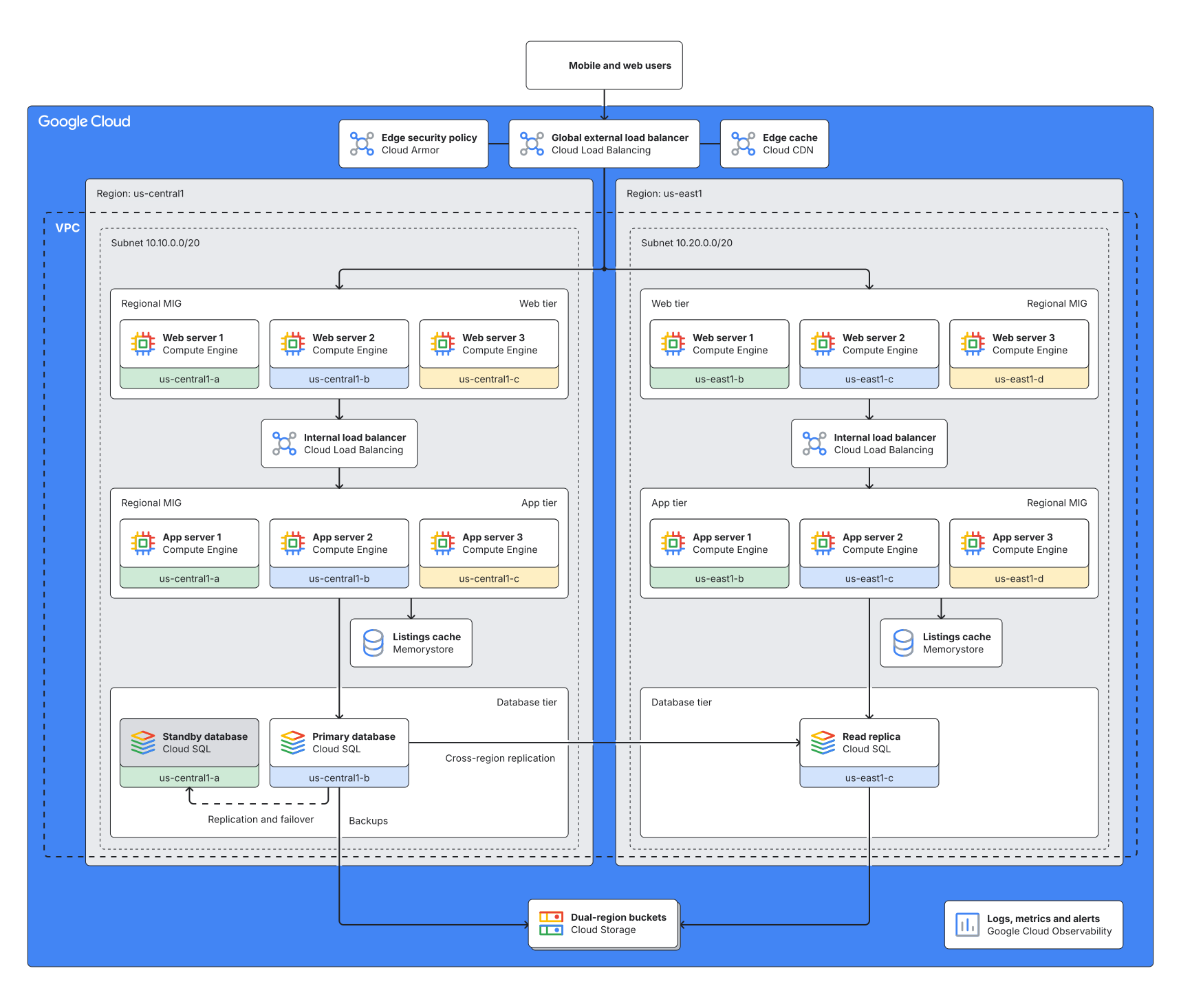
The production architecture of a used-car marketplace’s listings platform, drawn by an agent from the team’s Terraform as Google Cloud reference diagrams draw it. Each resource that runs or stores something is a Google product card. The buckets share one, drawn as a stack, the way Google draws several of one product. The agent wrote no coordinates.
The VPC runs across two Regions, each with its web, app and database tiers in rows and every VM on its zone’s colored strip. Each Region’s Memorystore cache sits between its app and database tiers, beside the app tier’s line to the database. The primary database has a standby in a second zone, drawn on Google’s gray, and a read replica in the other Region. The global load balancer sits above the Regions between Cloud Armor and Cloud CDN, and the buckets sit below the Regions.
Revision 2 records pull request 587, which adds a Pub/Sub topic and a Cloud Run function that makes thumbnails of listing photos. The Revision diff panel shows both revisions, before and after, with the compare response from diagram_history. It lists the topic, the function and their three edges as added. As changed, it lists the Region they joined and the cards the engine moved to make room.
When to use it
When the infrastructure is defined in Terraform and the team wants an architecture diagram drawn from it, with each infrastructure pull request showing what it changes before terraform apply. A plan lists resources; the diagram shows where they run and what talks to what.
What the agent does
On the first run the agent reads the configuration on the default branch. It makes a node with its Google Cloud icon for each resource that runs or stores something, the dual-region buckets sharing one stacked card. It puts each node in the group it runs in, and spans each zone over the nodes in it.
It adds an edge for each connection the configuration makes, such as a load balancer’s backends or a database’s replica, and saves the diagram with diagram_create. The engine places each group as Google’s reference diagrams do and routes the edges.
For each pull request that changes the infrastructure, the agent turns the new and removed resources into typed operations. A createNode names the group a resource joins, an updateFrame adds a new VM to its zone, and createEdge and deleteElement add connections and remove what’s gone. It saves them with diagram_edit as a revision whose message names the pull request. diagram_history with compare lists what changed, and over REST the image endpoint draws the new revision with the additions in green, ready to post on the pull request.
In pull request 587 the topic and the function take a row of their own in us-central1, below its subnet. The buckets and the Logging and Monitoring card move down to make room. The app tier’s line to the topic drops past the database tier between two zone columns, the topic standing under it. That gap opens in both Regions, and what lies right of it moves right.
Each internal load balancer moves to stay centered on its tiers. Each cache moves left of the app tier’s line to its database. The new row widens us-central1, so us-east1 moves right. The load balancer moves to stay over the gap between the Regions, and Cloud Armor and Cloud CDN beside it and the users above it move with it.
What the output includes
- One architecture diagram per environment, in Google Cloud’s groups and product cards on a light canvas, that every later run edits rather than redraws.
- A revision for each infrastructure pull request, its message starting with the pull request’s number.
- A compare JSON listing the elements each pull request adds, changes and removes.
- A colored image of each pull request’s revision, drawn by the REST image endpoint, with additions in green, removals in red and changes in amber. A card that only moved, or a group that only gained members, is drawn as unchanged.
- For a pull request closed without merging, a revision that restores the one before it, so the latest revision shows what the default branch deploys.
Rendered diagram
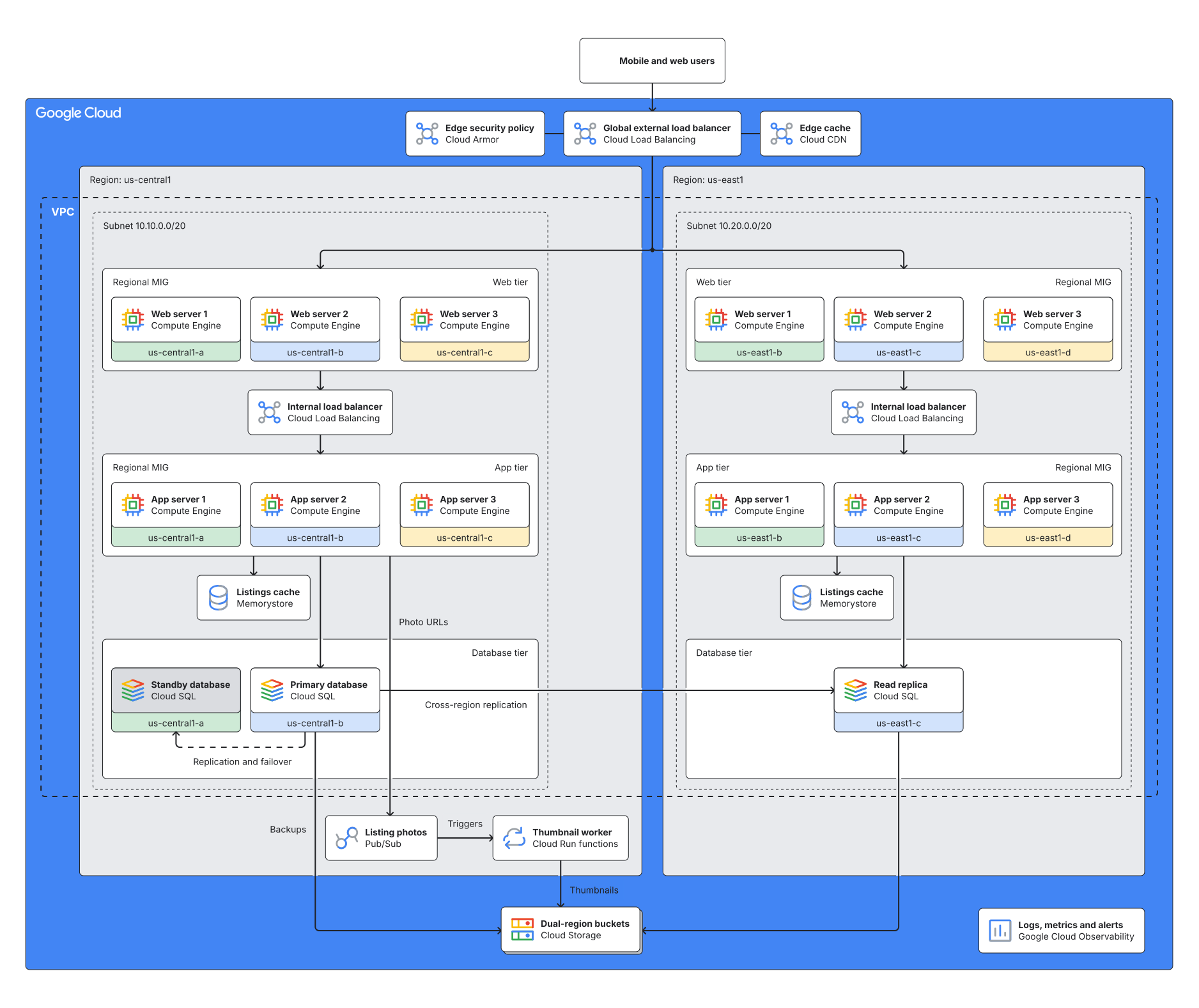
Revision 2 as Zindex saved it, from the edit to revision 1 that Revision diff shows. That edit moved no placed node Revision diff doesn't list, but the Playground draws the scene below from scratch, so its nodes can land elsewhere. Open the scene there to swap themes (clean / dark / blueprint / sketch).
Scene JSON
Raw
The DSP scene of revision 2, without the node positions Zindex saved with it. Open it in the
Playground, or send it as scene to
POST /v1/diagrams/preview, to draw it from scratch.
{
  "schemaVersion": "0.1",
  "diagramFamily": "architecture",
  "scene": {
    "id": "gcp-architecture-from-terraform",
    "title": "Listings platform on Google Cloud (production)",
    "brief": "Production Google Cloud architecture of the listings platform, drawn from the Terraform in infra/production.\nDrawn as Google Cloud reference diagrams are: gcp.* groups nested Google Cloud > Region > subnet > tiers, a gcp.vpc spanning both subnets and a gcp.zone spanning each zone's cards. Each resource that runs or stores something is a card with its gcp: icon, in the innermost group it runs in. Each subnet lists its web tier, internal load balancer, app tier, Memorystore instance and database tier, in that order. The NAM4 buckets share one card, stacked (style.multiple: true). A standby is gray (#DADCE0); no other card has a fill. A new VM also joins its zone's spans. Edges run from caller to callee. Web and app tier edges name the tier's frame, and database and cache edges name the instance. Leave layout off new nodes and frames. Each infrastructure pull request is a revision before terraform apply, its message starting with the PR number (PR 587: ...).",
    "units": "px",
    "canvas": {
      "width": 1600,
      "height": 1200,
      "background": "#ffffff"
    }
  },
  "elements": [
    {
      "id": "users",
      "kind": "node",
      "nodeType": "service",
      "icon": "gcp:users",
      "label": "Mobile and web users"
    },
    {
      "id": "cloud",
      "kind": "frame",
      "containerType": "gcp.cloud",
      "title": "Google Cloud",
      "children": [
        "armor",
        "glb",
        "cdn",
        "region_c1",
        "region_e1",
        "storage",
        "observability"
      ]
    },
    {
      "id": "region_c1",
      "kind": "frame",
      "containerType": "gcp.region",
      "title": "Region: us-central1",
      "children": [
        "subnet_c1",
        "photos_topic",
        "thumbnailer"
      ]
    },
    {
      "id": "subnet_c1",
      "kind": "frame",
      "containerType": "gcp.subnet",
      "title": "Subnet 10.10.0.0/20",
      "children": [
        "web_c1",
        "ilb_c1",
        "app_c1",
        "cache_c1",
        "db_c1"
      ]
    },
    {
      "id": "web_c1",
      "kind": "frame",
      "containerType": "gcp.instanceGroup",
      "title": "Web tier",
      "children": [
        "web1_c1",
        "web2_c1",
        "web3_c1"
      ]
    },
    {
      "id": "web1_c1",
      "kind": "node",
      "nodeType": "service",
      "icon": "gcp:compute-engine",
      "label": "Web server 1"
    },
    {
      "id": "web2_c1",
      "kind": "node",
      "nodeType": "service",
      "icon": "gcp:compute-engine",
      "label": "Web server 2"
    },
    {
      "id": "web3_c1",
      "kind": "node",
      "nodeType": "service",
      "icon": "gcp:compute-engine",
      "label": "Web server 3"
    },
    {
      "id": "ilb_c1",
      "kind": "node",
      "nodeType": "service",
      "icon": "gcp:cloud-load-balancing",
      "label": "Internal load balancer"
    },
    {
      "id": "app_c1",
      "kind": "frame",
      "containerType": "gcp.instanceGroup",
      "title": "App tier",
      "children": [
        "app1_c1",
        "app2_c1",
        "app3_c1"
      ]
    },
    {
      "id": "app1_c1",
      "kind": "node",
      "nodeType": "service",
      "icon": "gcp:compute-engine",
      "label": "App server 1"
    },
    {
      "id": "app2_c1",
      "kind": "node",
      "nodeType": "service",
      "icon": "gcp:compute-engine",
      "label": "App server 2"
    },
    {
      "id": "app3_c1",
      "kind": "node",
      "nodeType": "service",
      "icon": "gcp:compute-engine",
      "label": "App server 3"
    },
    {
      "id": "cache_c1",
      "kind": "node",
      "nodeType": "database",
      "icon": "gcp:memorystore",
      "label": "Listings cache"
    },
    {
      "id": "db_c1",
      "kind": "frame",
      "containerType": "gcp.tier",
      "title": "Database tier",
      "children": [
        "standby_c1",
        "primary_c1"
      ]
    },
    {
      "id": "standby_c1",
      "kind": "node",
      "nodeType": "service",
      "icon": "gcp:cloud-sql",
      "label": "Standby database",
      "style": {
        "fill": "#DADCE0"
      }
    },
    {
      "id": "primary_c1",
      "kind": "node",
      "nodeType": "service",
      "icon": "gcp:cloud-sql",
      "label": "Primary database"
    },
    {
      "id": "region_e1",
      "kind": "frame",
      "containerType": "gcp.region",
      "title": "Region: us-east1",
      "children": [
        "subnet_e1"
      ]
    },
    {
      "id": "subnet_e1",
      "kind": "frame",
      "containerType": "gcp.subnet",
      "title": "Subnet 10.20.0.0/20",
      "children": [
        "web_e1",
        "ilb_e1",
        "app_e1",
        "cache_e1",
        "db_e1"
      ]
    },
    {
      "id": "web_e1",
      "kind": "frame",
      "containerType": "gcp.instanceGroup",
      "title": "Web tier",
      "children": [
        "web1_e1",
        "web2_e1",
        "web3_e1"
      ]
    },
    {
      "id": "web1_e1",
      "kind": "node",
      "nodeType": "service",
      "icon": "gcp:compute-engine",
      "label": "Web server 1"
    },
    {
      "id": "web2_e1",
      "kind": "node",
      "nodeType": "service",
      "icon": "gcp:compute-engine",
      "label": "Web server 2"
    },
    {
      "id": "web3_e1",
      "kind": "node",
      "nodeType": "service",
      "icon": "gcp:compute-engine",
      "label": "Web server 3"
    },
    {
      "id": "ilb_e1",
      "kind": "node",
      "nodeType": "service",
      "icon": "gcp:cloud-load-balancing",
      "label": "Internal load balancer"
    },
    {
      "id": "app_e1",
      "kind": "frame",
      "containerType": "gcp.instanceGroup",
      "title": "App tier",
      "children": [
        "app1_e1",
        "app2_e1",
        "app3_e1"
      ]
    },
    {
      "id": "app1_e1",
      "kind": "node",
      "nodeType": "service",
      "icon": "gcp:compute-engine",
      "label": "App server 1"
    },
    {
      "id": "app2_e1",
      "kind": "node",
      "nodeType": "service",
      "icon": "gcp:compute-engine",
      "label": "App server 2"
    },
    {
      "id": "app3_e1",
      "kind": "node",
      "nodeType": "service",
      "icon": "gcp:compute-engine",
      "label": "App server 3"
    },
    {
      "id": "cache_e1",
      "kind": "node",
      "nodeType": "database",
      "icon": "gcp:memorystore",
      "label": "Listings cache"
    },
    {
      "id": "db_e1",
      "kind": "frame",
      "containerType": "gcp.tier",
      "title": "Database tier",
      "children": [
        "replica_e1"
      ]
    },
    {
      "id": "replica_e1",
      "kind": "node",
      "nodeType": "service",
      "icon": "gcp:cloud-sql",
      "label": "Read replica"
    },
    {
      "id": "armor",
      "kind": "node",
      "nodeType": "service",
      "icon": "gcp:cloud-armor",
      "label": "Edge security policy"
    },
    {
      "id": "glb",
      "kind": "node",
      "nodeType": "service",
      "icon": "gcp:cloud-load-balancing",
      "label": "Global external load balancer"
    },
    {
      "id": "cdn",
      "kind": "node",
      "nodeType": "service",
      "icon": "gcp:cloud-cdn",
      "label": "Edge cache"
    },
    {
      "id": "storage",
      "kind": "node",
      "nodeType": "service",
      "icon": "gcp:cloud-storage",
      "label": "Dual-region buckets",
      "style": {
        "multiple": true
      }
    },
    {
      "id": "observability",
      "kind": "node",
      "nodeType": "service",
      "icon": "gcp:observability",
      "label": "Logs, metrics and alerts"
    },
    {
      "id": "photos_topic",
      "kind": "node",
      "nodeType": "queue",
      "icon": "gcp:pubsub",
      "label": "Listing photos"
    },
    {
      "id": "thumbnailer",
      "kind": "node",
      "nodeType": "service",
      "icon": "gcp:cloud-run-functions",
      "label": "Thumbnail worker"
    },
    {
      "id": "vpc",
      "kind": "frame",
      "containerType": "gcp.vpc",
      "title": "VPC",
      "spans": [
        "subnet_c1",
        "subnet_e1"
      ]
    },
    {
      "id": "zone_c1_a",
      "kind": "frame",
      "containerType": "gcp.zone",
      "title": "us-central1-a",
      "spans": [
        "web1_c1",
        "app1_c1",
        "standby_c1"
      ]
    },
    {
      "id": "zone_c1_b",
      "kind": "frame",
      "containerType": "gcp.zone",
      "title": "us-central1-b",
      "spans": [
        "web2_c1",
        "app2_c1",
        "primary_c1"
      ]
    },
    {
      "id": "zone_c1_c",
      "kind": "frame",
      "containerType": "gcp.zone",
      "title": "us-central1-c",
      "spans": [
        "web3_c1",
        "app3_c1"
      ]
    },
    {
      "id": "zone_e1_b",
      "kind": "frame",
      "containerType": "gcp.zone",
      "title": "us-east1-b",
      "spans": [
        "web1_e1",
        "app1_e1"
      ]
    },
    {
      "id": "zone_e1_c",
      "kind": "frame",
      "containerType": "gcp.zone",
      "title": "us-east1-c",
      "spans": [
        "web2_e1",
        "app2_e1",
        "replica_e1"
      ]
    },
    {
      "id": "zone_e1_d",
      "kind": "frame",
      "containerType": "gcp.zone",
      "title": "us-east1-d",
      "spans": [
        "web3_e1",
        "app3_e1"
      ]
    },
    {
      "id": "e_users",
      "kind": "edge",
      "from": {
        "elementId": "users"
      },
      "to": {
        "elementId": "glb"
      }
    },
    {
      "id": "e_armor",
      "kind": "edge",
      "from": {
        "elementId": "armor"
      },
      "to": {
        "elementId": "glb"
      },
      "endpoints": {
        "startArrow": "none",
        "endArrow": "none"
      }
    },
    {
      "id": "e_cdn",
      "kind": "edge",
      "from": {
        "elementId": "cdn"
      },
      "to": {
        "elementId": "glb"
      },
      "endpoints": {
        "startArrow": "none",
        "endArrow": "none"
      }
    },
    {
      "id": "e_glb_c1",
      "kind": "edge",
      "from": {
        "elementId": "glb"
      },
      "to": {
        "elementId": "web_c1"
      }
    },
    {
      "id": "e_glb_e1",
      "kind": "edge",
      "from": {
        "elementId": "glb"
      },
      "to": {
        "elementId": "web_e1"
      }
    },
    {
      "id": "e_web_c1",
      "kind": "edge",
      "from": {
        "elementId": "web_c1"
      },
      "to": {
        "elementId": "ilb_c1"
      }
    },
    {
      "id": "e_ilb_c1",
      "kind": "edge",
      "from": {
        "elementId": "ilb_c1"
      },
      "to": {
        "elementId": "app_c1"
      }
    },
    {
      "id": "e_app_c1",
      "kind": "edge",
      "from": {
        "elementId": "app_c1"
      },
      "to": {
        "elementId": "primary_c1"
      }
    },
    {
      "id": "e_cache_c1",
      "kind": "edge",
      "from": {
        "elementId": "app_c1"
      },
      "to": {
        "elementId": "cache_c1"
      }
    },
    {
      "id": "e_web_e1",
      "kind": "edge",
      "from": {
        "elementId": "web_e1"
      },
      "to": {
        "elementId": "ilb_e1"
      }
    },
    {
      "id": "e_ilb_e1",
      "kind": "edge",
      "from": {
        "elementId": "ilb_e1"
      },
      "to": {
        "elementId": "app_e1"
      }
    },
    {
      "id": "e_app_e1",
      "kind": "edge",
      "from": {
        "elementId": "app_e1"
      },
      "to": {
        "elementId": "replica_e1"
      }
    },
    {
      "id": "e_cache_e1",
      "kind": "edge",
      "from": {
        "elementId": "app_e1"
      },
      "to": {
        "elementId": "cache_e1"
      }
    },
    {
      "id": "e_failover",
      "kind": "edge",
      "from": {
        "elementId": "primary_c1"
      },
      "to": {
        "elementId": "standby_c1"
      },
      "label": "Replication and failover",
      "style": {
        "dash": [
          8,
          8
        ]
      }
    },
    {
      "id": "e_replication",
      "kind": "edge",
      "from": {
        "elementId": "primary_c1"
      },
      "to": {
        "elementId": "replica_e1"
      },
      "label": "Cross-region replication"
    },
    {
      "id": "e_backups",
      "kind": "edge",
      "from": {
        "elementId": "primary_c1"
      },
      "to": {
        "elementId": "storage"
      },
      "label": "Backups"
    },
    {
      "id": "e_replica_backups",
      "kind": "edge",
      "from": {
        "elementId": "replica_e1"
      },
      "to": {
        "elementId": "storage"
      }
    },
    {
      "id": "e_publish",
      "kind": "edge",
      "from": {
        "elementId": "app_c1"
      },
      "to": {
        "elementId": "photos_topic"
      },
      "label": "Photo URLs"
    },
    {
      "id": "e_trigger",
      "kind": "edge",
      "from": {
        "elementId": "photos_topic"
      },
      "to": {
        "elementId": "thumbnailer"
      },
      "label": "Triggers"
    },
    {
      "id": "e_thumbs",
      "kind": "edge",
      "from": {
        "elementId": "thumbnailer"
      },
      "to": {
        "elementId": "storage"
      },
      "label": "Thumbnails"
    }
  ]
}
Agent workflow
Keep a team's Google Cloud diagram in step with its Terraform: drawn once from the default branch, then one revision per infrastructure pull request, posted on the pull request before terraform apply.
Inputs
- The Terraform configuration on the default branch (infra/production)
- The pull request's diff of that configuration, or its plan as JSON (terraform show -json) when CI publishes one
- The diagram's Zindex key, listings-gcp-production, or its ID from .zindex.json (long-lived, never recreated)
- A Zindex API key (the colored diff image of a private diagram needs one), or an MCP client signed in to Zindex
Outputs
- Revision 1: the production architecture drawn from the default branch, in Google Cloud's groups and product cards, laid out by the engine
- One revision per infrastructure pull request, its message starting with the pull request's number
- Compare JSON listing the elements the pull request adds, changes and removes
- Before and after images, or one image with the changes colored, posted on the pull request
- 01
Find the architecture diagram
Call
diagram_findwith the diagram's key,listings-gcp-production, or read its ID from.zindex.json. If it exists, go toread_current. Over REST,GET /v1/diagrams/{key}answers 404NOT_FOUNDwhen there is none yet. - 02
Read the Terraform on the default branch
Read
infra/productionon the default branch and the conventions in its README. Each resource that runs or stores something becomes a node with itsgcp:icon, in the innermost group the README places it in. Logging and Monitoring are one card, and the NAM4 buckets one stacked card. Health checks, backend services, URL maps, certificates, service accounts and role bindings aren't drawn; they become edges or nothing. - 03
Save the first drawing
Call
diagram_createwith the key, a message naming the commit, a brief that states these conventions, and the scene with the nodes and edges fromread_terraform. WritediagramFamily: "architecture"and a frame per Google Cloud group with itscontainerType, each subnet listing its web tier, internal load balancer, app tier, Memorystore instance and database tier in that order. Agcp.vpcspans both subnets and agcp.zonespans each zone's nodes. Leavelayout,shapeandfilloff, except the standby's graystyle.fill(#DADCE0), and give the buckets cardstyle.multiple: true. The engine arranges the groups and draws each node as Google's card. If the save'swarningscarryGCP_GROUP_UNTYPEDorGCP_GROUP_NESTING, act on the group each one names, as its fix says. - 04
Read the diagram's current revision
For each pull request that changes
infra/, calldiagram_get. The outline's first line gives the current revision number (MAIN_REVISION), the 'before' state for the compare, and its lines list each element inside its group, so you can see which IDs already exist and which group a new resource joins. - 05
Read the pull request's change
Read the pull request's diff of
infra/production, or theresource_changesof its plan when CI publishesterraform show -json. List the resources it creates and destroys, and the connections it adds or removes: a topic an app tier's metadata names, a function's trigger, a role on a bucket, a backend service's instance groups. - 06
Compute the operation batch
A new resource becomes a
createNodewithframeset to its group (PR 587's topic and function joinregion_c1), except a bucket in NAM4, which the buckets card stands for. A new VM also needs anupdateFrameon itsgcp.zonewith the wholespans, or, for a new zone, acreateFramewithcontainerTypegcp.zone, its name astitleandspanslisting the VM. New connections arecreateEdge, destroyed resourcesdeleteElementand renamed onesupdateNode. Reuse the diagram's IDs and write nolayout. A change that adds, removes or connects no drawn resource (machine types, resource labels, retention) isn't architectural. - 07
Save the pull request as a revision
Call
diagram_editwith the ops,baseRevision= MAIN_REVISION and a message that starts with the pull request's number; the new revision is PR_REVISION. A batch that changes nothing answersnoop: trueand makes no revision. In PR 587 the topic and the function take a row below us-central1's subnet, and the app tier's line to the topic opens a gap between two zone columns in both Regions. What lies past each growth moves by it, and the compare lists what moved. - 08
Compare the default branch's revision with the pull request's
Call
diagram_historywithcompare: { from: MAIN_REVISION, to: PR_REVISION }. It lists the element IDs the pull request adds, changes and removes. For PR 587 that is the topic, the function and their three edges added. As changed, it lists the Region they joined and the cards the engine moved to make room. - 09
Render both revisions
Call
diagram_renderwithrevision: MAIN_REVISION, then withrevision: PR_REVISION. Each returns SVG and PNG links that work without a key for 7 days, and each image prints its address with its revision number, so reviewers can tell which state they're looking at. - 10
Optional: one image with the changes colored
With an API key, the image endpoint draws PR_REVISION with what changed since MAIN_REVISION colored, with additions in green, removals in red and changes in amber. A card that only moved, or a group that only gained members, is drawn as unchanged, though the compare lists it as changed.
diagram_renderand its signed links draw plain versions only, so an agent signed in through MCP posts the two images and the compare instead. - 11
Post the change on the pull request
Post one comment on the pull request before
terraform applyruns: the summary (+2 services, +3 connections), the colored image or the two images, and the compare. When the pull request changes, record the difference as another revision with the same number, compare from MAIN_REVISION again, and update that comment rather than adding another. - 12
If the pull request is closed without merging
The latest revision no longer matches what the default branch deploys. Call
diagram_editwithrestoreRevision: MAIN_REVISION,baseRevisionset to the latest revision and a message saying the pull request was closed. The new revision equals MAIN_REVISION, and the pull request's revision stays in the history. A merged pull request needs nothing, since its revision already shows whatterraform applybuilds.
MCP recipe
For agents using Model Context Protocol. The tool sequence below matches the workflow steps; copy the prompt as a system message.
Tool sequence
- 01
diagram_findFind the architecture diagram - 02
diagram_createSave the first drawing - 03
diagram_getRead the diagram's current revision - 04
diagram_editSave the pull request as a revision - 05
diagram_historyCompare the default branch's revision with the pull request's - 06
diagram_renderRender both revisions - 07
diagram_editIf the pull request is closed without merging
Unique tools used: diagram_find, diagram_create, diagram_get, diagram_edit, diagram_history, diagram_render.
Copyable agent prompt
Drop this verbatim into a system prompt for an MCP-connected agent.
The Zindex MCP server at https://api.zindex.ai/mcp exposes
the tools the prompt references (connect a client),
and so does the npm package @zindexai/mcp, which forwards
to it.
You look after the team's Google Cloud architecture diagram, drawn from its Terraform. You show reviewers what each infrastructure pull request changes before `terraform apply`. You draw the diagram once from the default branch, as Google Cloud reference diagrams draw it, then record each pull request that changes the infrastructure as a revision named for it.

The diagram's Zindex ID is `${SCENE_ID}` and its key is `listings-gcp-production`. The configuration is in `infra/production`, and the README beside `infra/` gives the conventions in full. Revisions are permanent, so step 7 covers a pull request closed without merging.

How to draw it:
- `diagramFamily: "architecture"`, and a frame for each Google Cloud group with its `containerType`, nested `gcp.cloud` > `gcp.region` > `gcp.subnet` > tiers: a `gcp.instanceGroup` for each managed instance group and a `gcp.tier` for the database tier. Each subnet lists its web tier, internal load balancer, app tier, Memorystore instance and database tier, in that order.
- Two kinds of group are spanning frames, written with `spans` instead of `children`: a `gcp.vpc` that spans both subnets, and a `gcp.zone` for each zone of each Region that spans the nodes in that zone. Write each Region's `gcp.zone` frames in zone order (`us-central1-a`, then `-b`, then `-c`): their columns follow that order.
- A node for each resource that runs or stores something, with its `gcp:` icon and a short label that says what it does, in the innermost group it runs in:
  - one VM per zone in its tier, and each Region's internal load balancer and Memorystore instance in its subnet, in no zone;
  - the database instances, the primary's standby included, in the database tier;
  - topics and functions in their Region, outside the subnet;
  - in Google Cloud: the global load balancer, Cloud Armor, Cloud CDN, one card for Logging and Monitoring (`gcp:observability`) and one stacked card for the NAM4 buckets;
  - the users outside Google Cloud.
- Write no `layout` or `shape`, and no `style` on a node or frame but these two:
  - the standby: `style: { fill: "#DADCE0" }`, as Google draws a standby resource on gray;
  - the buckets card: `style: { multiple: true }`, as Google stacks a card that stands for several instances of one product.
- The engine arranges the groups as Google's reference diagrams do (https://zindex.ai/docs/reference/layout-engine/#google-cloud-architecture-diagrams) and draws each node as Google's product card. Health checks, backend services and the other resources the README lists as not drawn tell you the edges.
- An edge from caller to callee for each connection the configuration makes:
  - Edges to and from a web or app tier name the tier's frame, not one VM. Edges to and from a database or cache name its instance.
  - Leave the request path (users, load balancers, tiers, databases, caches), the attachments of Cloud Armor and Cloud CDN, and the replica's edge to the buckets unlabeled.
  - Label every other edge with what flows, such as `Cross-region replication`, `Backups`, `Photo URLs` or `Thumbnails`.
  - Dash the standby's replication (`style.dash` `[8, 8]`).
  - Draw Cloud Armor's and Cloud CDN's attachments to the load balancer with no arrowheads (`endpoints: { startArrow: "none", endArrow: "none" }`).

Steps:

1. If you don't have the diagram's ID yet, call `diagram_find({ query: "listings-gcp-production" })`, which returns it. If there is none, build the scene from the default branch and call `diagram_create({ key: "listings-gcp-production", scene, message })` with a brief that states these conventions, and use the ID it returns. Act on any group the save's `warnings` name (`GCP_GROUP_UNTYPED`, `GCP_GROUP_NESTING`), as its fix says.

2. For each pull request that changes `infra/`, call `diagram_get({ id: "${SCENE_ID}" })`. Read the current revision number from the outline's first line; call this `MAIN_REVISION`. It is the 'before' state for the compare.

3. Read the pull request's diff, or its plan's `resource_changes` when CI publishes `terraform show -json`. Turn it into operations:
   - A new resource is a `createNode` with `frame` set to the group it runs in.
   - A new VM also joins its zone: an `updateFrame` on that `gcp.zone` with the zone's whole `spans` list, the new VM included. For a zone the diagram doesn't have yet, send a `createFrame` with `containerType: "gcp.zone"`, the zone's name as its `title`, and `spans` listing the VM.
   - A new bucket in the NAM4 dual-region joins the buckets card and needs no node. A bucket kept anywhere else is a `createNode` of its own.
   - New connections are `createEdge`, destroyed resources `deleteElement` and renamed ones `updateNode`.

   Reuse the diagram's IDs and write no `layout`. A new VM stands in its zone's column in its tier. A topic or function takes a free place in a row of its Region: below the subnet when the subnet's edges lead to it, above when its edges lead into the subnet.

   Where there is no room, the row or column grows. Where a new line needs a gap between two zone columns, the gap grows. What lies past a growth moves by it, and the compare in step 5 lists what moved.

4. Call `diagram_edit({ id: "${SCENE_ID}", baseRevision: MAIN_REVISION, message, ops })` with a message that starts with the pull request's number, such as `PR 587: make listing thumbnails in a Cloud Run function fed by Pub/Sub`. Call the new revision `PR_REVISION`. If the batch changes nothing, the response carries `noop: true` and no revision is made.

5. Call `diagram_history({ id: "${SCENE_ID}", compare: { from: MAIN_REVISION, to: PR_REVISION } })` for the elements the pull request adds, changes and removes. Call `diagram_render` with `revision: MAIN_REVISION` and with `revision: PR_REVISION` for SVG and PNG links valid for 7 days. With an API key, `GET /v1/images/${SCENE_ID}@PR_REVISION.svg?from=MAIN_REVISION` draws one image with additions in green, removals in red and changes in amber; `diagram_render` has no such option. A card that only moved, or a group that only gained members, is drawn as unchanged, though the compare lists it as changed.

6. Post one comment on the pull request: the summary (`+2 services, +3 connections`), the images and the compare. When the pull request changes, record the difference as another revision with the same number and update that comment rather than adding another.

7. If the pull request merges, leave the diagram as it is. If it is closed without merging, call `diagram_edit({ id: "${SCENE_ID}", baseRevision: <the latest revision>, message, restoreRevision: MAIN_REVISION })` with a message saying so. The latest revision then shows what the default branch deploys again.

Hard rules: name the pull request in every revision message, so the history shows when each part of the architecture arrived. Never redraw the diagram or recreate an element to change it; the IDs carry its history. Never give a node a `layout`. If the pull request adds, removes or connects no drawn resource (machine types, resource labels, retention periods), post 'No architectural changes' so reviewers know the check ran, and record nothing.
HTTP API recipe
For agents/devs not using MCP. Send
Authorization: Bearer $ZINDEX_API_KEY on every call
except POST /v1/diagrams/validate and
POST /v1/diagrams/preview, which need no key. In the
paths, ${SCENE_ID} is the diagram's ID, or the
key you gave it in diagram_create. Full
reference: REST API, OpenAPI spec.
- 01
GET/v1/diagrams/${SCENE_ID}Call
diagram_findwith the diagram's key,listings-gcp-production, or read its ID from.zindex.json. If it exists, go toread_current. Over REST,GET /v1/diagrams/{key}answers 404NOT_FOUNDwhen there is none yet. - 02
POST/v1/diagramsCall
diagram_createwith the key, a message naming the commit, a brief that states these conventions, and the scene with the nodes and edges fromread_terraform. WritediagramFamily: "architecture"and a frame per Google Cloud group with itscontainerType, each subnet listing its web tier, internal load balancer, app tier, Memorystore instance and database tier in that order. Agcp.vpcspans both subnets and agcp.zonespans each zone's nodes. Leavelayout,shapeandfilloff, except the standby's graystyle.fill(#DADCE0), and give the buckets cardstyle.multiple: true. The engine arranges the groups and draws each node as Google's card. If the save'swarningscarryGCP_GROUP_UNTYPEDorGCP_GROUP_NESTING, act on the group each one names, as its fix says. - 03
GET/v1/diagrams/${SCENE_ID}For each pull request that changes
infra/, calldiagram_get. The outline's first line gives the current revision number (MAIN_REVISION), the 'before' state for the compare, and its lines list each element inside its group, so you can see which IDs already exist and which group a new resource joins. - 04
POST/v1/diagrams/${SCENE_ID}/revisionsCall
diagram_editwith the ops,baseRevision= MAIN_REVISION and a message that starts with the pull request's number; the new revision is PR_REVISION. A batch that changes nothing answersnoop: trueand makes no revision. In PR 587 the topic and the function take a row below us-central1's subnet, and the app tier's line to the topic opens a gap between two zone columns in both Regions. What lies past each growth moves by it, and the compare lists what moved.Example request body
{ "baseRevision": 1, "message": "PR 587: make listing thumbnails in a Cloud Run function fed by Pub/Sub", "ops": [ { "op": "createNode", "id": "photos_topic", "nodeType": "queue", "label": "Listing photos", "icon": "gcp:pubsub", "frame": "region_c1" }, { "op": "createNode", "id": "thumbnailer", "nodeType": "service", "label": "Thumbnail worker", "icon": "gcp:cloud-run-functions", "frame": "region_c1" }, { "op": "createEdge", "id": "e_publish", "from": { "elementId": "app_c1" }, "to": { "elementId": "photos_topic" }, "label": "Photo URLs" }, { "op": "createEdge", "id": "e_trigger", "from": { "elementId": "photos_topic" }, "to": { "elementId": "thumbnailer" }, "label": "Triggers" }, { "op": "createEdge", "id": "e_thumbs", "from": { "elementId": "thumbnailer" }, "to": { "elementId": "storage" }, "label": "Thumbnails" } ] } - 05
GET/v1/diagrams/${SCENE_ID}/compare?from=${MAIN_REVISION}&to=${PR_REVISION}Call
diagram_historywithcompare: { from: MAIN_REVISION, to: PR_REVISION }. It lists the element IDs the pull request adds, changes and removes. For PR 587 that is the topic, the function and their three edges added. As changed, it lists the Region they joined and the cards the engine moved to make room. - 06
GET/v1/diagrams/${SCENE_ID}/render?revision=${MAIN_REVISION}Call
diagram_renderwithrevision: MAIN_REVISION, then withrevision: PR_REVISION. Each returns SVG and PNG links that work without a key for 7 days, and each image prints its address with its revision number, so reviewers can tell which state they're looking at. - 07
GET/v1/images/${SCENE_ID}@${PR_REVISION}.svg?from=${MAIN_REVISION}With an API key, the image endpoint draws PR_REVISION with what changed since MAIN_REVISION colored, with additions in green, removals in red and changes in amber. A card that only moved, or a group that only gained members, is drawn as unchanged, though the compare lists it as changed.
diagram_renderand its signed links draw plain versions only, so an agent signed in through MCP posts the two images and the compare instead. - 08
POST/v1/diagrams/${SCENE_ID}/revisionsThe latest revision no longer matches what the default branch deploys. Call
diagram_editwithrestoreRevision: MAIN_REVISION,baseRevisionset to the latest revision and a message saying the pull request was closed. The new revision equals MAIN_REVISION, and the pull request's revision stays in the history. A merged pull request needs nothing, since its revision already shows whatterraform applybuilds.
Operations
Raw The typed operations that build revision 2's scene from empty in one edit, not through the edit the diagram above was saved by. Save an
empty diagram with diagram_create, then send the
envelope's baseRevision, message and
ops to diagram_edit, or
POST /v1/diagrams/{id}/revisions. Each op
carries a stable id so subsequent runs can update the
same elements instead of regenerating.
{
  "schemaVersion": "0.1",
  "sceneId": "gcp-architecture-from-terraform",
  "baseRevision": 1,
  "message": "Build the production Google Cloud architecture from infra/production, with PR 587's listing photos topic and thumbnail worker",
  "ops": [
    {
      "op": "createFrame",
      "id": "cloud",
      "title": "Google Cloud",
      "containerType": "gcp.cloud",
      "children": [
        "armor",
        "glb",
        "cdn",
        "region_c1",
        "region_e1",
        "storage",
        "observability"
      ]
    },
    {
      "op": "createFrame",
      "id": "region_c1",
      "title": "Region: us-central1",
      "containerType": "gcp.region",
      "children": [
        "subnet_c1"
      ]
    },
    {
      "op": "createFrame",
      "id": "subnet_c1",
      "title": "Subnet 10.10.0.0/20",
      "containerType": "gcp.subnet",
      "children": [
        "web_c1",
        "ilb_c1",
        "app_c1",
        "cache_c1",
        "db_c1"
      ]
    },
    {
      "op": "createFrame",
      "id": "web_c1",
      "title": "Web tier",
      "containerType": "gcp.instanceGroup",
      "children": [
        "web1_c1",
        "web2_c1",
        "web3_c1"
      ]
    },
    {
      "op": "createFrame",
      "id": "app_c1",
      "title": "App tier",
      "containerType": "gcp.instanceGroup",
      "children": [
        "app1_c1",
        "app2_c1",
        "app3_c1"
      ]
    },
    {
      "op": "createFrame",
      "id": "db_c1",
      "title": "Database tier",
      "containerType": "gcp.tier",
      "children": [
        "standby_c1",
        "primary_c1"
      ]
    },
    {
      "op": "createFrame",
      "id": "region_e1",
      "title": "Region: us-east1",
      "containerType": "gcp.region",
      "children": [
        "subnet_e1"
      ]
    },
    {
      "op": "createFrame",
      "id": "subnet_e1",
      "title": "Subnet 10.20.0.0/20",
      "containerType": "gcp.subnet",
      "children": [
        "web_e1",
        "ilb_e1",
        "app_e1",
        "cache_e1",
        "db_e1"
      ]
    },
    {
      "op": "createFrame",
      "id": "web_e1",
      "title": "Web tier",
      "containerType": "gcp.instanceGroup",
      "children": [
        "web1_e1",
        "web2_e1",
        "web3_e1"
      ]
    },
    {
      "op": "createFrame",
      "id": "app_e1",
      "title": "App tier",
      "containerType": "gcp.instanceGroup",
      "children": [
        "app1_e1",
        "app2_e1",
        "app3_e1"
      ]
    },
    {
      "op": "createFrame",
      "id": "db_e1",
      "title": "Database tier",
      "containerType": "gcp.tier",
      "children": [
        "replica_e1"
      ]
    },
    {
      "op": "createFrame",
      "id": "vpc",
      "title": "VPC",
      "containerType": "gcp.vpc",
      "spans": [
        "subnet_c1",
        "subnet_e1"
      ]
    },
    {
      "op": "createFrame",
      "id": "zone_c1_a",
      "title": "us-central1-a",
      "containerType": "gcp.zone",
      "spans": [
        "web1_c1",
        "app1_c1",
        "standby_c1"
      ]
    },
    {
      "op": "createFrame",
      "id": "zone_c1_b",
      "title": "us-central1-b",
      "containerType": "gcp.zone",
      "spans": [
        "web2_c1",
        "app2_c1",
        "primary_c1"
      ]
    },
    {
      "op": "createFrame",
      "id": "zone_c1_c",
      "title": "us-central1-c",
      "containerType": "gcp.zone",
      "spans": [
        "web3_c1",
        "app3_c1"
      ]
    },
    {
      "op": "createFrame",
      "id": "zone_e1_b",
      "title": "us-east1-b",
      "containerType": "gcp.zone",
      "spans": [
        "web1_e1",
        "app1_e1"
      ]
    },
    {
      "op": "createFrame",
      "id": "zone_e1_c",
      "title": "us-east1-c",
      "containerType": "gcp.zone",
      "spans": [
        "web2_e1",
        "app2_e1",
        "replica_e1"
      ]
    },
    {
      "op": "createFrame",
      "id": "zone_e1_d",
      "title": "us-east1-d",
      "containerType": "gcp.zone",
      "spans": [
        "web3_e1",
        "app3_e1"
      ]
    },
    {
      "op": "createNode",
      "id": "users",
      "nodeType": "service",
      "label": "Mobile and web users",
      "icon": "gcp:users"
    },
    {
      "op": "createNode",
      "id": "web1_c1",
      "nodeType": "service",
      "label": "Web server 1",
      "icon": "gcp:compute-engine"
    },
    {
      "op": "createNode",
      "id": "web2_c1",
      "nodeType": "service",
      "label": "Web server 2",
      "icon": "gcp:compute-engine"
    },
    {
      "op": "createNode",
      "id": "web3_c1",
      "nodeType": "service",
      "label": "Web server 3",
      "icon": "gcp:compute-engine"
    },
    {
      "op": "createNode",
      "id": "ilb_c1",
      "nodeType": "service",
      "label": "Internal load balancer",
      "icon": "gcp:cloud-load-balancing"
    },
    {
      "op": "createNode",
      "id": "app1_c1",
      "nodeType": "service",
      "label": "App server 1",
      "icon": "gcp:compute-engine"
    },
    {
      "op": "createNode",
      "id": "app2_c1",
      "nodeType": "service",
      "label": "App server 2",
      "icon": "gcp:compute-engine"
    },
    {
      "op": "createNode",
      "id": "app3_c1",
      "nodeType": "service",
      "label": "App server 3",
      "icon": "gcp:compute-engine"
    },
    {
      "op": "createNode",
      "id": "cache_c1",
      "nodeType": "database",
      "label": "Listings cache",
      "icon": "gcp:memorystore"
    },
    {
      "op": "createNode",
      "id": "standby_c1",
      "nodeType": "service",
      "label": "Standby database",
      "icon": "gcp:cloud-sql",
      "style": {
        "fill": "#DADCE0"
      }
    },
    {
      "op": "createNode",
      "id": "primary_c1",
      "nodeType": "service",
      "label": "Primary database",
      "icon": "gcp:cloud-sql"
    },
    {
      "op": "createNode",
      "id": "web1_e1",
      "nodeType": "service",
      "label": "Web server 1",
      "icon": "gcp:compute-engine"
    },
    {
      "op": "createNode",
      "id": "web2_e1",
      "nodeType": "service",
      "label": "Web server 2",
      "icon": "gcp:compute-engine"
    },
    {
      "op": "createNode",
      "id": "web3_e1",
      "nodeType": "service",
      "label": "Web server 3",
      "icon": "gcp:compute-engine"
    },
    {
      "op": "createNode",
      "id": "ilb_e1",
      "nodeType": "service",
      "label": "Internal load balancer",
      "icon": "gcp:cloud-load-balancing"
    },
    {
      "op": "createNode",
      "id": "app1_e1",
      "nodeType": "service",
      "label": "App server 1",
      "icon": "gcp:compute-engine"
    },
    {
      "op": "createNode",
      "id": "app2_e1",
      "nodeType": "service",
      "label": "App server 2",
      "icon": "gcp:compute-engine"
    },
    {
      "op": "createNode",
      "id": "app3_e1",
      "nodeType": "service",
      "label": "App server 3",
      "icon": "gcp:compute-engine"
    },
    {
      "op": "createNode",
      "id": "cache_e1",
      "nodeType": "database",
      "label": "Listings cache",
      "icon": "gcp:memorystore"
    },
    {
      "op": "createNode",
      "id": "replica_e1",
      "nodeType": "service",
      "label": "Read replica",
      "icon": "gcp:cloud-sql"
    },
    {
      "op": "createNode",
      "id": "armor",
      "nodeType": "service",
      "label": "Edge security policy",
      "icon": "gcp:cloud-armor"
    },
    {
      "op": "createNode",
      "id": "glb",
      "nodeType": "service",
      "label": "Global external load balancer",
      "icon": "gcp:cloud-load-balancing"
    },
    {
      "op": "createNode",
      "id": "cdn",
      "nodeType": "service",
      "label": "Edge cache",
      "icon": "gcp:cloud-cdn"
    },
    {
      "op": "createNode",
      "id": "storage",
      "nodeType": "service",
      "label": "Dual-region buckets",
      "icon": "gcp:cloud-storage",
      "style": {
        "multiple": true
      }
    },
    {
      "op": "createNode",
      "id": "observability",
      "nodeType": "service",
      "label": "Logs, metrics and alerts",
      "icon": "gcp:observability"
    },
    {
      "op": "createNode",
      "id": "photos_topic",
      "nodeType": "queue",
      "label": "Listing photos",
      "icon": "gcp:pubsub",
      "frame": "region_c1"
    },
    {
      "op": "createNode",
      "id": "thumbnailer",
      "nodeType": "service",
      "label": "Thumbnail worker",
      "icon": "gcp:cloud-run-functions",
      "frame": "region_c1"
    },
    {
      "op": "createEdge",
      "id": "e_users",
      "from": {
        "elementId": "users"
      },
      "to": {
        "elementId": "glb"
      }
    },
    {
      "op": "createEdge",
      "id": "e_armor",
      "from": {
        "elementId": "armor"
      },
      "to": {
        "elementId": "glb"
      },
      "endpoints": {
        "startArrow": "none",
        "endArrow": "none"
      }
    },
    {
      "op": "createEdge",
      "id": "e_cdn",
      "from": {
        "elementId": "cdn"
      },
      "to": {
        "elementId": "glb"
      },
      "endpoints": {
        "startArrow": "none",
        "endArrow": "none"
      }
    },
    {
      "op": "createEdge",
      "id": "e_glb_c1",
      "from": {
        "elementId": "glb"
      },
      "to": {
        "elementId": "web_c1"
      }
    },
    {
      "op": "createEdge",
      "id": "e_glb_e1",
      "from": {
        "elementId": "glb"
      },
      "to": {
        "elementId": "web_e1"
      }
    },
    {
      "op": "createEdge",
      "id": "e_web_c1",
      "from": {
        "elementId": "web_c1"
      },
      "to": {
        "elementId": "ilb_c1"
      }
    },
    {
      "op": "createEdge",
      "id": "e_ilb_c1",
      "from": {
        "elementId": "ilb_c1"
      },
      "to": {
        "elementId": "app_c1"
      }
    },
    {
      "op": "createEdge",
      "id": "e_app_c1",
      "from": {
        "elementId": "app_c1"
      },
      "to": {
        "elementId": "primary_c1"
      }
    },
    {
      "op": "createEdge",
      "id": "e_cache_c1",
      "from": {
        "elementId": "app_c1"
      },
      "to": {
        "elementId": "cache_c1"
      }
    },
    {
      "op": "createEdge",
      "id": "e_web_e1",
      "from": {
        "elementId": "web_e1"
      },
      "to": {
        "elementId": "ilb_e1"
      }
    },
    {
      "op": "createEdge",
      "id": "e_ilb_e1",
      "from": {
        "elementId": "ilb_e1"
      },
      "to": {
        "elementId": "app_e1"
      }
    },
    {
      "op": "createEdge",
      "id": "e_app_e1",
      "from": {
        "elementId": "app_e1"
      },
      "to": {
        "elementId": "replica_e1"
      }
    },
    {
      "op": "createEdge",
      "id": "e_cache_e1",
      "from": {
        "elementId": "app_e1"
      },
      "to": {
        "elementId": "cache_e1"
      }
    },
    {
      "op": "createEdge",
      "id": "e_failover",
      "from": {
        "elementId": "primary_c1"
      },
      "to": {
        "elementId": "standby_c1"
      },
      "label": "Replication and failover",
      "style": {
        "dash": [
          8,
          8
        ]
      }
    },
    {
      "op": "createEdge",
      "id": "e_replication",
      "from": {
        "elementId": "primary_c1"
      },
      "to": {
        "elementId": "replica_e1"
      },
      "label": "Cross-region replication"
    },
    {
      "op": "createEdge",
      "id": "e_backups",
      "from": {
        "elementId": "primary_c1"
      },
      "to": {
        "elementId": "storage"
      },
      "label": "Backups"
    },
    {
      "op": "createEdge",
      "id": "e_replica_backups",
      "from": {
        "elementId": "replica_e1"
      },
      "to": {
        "elementId": "storage"
      }
    },
    {
      "op": "createEdge",
      "id": "e_publish",
      "from": {
        "elementId": "app_c1"
      },
      "to": {
        "elementId": "photos_topic"
      },
      "label": "Photo URLs"
    },
    {
      "op": "createEdge",
      "id": "e_trigger",
      "from": {
        "elementId": "photos_topic"
      },
      "to": {
        "elementId": "thumbnailer"
      },
      "label": "Triggers"
    },
    {
      "op": "createEdge",
      "id": "e_thumbs",
      "from": {
        "elementId": "thumbnailer"
      },
      "to": {
        "elementId": "storage"
      },
      "label": "Thumbnails"
    }
  ]
}
Validation
Valid
Captured response from POST /v1/diagrams/validate, the
check diagram_validate runs. It checks the scene and
draws it. Every code it can return is in the validation rules.
- 0 errors
- 0 warnings
The scene validates with no errors or warnings.
Each entry has a code, the element it
concerns when there is one, and a one-line fix.
diagram_create and diagram_edit save
nothing when there are errors and return
VALIDATION_FAILED; warnings don't block a save. Both
return the same warnings for the revision they save, so an agent
reads them from the write itself.
Revision diff
Raw
What changed between two revisions of the diagram, as
diagram_history returns it with compare.
Every revision is kept, so any two can be compared, by revision
number or by date.
Scenario
Pull request 587 adds a Pub/Sub topic, a Cloud Run function and their three edges. As changed, the compare also lists the Region they joined and nineteen cards the engine moved. It moved them for the row the topic and function take below us-central1's subnet, and for the app tier's line down to the topic. The colored image of revision 2, not the plain pair shown here, marks only the five new elements, in green. The rest changed only their places or members.
- Revision 1 → 2
- +5 added
- -0 removed
- ~20 changed
+ Added
photos_topicthumbnailere_publishe_triggere_thumbs
~ Changed
usersregion_c1web3_c1ilb_c1app3_c1cache_c1web1_e1web2_e1web3_e1ilb_e1app1_e1app2_e1app3_e1cache_e1replica_e1armorglbcdnstorageobservability
Raw compare response
{
  "id": "dgm_9UFEnnY3jHwq",
  "from": 1,
  "to": 2,
  "added": [
    "photos_topic",
    "thumbnailer",
    "e_publish",
    "e_trigger",
    "e_thumbs"
  ],
  "changed": [
    "users",
    "region_c1",
    "web3_c1",
    "ilb_c1",
    "app3_c1",
    "cache_c1",
    "web1_e1",
    "web2_e1",
    "web3_e1",
    "ilb_e1",
    "app1_e1",
    "app2_e1",
    "app3_e1",
    "cache_e1",
    "replica_e1",
    "armor",
    "glb",
    "cdn",
    "storage",
    "observability"
  ],
  "removed": [],
  "scene": [],
  "scenario": "Pull request 587 adds a Pub/Sub topic, a Cloud Run function and their three edges. As changed, the compare also lists the Region they joined and nineteen cards the engine moved. It moved them for the row the topic and function take below us-central1's subnet, and for the app tier's line down to the topic. The colored image of revision 2, not the plain pair shown here, marks only the five new elements, in green. The rest changed only their places or members."
}Agent resources
Machine-readable versions of this example. Agents should fetch these rather than scrape the rendered HTML.
-
gcp-architecture-from-terraform.scene.jsonCanonical DSP scene Open -
gcp-architecture-from-terraform.ops.jsonTyped-operation envelope that builds the scene Open -
gcp-architecture-from-terraform.workflow.jsonStructured agent workflow (goal, inputs, outputs, steps) Open -
gcp-architecture-from-terraform.diff.jsonSamplediagram_historycompare response Open -
gcp-architecture-from-terraform.svgRendered diagram: revision 2 as Zindex saved it Open -
gcp-architecture-from-terraform.before.svgRevision diff's before picture: revision 1 as Zindex saved it Open -
gcp-architecture-from-terraform.mdAgent-readable markdown summary Open -
/examples/index.jsonManifest of all examples (cross-linked) Open