What this example shows
A bike-share platform’s codebase drawn as five layers, top to bottom: clients, edge, services, data and external providers. The agent listed each layer and the cards in it, and wrote no coordinates, no layout on a layer or a card, and no anchors. The engine stacked the layers as rows in the order listed and put every card in its layer’s frame. It gave the five layers one width and left a gap between them for the lines.
Payments is a sub-group inside Services, and its two runners stay together in the row. Every line runs from caller to callee. The Charge runner and the Notice sender each call a provider, so their two lines skip the Data layer. In this drawing each runs between the Data layer’s cards and crosses every layer border at a right angle. The one label, Trip events, names the line from the Trip service to the event bus.
When to use it
When a codebase is arranged in layers and the diagram should say which layer each part belongs to. The agent knows a package’s layer and whether it is a service or a store, and the engine places it in that layer’s row. When the order should follow the lines instead, draw without layers and the engine places the nodes from the edges (Layout engine).
What the agent does
The agent reads ARCHITECTURE.md for the layers and their order, and each package’s package.json for its layer and the packages it calls. It writes a frame for each layer with containerType: "layer", lists the layers top to bottom, lists each card in its layer, and writes an edge for each call. It saves the diagram with diagram_create, then reads the warnings the save returns.
When a package is added, the agent sends createNode with frame set to its layer and a createEdge for each call. The card stands in that layer’s row, and a layer that grows moves the layers after it along (Layers). A package that moves to another layer is an updateNode with a new frame.
What the output includes
- A layered architecture diagram: five layer frames of one width, 19 cards with Lucide icons, a sub-group and 21 lines.
- The agent’s prompt, the typed operations that build the scene, and the scene itself, which has no
layoutoranchoranywhere. - A revision for each change to the codebase, its message naming the package.
- The limits (Layers): the order of the layers comes from the agent’s listing and never from the lines, and the engine orders the cards of a row itself. Only the scene’s first stack is arranged, in an architecture diagram or one without a family, outside any pool, lane or fragment. In an AWS or Google Cloud diagram, the stack goes in a generic frame of its own, or a cloud boundary that holds no Region. A layer written with a
layoutof its own keeps that box and draws as a plain frame, with no warning.
Rendered diagram
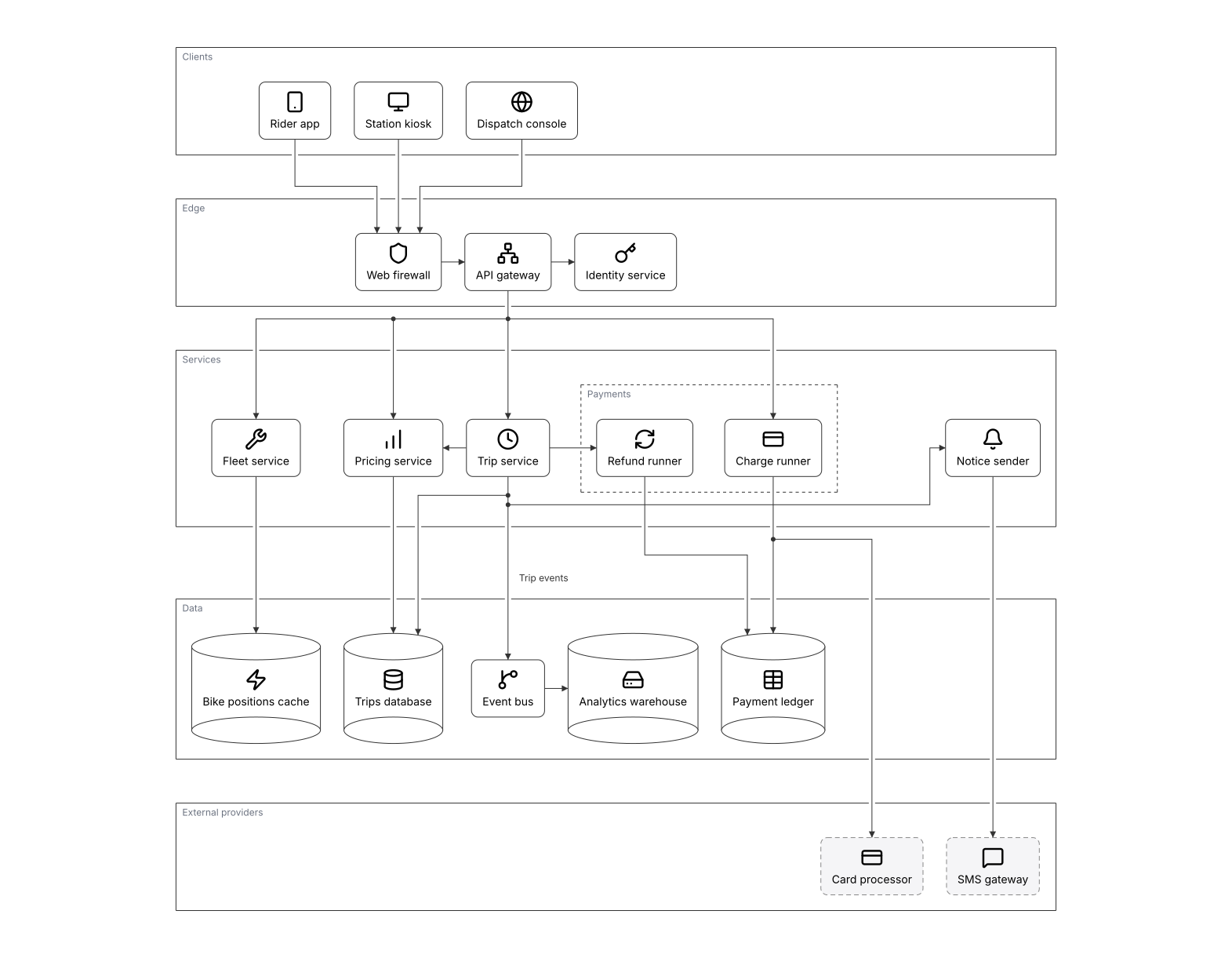
Drawn by Zindex from the scene below with POST /v1/diagrams/preview.
Open it in the Playground to swap themes (clean / dark / blueprint / sketch),
or add format: "png" to the same request for a PNG.
Scene JSON
Raw
The DSP scene the diagram above is drawn from. Open it in the
Playground, or send it as scene to
POST /v1/diagrams/preview to draw it yourself.
{
  "schemaVersion": "0.1",
  "diagramFamily": "architecture",
  "scene": {
    "id": "layered-architecture-from-codebase",
    "title": "Bike-share platform in five layers",
    "brief": "A city bike-share platform in five layers, top to bottom: clients, edge, services, data, external providers.\nEach layer is a frame with containerType layer, listed in the order the layers stack, with no layout; each card is listed in its layer's children, and Payments is a sub-group inside Services. Edges run from caller to callee; only the trip events line is labeled. Leave layout and anchors off new cards and layers, and list a new card in its layer.",
    "units": "px",
    "canvas": {
      "width": 1600,
      "height": 1200,
      "background": "#ffffff"
    }
  },
  "elements": [
    {
      "id": "clients",
      "kind": "frame",
      "containerType": "layer",
      "title": "Clients",
      "children": [
        "rider_app",
        "kiosk",
        "dispatch"
      ]
    },
    {
      "id": "rider_app",
      "kind": "node",
      "nodeType": "service",
      "label": "Rider app",
      "icon": "lucide:smartphone"
    },
    {
      "id": "kiosk",
      "kind": "node",
      "nodeType": "service",
      "label": "Station kiosk",
      "icon": "lucide:monitor"
    },
    {
      "id": "dispatch",
      "kind": "node",
      "nodeType": "service",
      "label": "Dispatch console",
      "icon": "lucide:globe"
    },
    {
      "id": "edge",
      "kind": "frame",
      "containerType": "layer",
      "title": "Edge",
      "children": [
        "waf",
        "gateway",
        "identity"
      ]
    },
    {
      "id": "waf",
      "kind": "node",
      "nodeType": "service",
      "label": "Web firewall",
      "icon": "lucide:shield"
    },
    {
      "id": "gateway",
      "kind": "node",
      "nodeType": "service",
      "label": "API gateway",
      "icon": "lucide:network"
    },
    {
      "id": "identity",
      "kind": "node",
      "nodeType": "service",
      "label": "Identity service",
      "icon": "lucide:key"
    },
    {
      "id": "services",
      "kind": "frame",
      "containerType": "layer",
      "title": "Services",
      "children": [
        "fleet",
        "pricing",
        "trips",
        "payments",
        "notices"
      ]
    },
    {
      "id": "fleet",
      "kind": "node",
      "nodeType": "service",
      "label": "Fleet service",
      "icon": "lucide:wrench"
    },
    {
      "id": "pricing",
      "kind": "node",
      "nodeType": "service",
      "label": "Pricing service",
      "icon": "lucide:bar-chart"
    },
    {
      "id": "trips",
      "kind": "node",
      "nodeType": "service",
      "label": "Trip service",
      "icon": "lucide:clock"
    },
    {
      "id": "notices",
      "kind": "node",
      "nodeType": "service",
      "label": "Notice sender",
      "icon": "lucide:bell"
    },
    {
      "id": "payments",
      "kind": "frame",
      "title": "Payments",
      "children": [
        "charges",
        "refunds"
      ]
    },
    {
      "id": "charges",
      "kind": "node",
      "nodeType": "service",
      "label": "Charge runner",
      "icon": "lucide:credit-card"
    },
    {
      "id": "refunds",
      "kind": "node",
      "nodeType": "service",
      "label": "Refund runner",
      "icon": "lucide:refresh-cw"
    },
    {
      "id": "data",
      "kind": "frame",
      "containerType": "layer",
      "title": "Data",
      "children": [
        "positions",
        "trips_db",
        "ledger",
        "bus",
        "warehouse"
      ]
    },
    {
      "id": "positions",
      "kind": "node",
      "nodeType": "database",
      "label": "Bike positions cache",
      "icon": "lucide:zap"
    },
    {
      "id": "trips_db",
      "kind": "node",
      "nodeType": "database",
      "label": "Trips database",
      "icon": "lucide:database"
    },
    {
      "id": "ledger",
      "kind": "node",
      "nodeType": "database",
      "label": "Payment ledger",
      "icon": "lucide:table"
    },
    {
      "id": "bus",
      "kind": "node",
      "nodeType": "queue",
      "label": "Event bus",
      "icon": "lucide:git-branch"
    },
    {
      "id": "warehouse",
      "kind": "node",
      "nodeType": "database",
      "label": "Analytics warehouse",
      "icon": "lucide:hard-drive"
    },
    {
      "id": "providers",
      "kind": "frame",
      "containerType": "layer",
      "title": "External providers",
      "children": [
        "processor",
        "sms"
      ]
    },
    {
      "id": "processor",
      "kind": "node",
      "nodeType": "externalSystem",
      "label": "Card processor",
      "icon": "lucide:credit-card"
    },
    {
      "id": "sms",
      "kind": "node",
      "nodeType": "externalSystem",
      "label": "SMS gateway",
      "icon": "lucide:message-square"
    },
    {
      "id": "e_rider_waf",
      "kind": "edge",
      "from": {
        "elementId": "rider_app"
      },
      "to": {
        "elementId": "waf"
      }
    },
    {
      "id": "e_kiosk_waf",
      "kind": "edge",
      "from": {
        "elementId": "kiosk"
      },
      "to": {
        "elementId": "waf"
      }
    },
    {
      "id": "e_dispatch_waf",
      "kind": "edge",
      "from": {
        "elementId": "dispatch"
      },
      "to": {
        "elementId": "waf"
      }
    },
    {
      "id": "e_waf_gateway",
      "kind": "edge",
      "from": {
        "elementId": "waf"
      },
      "to": {
        "elementId": "gateway"
      }
    },
    {
      "id": "e_gateway_identity",
      "kind": "edge",
      "from": {
        "elementId": "gateway"
      },
      "to": {
        "elementId": "identity"
      }
    },
    {
      "id": "e_gateway_trips",
      "kind": "edge",
      "from": {
        "elementId": "gateway"
      },
      "to": {
        "elementId": "trips"
      }
    },
    {
      "id": "e_gateway_pricing",
      "kind": "edge",
      "from": {
        "elementId": "gateway"
      },
      "to": {
        "elementId": "pricing"
      }
    },
    {
      "id": "e_gateway_fleet",
      "kind": "edge",
      "from": {
        "elementId": "gateway"
      },
      "to": {
        "elementId": "fleet"
      }
    },
    {
      "id": "e_gateway_charges",
      "kind": "edge",
      "from": {
        "elementId": "gateway"
      },
      "to": {
        "elementId": "charges"
      }
    },
    {
      "id": "e_trips_notices",
      "kind": "edge",
      "from": {
        "elementId": "trips"
      },
      "to": {
        "elementId": "notices"
      }
    },
    {
      "id": "e_trips_pricing",
      "kind": "edge",
      "from": {
        "elementId": "trips"
      },
      "to": {
        "elementId": "pricing"
      }
    },
    {
      "id": "e_trips_refunds",
      "kind": "edge",
      "from": {
        "elementId": "trips"
      },
      "to": {
        "elementId": "refunds"
      }
    },
    {
      "id": "e_trips_db",
      "kind": "edge",
      "from": {
        "elementId": "trips"
      },
      "to": {
        "elementId": "trips_db"
      }
    },
    {
      "id": "e_trips_bus",
      "kind": "edge",
      "from": {
        "elementId": "trips"
      },
      "to": {
        "elementId": "bus"
      },
      "label": "Trip events"
    },
    {
      "id": "e_fleet_positions",
      "kind": "edge",
      "from": {
        "elementId": "fleet"
      },
      "to": {
        "elementId": "positions"
      }
    },
    {
      "id": "e_pricing_trips_db",
      "kind": "edge",
      "from": {
        "elementId": "pricing"
      },
      "to": {
        "elementId": "trips_db"
      }
    },
    {
      "id": "e_charges_ledger",
      "kind": "edge",
      "from": {
        "elementId": "charges"
      },
      "to": {
        "elementId": "ledger"
      }
    },
    {
      "id": "e_refunds_ledger",
      "kind": "edge",
      "from": {
        "elementId": "refunds"
      },
      "to": {
        "elementId": "ledger"
      }
    },
    {
      "id": "e_bus_warehouse",
      "kind": "edge",
      "from": {
        "elementId": "bus"
      },
      "to": {
        "elementId": "warehouse"
      }
    },
    {
      "id": "e_notices_sms",
      "kind": "edge",
      "from": {
        "elementId": "notices"
      },
      "to": {
        "elementId": "sms"
      }
    },
    {
      "id": "e_charges_processor",
      "kind": "edge",
      "from": {
        "elementId": "charges"
      },
      "to": {
        "elementId": "processor"
      }
    }
  ]
}
Agent workflow
Draw a codebase's layered architecture from its package manifests as a stack of layers the engine arranges, then change the saved diagram when a package is added, moved, renamed or removed.
Inputs
- ARCHITECTURE.md, which names the layers in the order they stack
- Every package.json: its layer, its label and the packages it calls
- The diagram's Zindex key, bikeshare-layers, or its ID from .zindex.json (long-lived, never recreated)
- A Zindex API key, or an MCP client signed in to Zindex
Outputs
- A diagram of five layers, listed top to bottom, each holding its packages as cards, with a sub-group and a line from each caller to its callee
- A revision for each change to the codebase, its message naming the package
- SVG and PNG links to a revision, and an SVG committed next to ARCHITECTURE.md
- 01
Find the architecture diagram
Call
diagram_findwith the keybikeshare-layersand take the result whose key it is, or read the ID from.zindex.json. If the diagram exists, go toread_current. Over REST,GET /v1/diagrams/{key}answers 404NOT_FOUNDwhen there is none yet. - 02
Read the layers and the packages
Read ARCHITECTURE.md for the layers and their order, then every
package.jsonfor itslayer, itslabeland itscalls. Each package becomes a node with anodeType:databasefor a store,queuefor the bus,externalSystemfor a provider andservicefor the rest. Itsiconis a Lucide key writtenlucide:<name>, and itsidis the package's name. Packages that ARCHITECTURE.md groups under a heading become a sub-group, a frame with nocontainerType. Each entry incallsbecomes an edge from caller to callee, and a call to a layer further down is one edge like any other. - 03
Save the first drawing
Call
diagram_createwith the key, a message and the scene. WritediagramFamily: "architecture"and a frame for each layer withcontainerType: "layer", listed top to bottom in the order ARCHITECTURE.md gives, each listing its cards inchildren. Leavelayoutoff the layers, the sub-group and the nodes, write no anchors, and leavelayoutStrategy.directionoff so the stack runs top to bottom. The engine stacks the layers as rows in the order listed, all of one width. It fits each layer around its cards and orders each row to cut the crossings between layers, though not always to the fewest. It takes the order of the layers from the listing and never from the lines, and it arranges the scene's first stack only. A layer written with alayoutgets no warning and draws as a plain frame: write it without one, or sendautoLayoutwithoutelements, which places every card again and takes the layout off every frame but a pool, lane or fragment. - 04
Fix what the warnings report
The save's
warningslist what checking and drawing the diagram noticed, each with acode, theelementwhen there is one and a one-linefix.LAYER_NOT_ARRANGEDnames a layer drawn as a plain frame: list all the layers of the stack together, at the root or in one frame, outside any pool, lane or fragment, and in an AWS or Google Cloud diagram put the stack in a generic frame of its own.ICON_NOT_FOUNDnames an icon key that doesn't exist: set one that does withupdateNode. - 05
Read the diagram's current revision
When a package changes, call
diagram_get. The outline's first line gives the current revision. Each element line after it gives an ID, a type and a label, with each layer's cards indented under it, so you reuse the IDs the diagram already has. - 06
Compute the operations
A new package is a
createNodewithframeset to its layer's ID, or its sub-group's, and acreateEdgefor each entry in itscalls. A package that moves layers is anupdateNodewith the newframe, a renamed one anupdateNodewith itslabel, and a removed one adeleteElement. A new layer is acreateFramewithcontainerType: "layer"and atitle, and it goes after the others; setframewhen a frame lists the layers. No operation puts a layer between two others:deleteElementeach layer, thencreateFrameeach again in the new order. Give eachcontainerType: "layer", its cards and sub-groups inchildren, andframeset to the frame that lists the layers, if one does. Then sendautoLayoutwithoutelements. - 07
Save the change as one edit
One
diagram_editwithbaseRevisionset to the revision you read and amessagenaming the package, such asadd loyalty service to services. The card stands in its layer's row, and no saved card moves except to make room. If the diagram changed after you read it, the call returnsREVISION_CONFLICTwith what changed; plan again against the new revision. An edit that changes nothing returnsnoop: trueand makes no revision. - 08
Render the revision
Get SVG and PNG links to the revision; they work without a key for 7 days. Download the SVG and commit it next to ARCHITECTURE.md, since the links expire. Each revision's image is drawn once and kept, and prints its address,
zindex.ai/d/<id>@<revision>, and date.
MCP recipe
For agents using Model Context Protocol. The tool sequence below matches the workflow steps; copy the prompt as a system message.
Tool sequence
- 01
diagram_findFind the architecture diagram - 02
diagram_createSave the first drawing - 03
diagram_getRead the diagram's current revision - 04
diagram_editSave the change as one edit - 05
diagram_renderRender the revision
Unique tools used: diagram_find, diagram_create, diagram_get, diagram_edit, diagram_render.
Copyable agent prompt
Drop this verbatim into a system prompt for an MCP-connected agent.
The Zindex MCP server at https://api.zindex.ai/mcp exposes
the tools the prompt references (connect a client),
and so does the npm package @zindexai/mcp, which forwards
to it.
You keep the architecture diagram of a bike-share platform's monorepo in Zindex, drawn as a stack of layers. ARCHITECTURE.md names the five layers, top to bottom: `clients`, `edge`, `services`, `data` and `providers`. Each package's `package.json` has a `layer` field naming one of them, a `label` and a `calls` list of the packages it calls. You draw the diagram once from the default branch, then change it when a package is added, moved, renamed or removed.

The diagram's Zindex ID is `${SCENE_ID}` and its key is `bikeshare-layers`. Revisions are permanent, so change the diagram with edits and never recreate it.

How to draw it:
- `diagramFamily: "architecture"`, and a frame for each layer with `containerType: "layer"` and a `title`, listed in the order ARCHITECTURE.md gives them, top to bottom. The listing sets the order: a stack listed bottom to top draws bottom to top.
- Each layer lists in its `children` the packages whose `layer` is that layer. A frame with no `containerType` among them is a sub-group: it lists its own cards and stays whole in the layer's row. Use one for the packages ARCHITECTURE.md groups under a heading, here `Payments`.
- A node for each package. Use the package's name as its `id`, and keep that `id` if the package is renamed. Give it the `label` from `package.json`, an `icon` such as `lucide:database`, and a `nodeType`: `database` for a store, `queue` for the bus, `externalSystem` for a provider and `service` for the rest.
- An edge from caller to callee for each entry in `calls`. An edge can skip a layer: write one edge from a service to a provider, and the engine runs it through the layer in the way, across each border at a right angle. Label an edge only when its two ends don't say what flows, such as `Trip events`.
- Write no `layout` on a layer, a sub-group or a node, and no `anchor` on an edge. Leave `layoutStrategy.direction` off, so the stack runs top to bottom; `LR` and `RL` make the layers columns, and `BT` runs the stack upward.

With those left off, the engine stacks the layers as rows in the order listed, all of one width. It fits each layer around its cards, orders each row to cut the crossings between layers, and runs the lines through the layers and the gaps between them.

What the engine doesn't do:
- It takes the order of the layers from your listing, never from the lines, so list them as ARCHITECTURE.md does.
- It orders the cards of a row to cut the crossings between layers and doesn't promise the fewest, so don't rely on your listing for their order from left to right. A layer wider than 1,400 px wraps into rows of near-equal count.
- It arranges one stack, the first in the scene, in an architecture diagram or one without a family. In an AWS or Google Cloud diagram, it arranges the stack only inside a generic frame of its own, or a cloud boundary that holds no Region. List all five layers together, at the root or in one frame's `children`. A layer in a second stack, or inside a pool, lane or fragment, draws as a plain frame and gets `LAYER_NOT_ARRANGED`.
- A layer with a `layout` of its own isn't arranged. It keeps that box and draws as a plain frame, and the API returns no warning for it. To arrange it, write the layer without `layout`, or send `autoLayout` without `elements`, which takes its layout off and places every card again. `diagram_get` with `view: "dsp"` shows a layer's `layout`.
- A card in no layer isn't in a row, and an edit that adds one places it by the general rules. List every package in its layer.

Steps:

1. If you don't have the diagram's ID yet, call `diagram_find({ query: "bikeshare-layers" })` and take the result whose key is `bikeshare-layers`. If there is none, read ARCHITECTURE.md and every `package.json`, build the scene as above, and call `diagram_create({ key: "bikeshare-layers", scene, message })` with a brief that states these conventions. Use the ID it returns. Act on every warning in the save's `warnings`:
   - `LAYER_NOT_ARRANGED` names a layer drawn as a plain frame. List all the layers of the stack together, at the root or in one frame, outside any pool, lane or fragment. In an AWS or Google Cloud diagram, put the stack in a generic frame of its own.
   - `ICON_NOT_FOUND`: set an icon key that exists, such as `lucide:database`, with `updateNode`. The warning's `fix` names close ones.

2. When a package changes, call `diagram_get({ id: "${SCENE_ID}" })`. Read the current revision from the outline's first line. Each element line after it gives an ID, a type and a label, with each layer's cards indented under it: a layer's type is `layer` and a sub-group's is `frame`. Keep the revision for `baseRevision` and reuse the IDs.

3. Turn each change into edits:
   - A new package is a `createNode` with `frame` set to its layer's ID, or to its sub-group's ID when ARCHITECTURE.md groups it, and a `createEdge` for each entry in its `calls`. It stands in that layer's row. No saved card moves except to make room: a layer that gains a row or a taller card grows, and the layers after it move along. A card added to a sub-group makes it grow. When it grows wider, the cards to its right in the row move over. When it grows taller, its layer grows.
   - A package that moves to another layer is an `updateNode` with `frame` set to the new layer's ID. A renamed one is an `updateNode` with its new `label`. A removed one is a `deleteElement`.
   - A new layer is a `createFrame` with `containerType: "layer"` and a `title`, and it goes after the others. When a frame lists the layers, set `frame` to it, or the layer isn't part of the stack.
   - No operation puts a layer between two others. To insert one, send one edit with three steps. First, `deleteElement` each of the stack's layers. Second, `createFrame` each again in the new order. Give each `containerType: "layer"`, its `title`, its cards and sub-groups in `children`, and `frame` set to the frame that lists the layers, if one does. Third, `autoLayout` without `elements`, which places every card again. Without the `autoLayout` the layers draw in the old order.

4. Call `diagram_edit({ id: "${SCENE_ID}", baseRevision, message, ops })` with one batch and a `message` that names the package, such as `add loyalty service to services`. If it returns `REVISION_CONFLICT`, someone changed the diagram after you read it: the error lists what changed, so plan again. An edit that changes nothing returns `noop: true` and makes no revision.

5. Call `diagram_render({ id: "${SCENE_ID}" })`. It returns SVG and PNG links to the new revision, valid for 7 days. Download the SVG and commit it next to ARCHITECTURE.md, since the links expire.

Hard rules: write no `layout` on a layer, a sub-group or a node, and no `anchor` on an edge. Never leave a package out of its layer. Never recreate the diagram: stable IDs keep the revision history readable.
HTTP API recipe
For agents/devs not using MCP. Send
Authorization: Bearer $ZINDEX_API_KEY on every call
except POST /v1/diagrams/validate and
POST /v1/diagrams/preview, which need no key. In the
paths, ${SCENE_ID} is the diagram's ID, or the
key you gave it in diagram_create. Full
reference: REST API, OpenAPI spec.
- 01
GET/v1/diagrams/${SCENE_ID}Call
diagram_findwith the keybikeshare-layersand take the result whose key it is, or read the ID from.zindex.json. If the diagram exists, go toread_current. Over REST,GET /v1/diagrams/{key}answers 404NOT_FOUNDwhen there is none yet. - 02
POST/v1/diagramsCall
diagram_createwith the key, a message and the scene. WritediagramFamily: "architecture"and a frame for each layer withcontainerType: "layer", listed top to bottom in the order ARCHITECTURE.md gives, each listing its cards inchildren. Leavelayoutoff the layers, the sub-group and the nodes, write no anchors, and leavelayoutStrategy.directionoff so the stack runs top to bottom. The engine stacks the layers as rows in the order listed, all of one width. It fits each layer around its cards and orders each row to cut the crossings between layers, though not always to the fewest. It takes the order of the layers from the listing and never from the lines, and it arranges the scene's first stack only. A layer written with alayoutgets no warning and draws as a plain frame: write it without one, or sendautoLayoutwithoutelements, which places every card again and takes the layout off every frame but a pool, lane or fragment. - 03
GET/v1/diagrams/${SCENE_ID}When a package changes, call
diagram_get. The outline's first line gives the current revision. Each element line after it gives an ID, a type and a label, with each layer's cards indented under it, so you reuse the IDs the diagram already has. - 04
POST/v1/diagrams/${SCENE_ID}/revisionsOne
diagram_editwithbaseRevisionset to the revision you read and amessagenaming the package, such asadd loyalty service to services. The card stands in its layer's row, and no saved card moves except to make room. If the diagram changed after you read it, the call returnsREVISION_CONFLICTwith what changed; plan again against the new revision. An edit that changes nothing returnsnoop: trueand makes no revision. - 05
GET/v1/diagrams/${SCENE_ID}/renderGet SVG and PNG links to the revision; they work without a key for 7 days. Download the SVG and commit it next to ARCHITECTURE.md, since the links expire. Each revision's image is drawn once and kept, and prints its address,
zindex.ai/d/<id>@<revision>, and date.
Operations
Raw The typed operations that build this diagram from empty. Save an
empty diagram with diagram_create, then send the
envelope's baseRevision, message and
ops to diagram_edit, or
POST /v1/diagrams/{id}/revisions. Each op
carries a stable id so subsequent runs can update the
same elements instead of regenerating.
{
  "schemaVersion": "0.1",
  "sceneId": "layered-architecture-from-codebase",
  "baseRevision": 1,
  "message": "Draw the platform's five layers from the monorepo: clients, edge, services, data and external providers",
  "ops": [
    {
      "op": "createFrame",
      "id": "clients",
      "title": "Clients",
      "containerType": "layer",
      "children": [
        "rider_app",
        "kiosk",
        "dispatch"
      ]
    },
    {
      "op": "createNode",
      "id": "rider_app",
      "nodeType": "service",
      "label": "Rider app",
      "icon": "lucide:smartphone"
    },
    {
      "op": "createNode",
      "id": "kiosk",
      "nodeType": "service",
      "label": "Station kiosk",
      "icon": "lucide:monitor"
    },
    {
      "op": "createNode",
      "id": "dispatch",
      "nodeType": "service",
      "label": "Dispatch console",
      "icon": "lucide:globe"
    },
    {
      "op": "createFrame",
      "id": "edge",
      "title": "Edge",
      "containerType": "layer",
      "children": [
        "waf",
        "gateway",
        "identity"
      ]
    },
    {
      "op": "createNode",
      "id": "waf",
      "nodeType": "service",
      "label": "Web firewall",
      "icon": "lucide:shield"
    },
    {
      "op": "createNode",
      "id": "gateway",
      "nodeType": "service",
      "label": "API gateway",
      "icon": "lucide:network"
    },
    {
      "op": "createNode",
      "id": "identity",
      "nodeType": "service",
      "label": "Identity service",
      "icon": "lucide:key"
    },
    {
      "op": "createFrame",
      "id": "services",
      "title": "Services",
      "containerType": "layer",
      "children": [
        "fleet",
        "pricing",
        "trips",
        "payments",
        "notices"
      ]
    },
    {
      "op": "createNode",
      "id": "fleet",
      "nodeType": "service",
      "label": "Fleet service",
      "icon": "lucide:wrench"
    },
    {
      "op": "createNode",
      "id": "pricing",
      "nodeType": "service",
      "label": "Pricing service",
      "icon": "lucide:bar-chart"
    },
    {
      "op": "createNode",
      "id": "trips",
      "nodeType": "service",
      "label": "Trip service",
      "icon": "lucide:clock"
    },
    {
      "op": "createNode",
      "id": "notices",
      "nodeType": "service",
      "label": "Notice sender",
      "icon": "lucide:bell"
    },
    {
      "op": "createFrame",
      "id": "payments",
      "title": "Payments",
      "children": [
        "charges",
        "refunds"
      ]
    },
    {
      "op": "createNode",
      "id": "charges",
      "nodeType": "service",
      "label": "Charge runner",
      "icon": "lucide:credit-card"
    },
    {
      "op": "createNode",
      "id": "refunds",
      "nodeType": "service",
      "label": "Refund runner",
      "icon": "lucide:refresh-cw"
    },
    {
      "op": "createFrame",
      "id": "data",
      "title": "Data",
      "containerType": "layer",
      "children": [
        "positions",
        "trips_db",
        "ledger",
        "bus",
        "warehouse"
      ]
    },
    {
      "op": "createNode",
      "id": "positions",
      "nodeType": "database",
      "label": "Bike positions cache",
      "icon": "lucide:zap"
    },
    {
      "op": "createNode",
      "id": "trips_db",
      "nodeType": "database",
      "label": "Trips database",
      "icon": "lucide:database"
    },
    {
      "op": "createNode",
      "id": "ledger",
      "nodeType": "database",
      "label": "Payment ledger",
      "icon": "lucide:table"
    },
    {
      "op": "createNode",
      "id": "bus",
      "nodeType": "queue",
      "label": "Event bus",
      "icon": "lucide:git-branch"
    },
    {
      "op": "createNode",
      "id": "warehouse",
      "nodeType": "database",
      "label": "Analytics warehouse",
      "icon": "lucide:hard-drive"
    },
    {
      "op": "createFrame",
      "id": "providers",
      "title": "External providers",
      "containerType": "layer",
      "children": [
        "processor",
        "sms"
      ]
    },
    {
      "op": "createNode",
      "id": "processor",
      "nodeType": "externalSystem",
      "label": "Card processor",
      "icon": "lucide:credit-card"
    },
    {
      "op": "createNode",
      "id": "sms",
      "nodeType": "externalSystem",
      "label": "SMS gateway",
      "icon": "lucide:message-square"
    },
    {
      "op": "createEdge",
      "id": "e_rider_waf",
      "from": {
        "elementId": "rider_app"
      },
      "to": {
        "elementId": "waf"
      }
    },
    {
      "op": "createEdge",
      "id": "e_kiosk_waf",
      "from": {
        "elementId": "kiosk"
      },
      "to": {
        "elementId": "waf"
      }
    },
    {
      "op": "createEdge",
      "id": "e_dispatch_waf",
      "from": {
        "elementId": "dispatch"
      },
      "to": {
        "elementId": "waf"
      }
    },
    {
      "op": "createEdge",
      "id": "e_waf_gateway",
      "from": {
        "elementId": "waf"
      },
      "to": {
        "elementId": "gateway"
      }
    },
    {
      "op": "createEdge",
      "id": "e_gateway_identity",
      "from": {
        "elementId": "gateway"
      },
      "to": {
        "elementId": "identity"
      }
    },
    {
      "op": "createEdge",
      "id": "e_gateway_trips",
      "from": {
        "elementId": "gateway"
      },
      "to": {
        "elementId": "trips"
      }
    },
    {
      "op": "createEdge",
      "id": "e_gateway_pricing",
      "from": {
        "elementId": "gateway"
      },
      "to": {
        "elementId": "pricing"
      }
    },
    {
      "op": "createEdge",
      "id": "e_gateway_fleet",
      "from": {
        "elementId": "gateway"
      },
      "to": {
        "elementId": "fleet"
      }
    },
    {
      "op": "createEdge",
      "id": "e_gateway_charges",
      "from": {
        "elementId": "gateway"
      },
      "to": {
        "elementId": "charges"
      }
    },
    {
      "op": "createEdge",
      "id": "e_trips_notices",
      "from": {
        "elementId": "trips"
      },
      "to": {
        "elementId": "notices"
      }
    },
    {
      "op": "createEdge",
      "id": "e_trips_pricing",
      "from": {
        "elementId": "trips"
      },
      "to": {
        "elementId": "pricing"
      }
    },
    {
      "op": "createEdge",
      "id": "e_trips_refunds",
      "from": {
        "elementId": "trips"
      },
      "to": {
        "elementId": "refunds"
      }
    },
    {
      "op": "createEdge",
      "id": "e_trips_db",
      "from": {
        "elementId": "trips"
      },
      "to": {
        "elementId": "trips_db"
      }
    },
    {
      "op": "createEdge",
      "id": "e_trips_bus",
      "from": {
        "elementId": "trips"
      },
      "to": {
        "elementId": "bus"
      },
      "label": "Trip events"
    },
    {
      "op": "createEdge",
      "id": "e_fleet_positions",
      "from": {
        "elementId": "fleet"
      },
      "to": {
        "elementId": "positions"
      }
    },
    {
      "op": "createEdge",
      "id": "e_pricing_trips_db",
      "from": {
        "elementId": "pricing"
      },
      "to": {
        "elementId": "trips_db"
      }
    },
    {
      "op": "createEdge",
      "id": "e_charges_ledger",
      "from": {
        "elementId": "charges"
      },
      "to": {
        "elementId": "ledger"
      }
    },
    {
      "op": "createEdge",
      "id": "e_refunds_ledger",
      "from": {
        "elementId": "refunds"
      },
      "to": {
        "elementId": "ledger"
      }
    },
    {
      "op": "createEdge",
      "id": "e_bus_warehouse",
      "from": {
        "elementId": "bus"
      },
      "to": {
        "elementId": "warehouse"
      }
    },
    {
      "op": "createEdge",
      "id": "e_notices_sms",
      "from": {
        "elementId": "notices"
      },
      "to": {
        "elementId": "sms"
      }
    },
    {
      "op": "createEdge",
      "id": "e_charges_processor",
      "from": {
        "elementId": "charges"
      },
      "to": {
        "elementId": "processor"
      }
    }
  ]
}
Validation
Valid
Captured response from POST /v1/diagrams/validate, the
check diagram_validate runs. It checks the scene and
draws it. Every code it can return is in the validation rules.
- 0 errors
- 0 warnings
The scene validates with no errors or warnings.
Each entry has a code, the element it
concerns when there is one, and a one-line fix.
diagram_create and diagram_edit save
nothing when there are errors and return
VALIDATION_FAILED; warnings don't block a save. Both
return the same warnings for the revision they save, so an agent
reads them from the write itself.
Revision diff
Raw
What changed between two revisions of the diagram, as
diagram_history returns it with compare.
Every revision is kept, so any two can be compared, by revision
number or by date.
Scenario
The first drawing. Revision 1 is the empty diagram and revision 2 applies the operations in ops.json, so the five layers, the sub-group, the 19 cards and the 21 lines are added. Each later change compares the same way. It names what the change adds, changes or removes, and the layers and cards the engine moved to make room, so the history reads as the codebase's architecture changelog.
- Revision 1 → 2
- +46 added
- -0 removed
- ~0 changed
- scene fields changed: canvas
+ Added
clientsrider_appkioskdispatchedgewafgatewayidentityservicesfleetpricingtripsnoticespaymentschargesrefundsdatapositionstrips_dbledgerbuswarehouseprovidersprocessorsmse_rider_wafe_kiosk_wafe_dispatch_wafe_waf_gatewaye_gateway_identitye_gateway_tripse_gateway_pricinge_gateway_fleete_gateway_chargese_trips_noticese_trips_pricinge_trips_refundse_trips_dbe_trips_buse_fleet_positionse_pricing_trips_dbe_charges_ledgere_refunds_ledgere_bus_warehousee_notices_smse_charges_processor
Raw compare response
{
  "id": "dgm_nAk8VkVZ42cn",
  "from": 1,
  "to": 2,
  "added": [
    "clients",
    "rider_app",
    "kiosk",
    "dispatch",
    "edge",
    "waf",
    "gateway",
    "identity",
    "services",
    "fleet",
    "pricing",
    "trips",
    "notices",
    "payments",
    "charges",
    "refunds",
    "data",
    "positions",
    "trips_db",
    "ledger",
    "bus",
    "warehouse",
    "providers",
    "processor",
    "sms",
    "e_rider_waf",
    "e_kiosk_waf",
    "e_dispatch_waf",
    "e_waf_gateway",
    "e_gateway_identity",
    "e_gateway_trips",
    "e_gateway_pricing",
    "e_gateway_fleet",
    "e_gateway_charges",
    "e_trips_notices",
    "e_trips_pricing",
    "e_trips_refunds",
    "e_trips_db",
    "e_trips_bus",
    "e_fleet_positions",
    "e_pricing_trips_db",
    "e_charges_ledger",
    "e_refunds_ledger",
    "e_bus_warehouse",
    "e_notices_sms",
    "e_charges_processor"
  ],
  "changed": [],
  "removed": [],
  "scene": [
    "canvas"
  ],
  "scenario": "The first drawing. Revision 1 is the empty diagram and revision 2 applies the operations in ops.json, so the five layers, the sub-group, the 19 cards and the 21 lines are added. Each later change compares the same way. It names what the change adds, changes or removes, and the layers and cards the engine moved to make room, so the history reads as the codebase's architecture changelog."
}
To compare two versions of your own diagram, call
diagram_history with compare: { from, to },
or GET /v1/diagrams/{id}/compare with
from and to, giving revision numbers or
dates. With an API key,
GET /v1/images/{id}@{to}.svg?from={from}
draws the later version with what changed colored.
Agent resources
Machine-readable versions of this example. Agents should fetch these rather than scrape the rendered HTML.
-
layered-architecture-from-codebase.scene.jsonCanonical DSP scene Open -
layered-architecture-from-codebase.ops.jsonTyped-operation envelope that builds the scene Open -
layered-architecture-from-codebase.workflow.jsonStructured agent workflow (goal, inputs, outputs, steps) Open -
layered-architecture-from-codebase.diff.jsonSamplediagram_historycompare response Open -
layered-architecture-from-codebase.svgRendered diagram Open -
layered-architecture-from-codebase.mdAgent-readable markdown summary Open -
/examples/index.jsonManifest of all examples (cross-linked) Open