What this example shows
A BPMN-flavoured workflow that documents how three specialised agents and a human reviewer cooperate to triage incoming orders. The diagram makes the routing logic, the fall-back to humans, the approval gate, and the terminate path explicit - so a reader can audit the system’s behaviour without reading every prompt.
When to use it
When you operate a multi-agent system and need an honest picture of how the agents actually decide. Diagrams like this are useful for design review (does every input have a defined output?), for incident response (where did the order get stuck?), for onboarding new contributors (which agent does what?), and for compliance review (where does a human have to approve?).
What the agent does
A meta-agent reads the orchestration runtime’s configuration - the agent registry, the routing rules, the gateway conditions, the human-in-the-loop hooks - and translates them into a workflow scene. Each agent becomes a workflow.task. Gateways become workflow.gateway diamonds with the routing condition as the label. Human review steps stay visible as separate tasks because they’re behaviourally distinct from agent steps.
The same agent can re-run on every change to the orchestration config and apply incremental updates: a new agent appears as a new task; a routing rule change appears as a relabelled gateway edge; deprecated agents disappear with a deleteElement operation.
What the output includes
- A start event (
workflow.messageStart), end event (workflow.messageEnd), and an explicit terminate path (workflow.terminate) for rejected orders. - Three agent tasks (Classifier, Fast-path, Complex-case) plus one human task - the diagram makes the human-in-the-loop step visible by design.
- Two gateway diamonds: one for routing simple vs complex orders, one for the human approval gate.
- A
workflow.subprocessfor “Execute order” - the actual fulfilment is delegated to a different diagram, kept out of this view. - BPMN-correct edge styling: solid sequence-flow lines with triangle arrowheads, gateway labels external to the diamond.
Rendered diagram
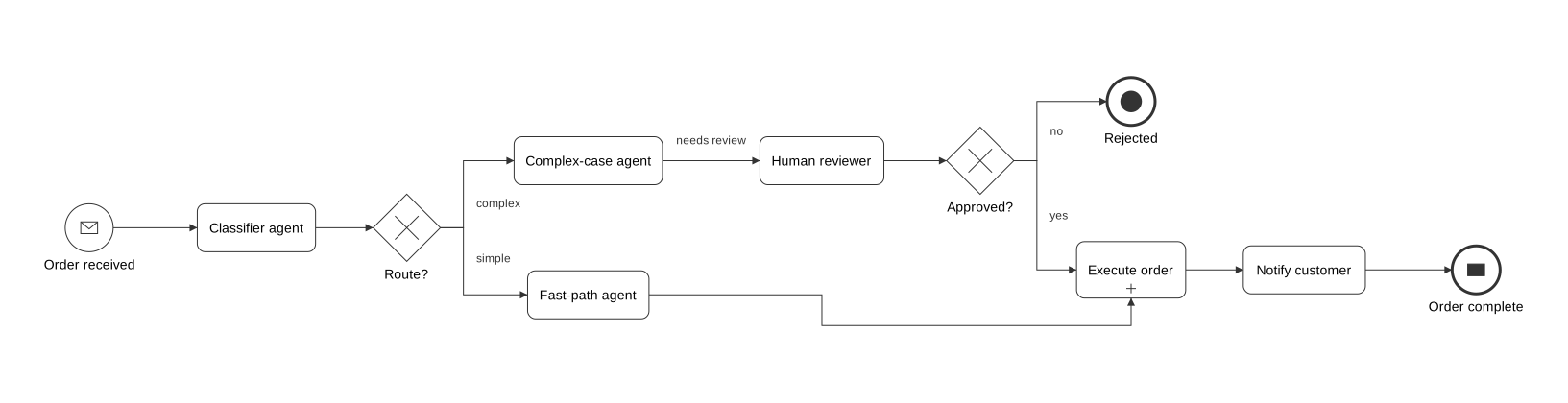
Built by Zindex from the canonical scene below. Open in Playground to swap themes
(clean / dark / blueprint / sketch), or POST the scene to /v1/scenes/render
with format: "png" for a rasterised version.
Scene JSON
Raw
The canonical DSP scene used to render the diagram above. Drop into the
Playground or POST to /v1/scenes/render to
reproduce.
{
  "schemaVersion": "0.1",
  "diagramFamily": "workflow",
  "scene": {
    "id": "multi-agent-workflow",
    "title": "Multi-agent Order Triage",
    "units": "px",
    "canvas": {
      "width": 1300,
      "height": 420
    }
  },
  "layoutStrategy": {
    "algorithm": "hierarchical",
    "direction": "LR",
    "nodeSpacing": 35,
    "rankSpacing": 80
  },
  "elements": [
    {
      "id": "msgStart",
      "kind": "node",
      "nodeType": "workflow.messageStart",
      "shape": "ellipse",
      "label": "Order received"
    },
    {
      "id": "classifier",
      "kind": "node",
      "nodeType": "workflow.task",
      "shape": "roundedRect",
      "label": "Classifier agent"
    },
    {
      "id": "decRoute",
      "kind": "node",
      "nodeType": "workflow.gateway",
      "shape": "diamond",
      "label": "Route?"
    },
    {
      "id": "fast",
      "kind": "node",
      "nodeType": "workflow.task",
      "shape": "roundedRect",
      "label": "Fast-path agent"
    },
    {
      "id": "complex",
      "kind": "node",
      "nodeType": "workflow.task",
      "shape": "roundedRect",
      "label": "Complex-case agent"
    },
    {
      "id": "human",
      "kind": "node",
      "nodeType": "workflow.task",
      "shape": "roundedRect",
      "label": "Human reviewer"
    },
    {
      "id": "decReview",
      "kind": "node",
      "nodeType": "workflow.gateway",
      "shape": "diamond",
      "label": "Approved?"
    },
    {
      "id": "exec",
      "kind": "node",
      "nodeType": "workflow.subprocess",
      "shape": "roundedRect",
      "label": "Execute order"
    },
    {
      "id": "notify",
      "kind": "node",
      "nodeType": "workflow.task",
      "shape": "roundedRect",
      "label": "Notify customer"
    },
    {
      "id": "msgEnd",
      "kind": "node",
      "nodeType": "workflow.messageEnd",
      "shape": "ellipse",
      "label": "Order complete"
    },
    {
      "id": "rejected",
      "kind": "node",
      "nodeType": "workflow.terminate",
      "shape": "ellipse",
      "label": "Rejected"
    },
    {
      "id": "e1",
      "kind": "edge",
      "edgeType": "workflow.sequenceFlow",
      "from": {
        "elementId": "msgStart"
      },
      "to": {
        "elementId": "classifier"
      },
      "router": "orthogonal"
    },
    {
      "id": "e2",
      "kind": "edge",
      "edgeType": "workflow.sequenceFlow",
      "from": {
        "elementId": "classifier"
      },
      "to": {
        "elementId": "decRoute"
      },
      "router": "orthogonal"
    },
    {
      "id": "e3",
      "kind": "edge",
      "edgeType": "workflow.sequenceFlow",
      "from": {
        "elementId": "decRoute"
      },
      "to": {
        "elementId": "fast"
      },
      "router": "orthogonal",
      "label": "simple"
    },
    {
      "id": "e4",
      "kind": "edge",
      "edgeType": "workflow.sequenceFlow",
      "from": {
        "elementId": "decRoute"
      },
      "to": {
        "elementId": "complex"
      },
      "router": "orthogonal",
      "label": "complex"
    },
    {
      "id": "e5",
      "kind": "edge",
      "edgeType": "workflow.sequenceFlow",
      "from": {
        "elementId": "complex"
      },
      "to": {
        "elementId": "human"
      },
      "router": "orthogonal",
      "label": "needs review"
    },
    {
      "id": "e6",
      "kind": "edge",
      "edgeType": "workflow.sequenceFlow",
      "from": {
        "elementId": "human"
      },
      "to": {
        "elementId": "decReview"
      },
      "router": "orthogonal"
    },
    {
      "id": "e7",
      "kind": "edge",
      "edgeType": "workflow.sequenceFlow",
      "from": {
        "elementId": "decReview"
      },
      "to": {
        "elementId": "rejected"
      },
      "router": "orthogonal",
      "label": "no"
    },
    {
      "id": "e8",
      "kind": "edge",
      "edgeType": "workflow.sequenceFlow",
      "from": {
        "elementId": "decReview"
      },
      "to": {
        "elementId": "exec"
      },
      "router": "orthogonal",
      "label": "yes"
    },
    {
      "id": "e9",
      "kind": "edge",
      "edgeType": "workflow.sequenceFlow",
      "from": {
        "elementId": "fast"
      },
      "to": {
        "elementId": "exec"
      },
      "router": "orthogonal"
    },
    {
      "id": "e10",
      "kind": "edge",
      "edgeType": "workflow.sequenceFlow",
      "from": {
        "elementId": "exec"
      },
      "to": {
        "elementId": "notify"
      },
      "router": "orthogonal"
    },
    {
      "id": "e11",
      "kind": "edge",
      "edgeType": "workflow.sequenceFlow",
      "from": {
        "elementId": "notify"
      },
      "to": {
        "elementId": "msgEnd"
      },
      "router": "orthogonal"
    }
  ]
}
Agent workflow
Document a multi-agent triage workflow as an executable BPMN-style diagram. The diagram is generated from the agent-orchestration configuration (declarative - typically a YAML file describing classifiers, tools, gateways, and human-in-the-loop checkpoints) and stays in sync as the orchestration evolves.
Inputs
- Agent orchestration configuration file (e.g. agents/triage.yaml describing the classifier, downstream agents, gateway conditions, and human-review steps)
- Existing Zindex scene id
- Zindex API key
Outputs
- Updated persisted scene with one workflow node per orchestration step (start event, classifier task, gateways, downstream agents, human-reviewer task, terminate events)
- Rendered BPMN-style SVG suitable for embedding in onboarding docs and runbooks
- Revision history showing how the orchestration policy has evolved (added a fast-path gateway, raised the auto-approve threshold, added human review for complex cases)
- 01
Fetch the persisted scene
Workflow scenes are long-lived. Fetch the current revision before deriving anything new.
- 02
Parse the orchestration configuration
Read agents/triage.yaml. Each entry describes one orchestration step: task type (`classifier`, `agent`, `human-review`, `gateway`, `terminate`), inputs, outputs, gateway conditions. The YAML is structured precisely so that one entry maps to one workflow element.
- 03
Compute the operation diff
For each orchestration step, ensure a node exists with the right `nodeType`: `workflow.messageStart` for the entrypoint, `workflow.task` for tasks, `workflow.gateway` (or one of the gateway* variants) for branching points, `workflow.terminate` for terminal failure paths, `workflow.messageEnd` for the success completion. For each transition, ensure an edge exists with `edgeType: workflow.sequenceFlow` and a label for any condition (e.g. 'simple', 'complex', 'needs review').
- 04
Apply the operation batch
One applyOps batch with errorPolicy=allOrNothing. The revisionMessage should describe the policy change: 'add fast-path gateway: simple cases skip human review' is meaningful months later, where 'orchestration update' is not.
- 05
Validate the workflow scene
Confirm BPMN semantics: every gateway has at least two outgoing edges, every messageStart has at least one outgoing edge, every messageEnd has at least one incoming edge. The platform validates these automatically against the workflow diagram family.
- 06
Render the workflow diagram
Render to SVG. The hierarchical LR layout naturally separates the start event, branching gateways, parallel paths, and terminate events - readable left-to-right as a process. Embed the rendered SVG in the agent runbook so on-call engineers can see what the orchestration is supposed to do without reading YAML.
- 07
Publish the diagram to the agent runbook
Drop the rendered SVG into the runbook directory. When the agent system pages on-call (because a gateway threshold was crossed or human review queue is backed up), the runbook now includes the canonical orchestration diagram pinned to the deployed revision.
MCP recipe
For agents using Model Context Protocol. The tool sequence below matches the workflow steps; copy the prompt as a system message.
Tool sequence
- 01
dsp_get_sceneFetch the persisted scene - 02
dsp_apply_opsApply the operation batch - 03
dsp_validate_sceneValidate the workflow scene - 04
dsp_render_sceneRender the workflow diagram
Unique tools used: dsp_get_scene, dsp_apply_ops, dsp_validate_scene, dsp_render_scene.
Copyable agent prompt
Drop this verbatim into a system prompt for an MCP-connected agent.
The Zindex MCP server (@zindex-ai/mcp, configured with a
ZINDEX_API_KEY environment variable - setup guide)
exposes the tools the prompt references.
You are an automated workflow-documentation agent. Your job is to keep a BPMN-style diagram of a multi-agent triage orchestration in sync with the orchestration configuration, so that on-call engineers, designers, and new hires always see what the system is supposed to do - independent of the YAML they would otherwise have to read.

The persisted Zindex scene id is `${SCENE_ID}`; it already exists. Each agent orchestration has one scene; revisions track policy changes ('add fast-path gateway', 'raise auto-approve threshold', 'add human review for complex cases'). Treat the scene as the canonical visual contract for the orchestration.

Workflow on every run (typically on every PR that touches `agents/triage.yaml` or its peers, plus a daily scheduled run as a safety net):

1. Read `agents/triage.yaml` (or whatever orchestration configuration file the project uses). Each entry describes one workflow step: type (`classifier`, `agent`, `human-review`, `gateway`, `terminate`), inputs, outputs, gateway conditions. The YAML is structured intentionally so that one entry maps to one workflow element - do not parse free-text comments; rely on the structured fields.

2. Call `dsp_get_scene({ sceneId: "${SCENE_ID}" })` to read the current revision and elements.

3. For each orchestration step, compute the corresponding workflow element. Map the step type to a `nodeType`: `workflow.messageStart` for the message-driven entrypoint, `workflow.task` for synchronous tasks, `workflow.subprocess` for calls into nested workflows, `workflow.gateway` (or one of the typed gateway variants when applicable) for branching, `workflow.terminate` for terminal failure paths, `workflow.messageEnd` for successful completion. Use the step's stable identifier (the YAML key) as the element id - never re-derive ids; renames must produce `updateNode`, not delete-and-create.

4. For each transition between steps, compute the corresponding edge with `edgeType: workflow.sequenceFlow`. Label the edge with any gateway condition ('simple', 'complex', 'yes', 'no'). Use stable edge ids built from `e_${from_id}_${to_id}` so re-running doesn't churn the graph.

5. Diff what you parsed against the persisted scene. New steps → `createNode`. Removed steps → `deleteElement`. Changed types → `updateNode` (the type might change when the policy decides a former task should become a gateway). Changed conditions → `updateEdge`.

6. Call `dsp_apply_ops` with one batch. `errorPolicy: "allOrNothing"`. The `revisionMessage` should describe the policy change: 'add fast-path gateway: simple cases skip human review' is meaningful months later in the audit trail, where 'orchestration update' is not.

7. Call `dsp_validate_scene`. Resolve workflow-family-specific issues: every gateway needs at least two outgoing edges, every messageStart needs at least one outgoing edge, every messageEnd needs at least one incoming edge. The platform validates these automatically against the `workflow` diagram family - if validation fails, the orchestration YAML is itself malformed and a human should review.

8. Call `dsp_render_scene({ format: "svg", theme: "clean" })`. Embed the rendered SVG in the agent runbook (`docs/runbooks/triage.md`) via a stable URL. When the orchestration pages on-call (a gateway threshold crossed, a human-review queue backed up), the runbook now includes the canonical diagram pinned to the deployed revision - so the responder sees what the system was *supposed* to do, then compares to what actually happened.

Hard rules: never hand-edit the rendered SVG; the rendered file is a throwaway projection of the persisted scene. Never regenerate the scene from scratch; always patch with stable ids - orchestration policy evolves over many small changes, and stable ids are what make the revision history a meaningful policy changelog. If validation fails, surface the structured diagnostic (`code`, `path`, `message`) on the PR; do not silently work around BPMN semantic violations.
HTTP API recipe
For agents/devs not using MCP. Set $ZINDEX_API_KEY in the
Authorization header on authenticated calls. Stateless endpoints
(/v1/scenes/render, /v1/scenes/validate,
/v1/scenes/normalize) need no key. Full reference: API endpoints, OpenAPI spec.
- 01
GET/v1/scenes/${SCENE_ID}Workflow scenes are long-lived. Fetch the current revision before deriving anything new.
- 02
POST/v1/scenes/${SCENE_ID}/opsOne applyOps batch with errorPolicy=allOrNothing. The revisionMessage should describe the policy change: 'add fast-path gateway: simple cases skip human review' is meaningful months later, where 'orchestration update' is not.
- 03
POST/v1/scenes/validateConfirm BPMN semantics: every gateway has at least two outgoing edges, every messageStart has at least one outgoing edge, every messageEnd has at least one incoming edge. The platform validates these automatically against the workflow diagram family.
- 04
POST/v1/scenes/${SCENE_ID}/renderRender to SVG. The hierarchical LR layout naturally separates the start event, branching gateways, parallel paths, and terminate events - readable left-to-right as a process. Embed the rendered SVG in the agent runbook so on-call engineers can see what the orchestration is supposed to do without reading YAML.
Operations
Raw
The typed-operation envelope that builds this scene from empty.
POST to /v1/scenes/:id/ops after creating a scene, or
pass to dsp_apply_ops. Each op carries a stable
id so subsequent runs can update the same elements
instead of regenerating.
{
  "schemaVersion": "0.1",
  "errorPolicy": "allOrNothing",
  "revisionMessage": "Initial multi-agent triage workflow: classifier, fast/complex/human paths",
  "ops": [
    {
      "op": "createNode",
      "id": "msgStart",
      "nodeType": "workflow.messageStart",
      "shape": "ellipse",
      "label": "Order received"
    },
    {
      "op": "createNode",
      "id": "classifier",
      "nodeType": "workflow.task",
      "shape": "roundedRect",
      "label": "Classifier agent"
    },
    {
      "op": "createNode",
      "id": "decRoute",
      "nodeType": "workflow.gateway",
      "shape": "diamond",
      "label": "Route?"
    },
    {
      "op": "createNode",
      "id": "fast",
      "nodeType": "workflow.task",
      "shape": "roundedRect",
      "label": "Fast-path agent"
    },
    {
      "op": "createNode",
      "id": "complex",
      "nodeType": "workflow.task",
      "shape": "roundedRect",
      "label": "Complex-case agent"
    },
    {
      "op": "createNode",
      "id": "human",
      "nodeType": "workflow.task",
      "shape": "roundedRect",
      "label": "Human reviewer"
    },
    {
      "op": "createNode",
      "id": "decReview",
      "nodeType": "workflow.gateway",
      "shape": "diamond",
      "label": "Approved?"
    },
    {
      "op": "createNode",
      "id": "exec",
      "nodeType": "workflow.subprocess",
      "shape": "roundedRect",
      "label": "Execute order"
    },
    {
      "op": "createNode",
      "id": "notify",
      "nodeType": "workflow.task",
      "shape": "roundedRect",
      "label": "Notify customer"
    },
    {
      "op": "createNode",
      "id": "msgEnd",
      "nodeType": "workflow.messageEnd",
      "shape": "ellipse",
      "label": "Order complete"
    },
    {
      "op": "createNode",
      "id": "rejected",
      "nodeType": "workflow.terminate",
      "shape": "ellipse",
      "label": "Rejected"
    },
    {
      "op": "createEdge",
      "id": "e1",
      "from": {
        "elementId": "msgStart"
      },
      "to": {
        "elementId": "classifier"
      },
      "edgeType": "workflow.sequenceFlow",
      "router": "orthogonal"
    },
    {
      "op": "createEdge",
      "id": "e2",
      "from": {
        "elementId": "classifier"
      },
      "to": {
        "elementId": "decRoute"
      },
      "edgeType": "workflow.sequenceFlow",
      "router": "orthogonal"
    },
    {
      "op": "createEdge",
      "id": "e3",
      "from": {
        "elementId": "decRoute"
      },
      "to": {
        "elementId": "fast"
      },
      "edgeType": "workflow.sequenceFlow",
      "label": "simple",
      "router": "orthogonal"
    },
    {
      "op": "createEdge",
      "id": "e4",
      "from": {
        "elementId": "decRoute"
      },
      "to": {
        "elementId": "complex"
      },
      "edgeType": "workflow.sequenceFlow",
      "label": "complex",
      "router": "orthogonal"
    },
    {
      "op": "createEdge",
      "id": "e5",
      "from": {
        "elementId": "complex"
      },
      "to": {
        "elementId": "human"
      },
      "edgeType": "workflow.sequenceFlow",
      "label": "needs review",
      "router": "orthogonal"
    },
    {
      "op": "createEdge",
      "id": "e6",
      "from": {
        "elementId": "human"
      },
      "to": {
        "elementId": "decReview"
      },
      "edgeType": "workflow.sequenceFlow",
      "router": "orthogonal"
    },
    {
      "op": "createEdge",
      "id": "e7",
      "from": {
        "elementId": "decReview"
      },
      "to": {
        "elementId": "rejected"
      },
      "edgeType": "workflow.sequenceFlow",
      "label": "no",
      "router": "orthogonal"
    },
    {
      "op": "createEdge",
      "id": "e8",
      "from": {
        "elementId": "decReview"
      },
      "to": {
        "elementId": "exec"
      },
      "edgeType": "workflow.sequenceFlow",
      "label": "yes",
      "router": "orthogonal"
    },
    {
      "op": "createEdge",
      "id": "e9",
      "from": {
        "elementId": "fast"
      },
      "to": {
        "elementId": "exec"
      },
      "edgeType": "workflow.sequenceFlow",
      "router": "orthogonal"
    },
    {
      "op": "createEdge",
      "id": "e10",
      "from": {
        "elementId": "exec"
      },
      "to": {
        "elementId": "notify"
      },
      "edgeType": "workflow.sequenceFlow",
      "router": "orthogonal"
    },
    {
      "op": "createEdge",
      "id": "e11",
      "from": {
        "elementId": "notify"
      },
      "to": {
        "elementId": "msgEnd"
      },
      "edgeType": "workflow.sequenceFlow",
      "router": "orthogonal"
    }
  ]
}
Validation
Valid
Captured response from POST /v1/scenes/validate. The
platform runs 40+ semantic checks; see the full list in the validation rules reference.
- 0 diagnostics
Scene validates with no diagnostics. Agents that produce scenes like this can ship the rendered SVG without a recovery loop.
Codes the platform can emit include TEXT_OVERFLOW,
CANVAS_AUTO_EXTENDED, EDGE_LABEL_SUPPRESSED_REDUNDANT,
EDGE_LABEL_SUPPRESSED_FANIN, EDGE_COLUMN_NOT_FOUND, LABEL_DUPLICATION_DETECTED, LAYOUT_ABSOLUTE_AT_ORIGIN, and MISSING_DIAGRAM_FAMILY. Each diagnostic carries a
structured data field with element ids and context an
agent can act on programmatically.
Revision diff
Raw
The structural diff between two revisions of the persisted scene -
the response shape dsp_diff_scene returns. Stateful
diagram evolution is Zindex's strongest differentiator: the same
scene id evolves through immutable revisions, each diffable.
Evolution scenario
A policy change: complex cases that previously routed straight to human review now go through an auto_escalate task that batches similar cases together before paging a human. The classifier's routing decision (`decRoute`) gained a third branch. The revision message reads 'add auto-escalate path: complex → batch → human review'.
- Revision 23 → 24
- +2 added
- -0 removed
- ~1 modified
+ Added
auto_escalatee_complex_escalate
~ Modified
decRoute
Raw dsp_diff_scene response
{
  "schemaVersion": "1.0",
  "sceneId": "triage-orchestration",
  "fromRevision": 23,
  "toRevision": 24,
  "summary": {
    "added": 2,
    "removed": 0,
    "modified": 1
  },
  "added": [
    "auto_escalate",
    "e_complex_escalate"
  ],
  "removed": [],
  "modified": [
    "decRoute"
  ],
  "scenario": "A policy change: complex cases that previously routed straight to human review now go through an auto_escalate task that batches similar cases together before paging a human. The classifier's routing decision (`decRoute`) gained a third branch. The revision message reads 'add auto-escalate path: complex → batch → human review'."
}
Want to see this on your own scene? Run the CI recipe below - it
calls dsp_diff_scene on every revision change and
surfaces a real before / after on every PR.
CI/CD recipe
A complete, runnable GitHub Actions workflow for this example.
Drop the YAML into .github/workflows/zindex-multi-agent-workflow.yml,
add the listed secrets, and the agent runs unattended on every
qualifying trigger. Re-comments idempotently using a hidden marker
so the PR conversation stays clean across pushes.
Trigger
Runs on every PR that touches the orchestration YAML, plus a daily safety-net run at 06:00 UTC. The PR trigger surfaces orchestration policy changes during review; the daily run catches any drift in case a YAML edit landed without its CI run completing.
Required secrets
-
ZINDEX_API_KEYrequired Zindex API key with scene-write scope. -
ZINDEX_SCENE_IDrequired Long-lived persisted scene id for the orchestration diagram. One scene per orchestration; never recreate.
Inputs
- agents/triage.yaml - the orchestration configuration
- scripts/parse-orchestration.mjs (you author this) - emits { steps: [{ id, type, label, transitions }] }
- scripts/orchestration-to-ops.mjs (you author this) - maps step types to workflow.* nodeTypes; emits typed ops with stable ids
Outputs
- out/diagram.svg - rendered BPMN-style workflow
- out/diff.json - structural diff vs previous revision
- out/validation.json - diagnostic capture (build fails if BPMN semantics are broken)
- PR comment with policy changes summary
- Workflow artifact 'orchestration-diagram-svg' (30-day retention)
GitHub Actions workflow
# Zindex - Multi-agent workflow diagram. Keeps a BPMN-style diagram of the
# agent orchestration policy in sync with the orchestration YAML on every PR
# that touches it (plus a daily safety-net run).
#
# Drop into .github/workflows/zindex-orchestration.yml.

name: Zindex - Multi-agent workflow

on:
  pull_request:
    paths:
      - "agents/triage.yaml"
      - "agents/**/*.yaml"
  schedule:
    - cron: "0 6 * * *"   # Daily 06:00 UTC safety net
  workflow_dispatch:

permissions:
  contents: read
  pull-requests: write

concurrency:
  group: ${{ github.workflow }}-${{ github.event.pull_request.number || github.ref }}
  cancel-in-progress: ${{ github.event_name == 'pull_request' }}

env:
  ZINDEX_API_BASE: https://api.zindex.ai

jobs:
  sync-orchestration-diagram:
    runs-on: ubuntu-latest
    steps:
      - uses: actions/checkout@v4

      # 1. Parse the orchestration YAML. Each entry maps to a workflow
      #    element - author scripts/parse-orchestration.mjs against your
      #    project's YAML schema. The parser should emit
      #    { steps: [{ id, type, label, transitions }] } where `type` is one
      #    of classifier|agent|human-review|gateway|terminate.
      - name: Parse orchestration to steps.json
        run: |
          mkdir -p out
          node scripts/parse-orchestration.mjs > out/steps.json
          echo "::notice::Parsed $(jq '.steps | length' out/steps.json) steps"

      - name: Capture current revision
        id: prev_rev
        env:
          ZINDEX_API_KEY: ${{ secrets.ZINDEX_API_KEY }}
          ZINDEX_SCENE_ID: ${{ secrets.ZINDEX_SCENE_ID }}
        run: |
          echo "rev=$(curl -fsSL -H "Authorization: Bearer $ZINDEX_API_KEY" \
            "$ZINDEX_API_BASE/v1/scenes/$ZINDEX_SCENE_ID" | jq -r '.revision')" >> "$GITHUB_OUTPUT"

      # 2. Map each step to a Zindex workflow element. Use stable ids (the
      #    YAML key) so a renamed step produces updateNode rather than
      #    delete + create - the latter would break sequenceFlow edges.
      - name: Compute applyOps batch
        run: node scripts/orchestration-to-ops.mjs out/steps.json > out/ops.json

      - name: Apply ops
        id: apply
        env:
          ZINDEX_API_KEY: ${{ secrets.ZINDEX_API_KEY }}
          ZINDEX_SCENE_ID: ${{ secrets.ZINDEX_SCENE_ID }}
        run: |
          RESP=$(curl -fsSL -X POST \
            -H "Authorization: Bearer $ZINDEX_API_KEY" \
            -H "Content-Type: application/json" \
            --data-binary @out/ops.json \
            "$ZINDEX_API_BASE/v1/scenes/$ZINDEX_SCENE_ID/ops")
          echo "rev=$(echo "$RESP" | jq -r '.revision')" >> "$GITHUB_OUTPUT"
          echo "applied=$(echo "$RESP" | jq -r '.applied')" >> "$GITHUB_OUTPUT"

      - name: Validate workflow semantics
        env:
          ZINDEX_API_KEY: ${{ secrets.ZINDEX_API_KEY }}
          ZINDEX_SCENE_ID: ${{ secrets.ZINDEX_SCENE_ID }}
        run: |
          curl -fsSL -X POST \
            -H "Authorization: Bearer $ZINDEX_API_KEY" \
            -H "Content-Type: application/json" \
            --data-binary @<(curl -fsSL -H "Authorization: Bearer $ZINDEX_API_KEY" \
              "$ZINDEX_API_BASE/v1/scenes/$ZINDEX_SCENE_ID" | jq '{schemaVersion: "0.1", diagramFamily, scene, layoutStrategy, elements}') \
            "$ZINDEX_API_BASE/v1/scenes/validate" \
            > out/validation.json
          if [ "$(jq -r '.ok' out/validation.json)" != "true" ]; then
            echo "::error::Validation failed - workflow YAML may have invalid BPMN semantics. See out/validation.json."
            jq -r '.diagnostics[] | "::error::\(.code) at \(.path // "scene"): \(.message)"' out/validation.json
            exit 1
          fi

      - name: Render
        env:
          ZINDEX_API_KEY: ${{ secrets.ZINDEX_API_KEY }}
          ZINDEX_SCENE_ID: ${{ secrets.ZINDEX_SCENE_ID }}
        run: |
          curl -fsSL -X POST \
            -H "Authorization: Bearer $ZINDEX_API_KEY" \
            -H "Content-Type: application/json" \
            -d '{"format":"svg","theme":"clean"}' \
            "$ZINDEX_API_BASE/v1/scenes/$ZINDEX_SCENE_ID/render" \
            | jq -r '.output.content' > out/diagram.svg

      - name: Diff revisions
        id: diff
        if: steps.apply.outputs.rev != steps.prev_rev.outputs.rev
        env:
          ZINDEX_API_KEY: ${{ secrets.ZINDEX_API_KEY }}
          ZINDEX_SCENE_ID: ${{ secrets.ZINDEX_SCENE_ID }}
          PREV: ${{ steps.prev_rev.outputs.rev }}
          NEW: ${{ steps.apply.outputs.rev }}
        run: |
          curl -fsSL -H "Authorization: Bearer $ZINDEX_API_KEY" \
            "$ZINDEX_API_BASE/v1/scenes/$ZINDEX_SCENE_ID/diff?from=$PREV&to=$NEW" \
            > out/diff.json
          echo "added=$(jq -r '.summary.added' out/diff.json)" >> "$GITHUB_OUTPUT"
          echo "removed=$(jq -r '.summary.removed' out/diff.json)" >> "$GITHUB_OUTPUT"
          echo "modified=$(jq -r '.summary.modified' out/diff.json)" >> "$GITHUB_OUTPUT"

      - uses: actions/upload-artifact@v4
        id: upload
        with:
          name: orchestration-diagram-svg
          path: out/diagram.svg
          retention-days: 30

      - uses: peter-evans/find-comment@v3
        if: github.event_name == 'pull_request'
        id: find_comment
        with:
          issue-number: ${{ github.event.pull_request.number }}
          comment-author: "github-actions[bot]"
          body-includes: "<!-- zindex-bot:multi-agent-workflow -->"

      - uses: peter-evans/create-or-update-comment@v4
        if: github.event_name == 'pull_request'
        with:
          comment-id: ${{ steps.find_comment.outputs.comment-id }}
          issue-number: ${{ github.event.pull_request.number }}
          edit-mode: replace
          body: |
            <!-- zindex-bot:multi-agent-workflow -->
            ### Orchestration diagram updated · revision ${{ steps.apply.outputs.rev }}

            | | |
            |---|---|
            | Workflow changes | +${{ steps.diff.outputs.added || '0' }} / -${{ steps.diff.outputs.removed || '0' }} / ~${{ steps.diff.outputs.modified || '0' }} |
            | Revision | ${{ steps.prev_rev.outputs.rev }} → ${{ steps.apply.outputs.rev }} |

            <details><summary>Download rendered SVG</summary>

            ${{ steps.upload.outputs.artifact-url }}

            </details>

            <sub>Rendered by Zindex · scene `${{ secrets.ZINDEX_SCENE_ID }}`</sub>
Agent resources
Machine-readable versions of this example. Agents should fetch these rather than scrape the rendered HTML.
-
multi-agent-workflow.scene.jsonCanonical DSP scene Open -
multi-agent-workflow.ops.jsonTyped-operation envelope that builds the scene Open -
multi-agent-workflow.workflow.jsonStructured agent workflow (goal, inputs, outputs, steps) Open -
multi-agent-workflow.diff.jsonSampledsp_diff_sceneresponse (revision evolution) Open -
multi-agent-workflow.github-actions.ymlRunnable GitHub Actions workflow for the CI/CD recipe Open -
multi-agent-workflow.svgBuild-time rendered diagram Open -
multi-agent-workflow.mdAgent-readable markdown summary Open -
/examples/index.jsonManifest of all examples (cross-linked) Open
PR comment template
The bot posts this comment on every triggering PR. The hidden marker
<!-- zindex-bot:multi-agent-workflow -->letspeter-evans/create-or-update-commentfind and overwrite the previous comment instead of appending a new one.