What this example shows
A person asks their coding agent, before a security review: “Map every public-facing interface across our repositories: the Terraform, the gateway routes and the ingress.” The agent reads an online store’s Terraform, gateway routes, service specs and Kubernetes ingress files. It saves an architecture diagram of what they open.
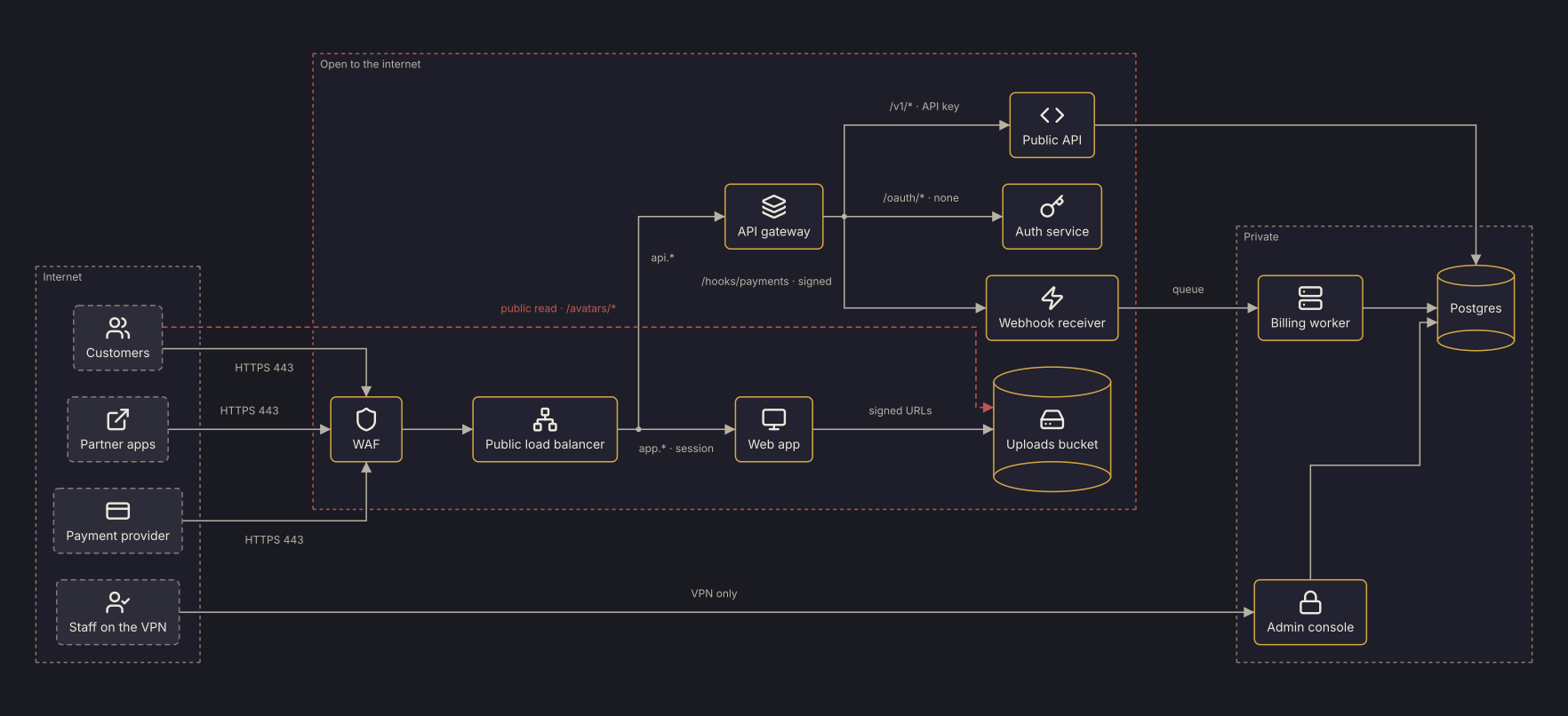
Callers sit on the left: customers, partner apps, the payment provider and staff on the VPN. Each path into the “Open to the internet” frame is labeled with how it gets in: the port at the edge, the host an ingress matches, or a gateway route with its auth. The bucket policy’s public avatars/* prefix puts the uploads bucket in that frame too. A dashed red line from the customers marks it: the one path that skips the WAF and the load balancer and needs no credentials. Revision 2 records the review’s fix, which closes that prefix, and the Revision diff panel below shows both revisions and the compare.
When to use it
Before a security review, a penetration test or an audit that asks what faces the internet. Use it when the answer is spread across Terraform, gateway config, service specs and ingress files in several repositories. The diagram is saved in the team’s workspace, so everyone in it opens the same one; a share link shows its images to a reviewer outside it. When the files change, the person asks again, and the agent updates the same diagram instead of drawing a new one.
What the agent does
The agent turns what the files grant into a scene. Each caller, and each thing that answers or stores, is a node in one of three frames: the internet, what is open to it, and what is private. Each path is an edge, labeled with its port, host or route and its auth. Listeners, security groups, DNS records and IAM policies become edges and labels, not nodes.
The agent saves the scene with diagram_create and the key public-interfaces. The engine places every node and routes every edge, so the agent writes no coordinates.
After the review, the team removes the public read on avatars/*, and the person asks the agent again. The agent reads the change and sends one deleteElement for the dashed line with diagram_edit. It records a revision whose message names the fix; every other element keeps its ID, and no node moves. diagram_history with compare lists the removed edge, and diagram_render gives image links for the review notes.
What the output includes
- One architecture diagram of the store’s public interfaces, on a dark canvas, that the agent edits rather than redraws when asked again.
- Each path the files open to the internet, labeled with how it is authenticated. The one path past the WAF and the load balancer that needs no credentials, a public bucket prefix, is dashed in revision 1.
- A revision for each change the agent is asked to record, its message naming the change, such as the fix that closes the public prefix.
- A compare JSON listing what each change adds, changes and removes, and SVG and PNG links to each revision.
What this example does not aim to do
The diagram shows what the agent found in the files it read, not what is deployed. A resource created by hand, a rule changed in a console or a repository the agent wasn’t pointed at isn’t in it. This example doesn’t scan ports, test authentication or rate a risk. It gives the review a shared picture of what the code opens, to start from.
Rendered diagram
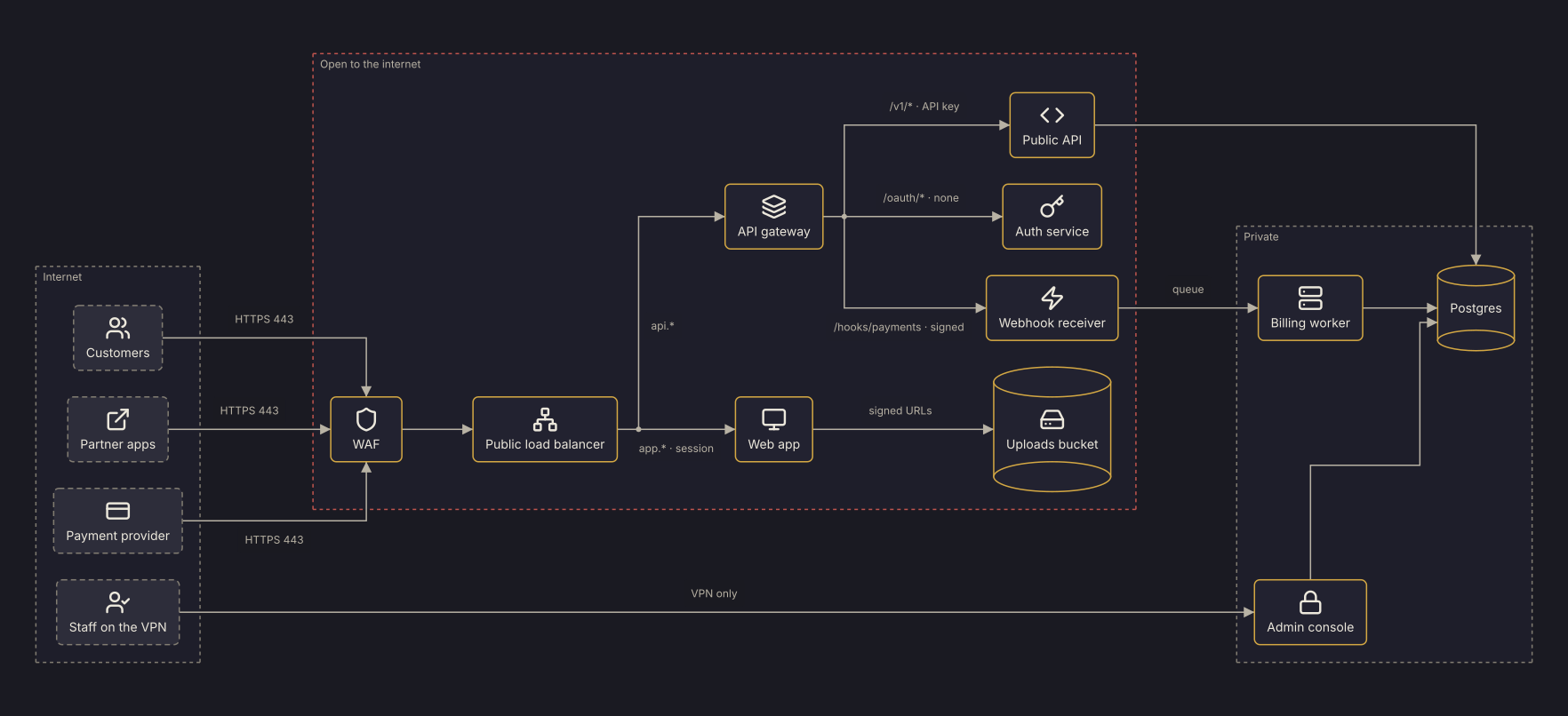
Revision 2 as Zindex saved it, from the edit to revision 1 that Revision diff shows. That edit moved no placed node Revision diff doesn't list, but the Playground draws the scene below from scratch, so its nodes can land elsewhere. Open the scene there to swap themes (clean / dark / blueprint / sketch).
Scene JSON
Raw
The DSP scene of revision 2, without the node positions Zindex saved with it. Open it in the
Playground, or send it as scene to
POST /v1/diagrams/preview, to draw it from scratch.
{
  "schemaVersion": "0.1",
  "diagramFamily": "architecture",
  "scene": {
    "id": "public-interfaces-for-security-review",
    "title": "Public-facing interfaces",
    "brief": "What the store's code opens to the internet, for a security review.\nDrawn from infra/*.tf, gateway/routes.yaml, services/*/openapi.yaml and k8s/ingress/*.yaml. Frames: internet (who calls in), open (everything a request from the internet reaches, through the edge or straight past it) and private (what only the cluster or the VPN reaches). Edges run from caller to callee; an edge into the open frame is labeled with how the internet reaches it: the port at the edge, the host an ingress matches, each gateway route with its auth. A public grant, which skips the WAF and the load balancer and needs no credentials, is dashed and labeled with its path. The open frame and a public grant's edge are red. IDs are short and stable; reuse them.",
    "units": "px",
    "canvas": {
      "background": "#1a1a22"
    }
  },
  "elements": [
    {
      "id": "internet",
      "kind": "frame",
      "title": "Internet",
      "containerType": "generic",
      "style": {
        "dash": [
          4,
          4
        ],
        "cornerRadius": 8
      },
      "children": [
        "customers",
        "partners",
        "payments_provider",
        "staff"
      ]
    },
    {
      "id": "customers",
      "kind": "node",
      "nodeType": "externalSystem",
      "label": "Customers",
      "icon": "lucide:users"
    },
    {
      "id": "partners",
      "kind": "node",
      "nodeType": "externalSystem",
      "label": "Partner apps",
      "icon": "lucide:external-link"
    },
    {
      "id": "payments_provider",
      "kind": "node",
      "nodeType": "externalSystem",
      "label": "Payment provider",
      "icon": "lucide:credit-card"
    },
    {
      "id": "staff",
      "kind": "node",
      "nodeType": "externalSystem",
      "label": "Staff on the VPN",
      "icon": "lucide:user-check"
    },
    {
      "id": "open",
      "kind": "frame",
      "title": "Open to the internet",
      "containerType": "generic",
      "style": {
        "dash": [
          4,
          4
        ],
        "cornerRadius": 8,
        "stroke": "#c0544e"
      },
      "children": [
        "waf",
        "lb",
        "gateway",
        "web",
        "public_api",
        "auth",
        "webhooks",
        "uploads"
      ]
    },
    {
      "id": "waf",
      "kind": "node",
      "nodeType": "service",
      "shape": "roundedRect",
      "label": "WAF",
      "icon": "lucide:shield"
    },
    {
      "id": "lb",
      "kind": "node",
      "nodeType": "service",
      "shape": "roundedRect",
      "label": "Public load balancer",
      "icon": "lucide:network"
    },
    {
      "id": "gateway",
      "kind": "node",
      "nodeType": "service",
      "shape": "roundedRect",
      "label": "API gateway",
      "icon": "lucide:layers"
    },
    {
      "id": "web",
      "kind": "node",
      "nodeType": "service",
      "shape": "roundedRect",
      "label": "Web app",
      "icon": "lucide:monitor"
    },
    {
      "id": "public_api",
      "kind": "node",
      "nodeType": "service",
      "shape": "roundedRect",
      "label": "Public API",
      "icon": "lucide:code"
    },
    {
      "id": "auth",
      "kind": "node",
      "nodeType": "service",
      "shape": "roundedRect",
      "label": "Auth service",
      "icon": "lucide:key"
    },
    {
      "id": "webhooks",
      "kind": "node",
      "nodeType": "service",
      "shape": "roundedRect",
      "label": "Webhook receiver",
      "icon": "lucide:zap"
    },
    {
      "id": "private",
      "kind": "frame",
      "title": "Private",
      "containerType": "generic",
      "style": {
        "dash": [
          4,
          4
        ],
        "cornerRadius": 8
      },
      "children": [
        "admin",
        "billing",
        "postgres"
      ]
    },
    {
      "id": "admin",
      "kind": "node",
      "nodeType": "service",
      "shape": "roundedRect",
      "label": "Admin console",
      "icon": "lucide:lock"
    },
    {
      "id": "billing",
      "kind": "node",
      "nodeType": "service",
      "shape": "roundedRect",
      "label": "Billing worker",
      "icon": "lucide:server"
    },
    {
      "id": "postgres",
      "kind": "node",
      "nodeType": "database",
      "label": "Postgres"
    },
    {
      "id": "uploads",
      "kind": "node",
      "nodeType": "database",
      "label": "Uploads bucket",
      "icon": "lucide:hard-drive"
    },
    {
      "id": "e_cust_waf",
      "kind": "edge",
      "from": {
        "elementId": "customers"
      },
      "to": {
        "elementId": "waf"
      },
      "label": "HTTPS 443"
    },
    {
      "id": "e_part_waf",
      "kind": "edge",
      "from": {
        "elementId": "partners"
      },
      "to": {
        "elementId": "waf"
      },
      "label": "HTTPS 443"
    },
    {
      "id": "e_pay_waf",
      "kind": "edge",
      "from": {
        "elementId": "payments_provider"
      },
      "to": {
        "elementId": "waf"
      },
      "label": "HTTPS 443"
    },
    {
      "id": "e_waf_lb",
      "kind": "edge",
      "from": {
        "elementId": "waf"
      },
      "to": {
        "elementId": "lb"
      }
    },
    {
      "id": "e_lb_web",
      "kind": "edge",
      "from": {
        "elementId": "lb"
      },
      "to": {
        "elementId": "web"
      },
      "label": "app.* · session"
    },
    {
      "id": "e_lb_gw",
      "kind": "edge",
      "from": {
        "elementId": "lb"
      },
      "to": {
        "elementId": "gateway"
      },
      "label": "api.*"
    },
    {
      "id": "e_gw_api",
      "kind": "edge",
      "from": {
        "elementId": "gateway"
      },
      "to": {
        "elementId": "public_api"
      },
      "label": "/v1/* · API key"
    },
    {
      "id": "e_gw_auth",
      "kind": "edge",
      "from": {
        "elementId": "gateway"
      },
      "to": {
        "elementId": "auth"
      },
      "label": "/oauth/* · none"
    },
    {
      "id": "e_gw_hooks",
      "kind": "edge",
      "from": {
        "elementId": "gateway"
      },
      "to": {
        "elementId": "webhooks"
      },
      "label": "/hooks/payments · signed"
    },
    {
      "id": "e_hooks_billing",
      "kind": "edge",
      "from": {
        "elementId": "webhooks"
      },
      "to": {
        "elementId": "billing"
      },
      "label": "queue"
    },
    {
      "id": "e_api_pg",
      "kind": "edge",
      "from": {
        "elementId": "public_api"
      },
      "to": {
        "elementId": "postgres"
      }
    },
    {
      "id": "e_billing_pg",
      "kind": "edge",
      "from": {
        "elementId": "billing"
      },
      "to": {
        "elementId": "postgres"
      }
    },
    {
      "id": "e_staff_admin",
      "kind": "edge",
      "from": {
        "elementId": "staff"
      },
      "to": {
        "elementId": "admin"
      },
      "label": "VPN only"
    },
    {
      "id": "e_admin_pg",
      "kind": "edge",
      "from": {
        "elementId": "admin"
      },
      "to": {
        "elementId": "postgres"
      }
    },
    {
      "id": "e_web_uploads",
      "kind": "edge",
      "from": {
        "elementId": "web"
      },
      "to": {
        "elementId": "uploads"
      },
      "label": "signed URLs"
    }
  ]
}
Agent workflow
Draw what a store's Terraform, gateway routes, service specs and ingress files open to the internet, as an architecture diagram for a security review. When asked again after those files change, record the change as a revision of the same diagram.
Inputs
- The edge and data Terraform (infra/*.tf)
- The API gateway's routes (gateway/routes.yaml) and each service's OpenAPI spec (services/*/openapi.yaml)
- The Kubernetes ingress files (k8s/ingress/*.yaml)
- The diagram's Zindex key, public-interfaces (the diagram is created on the first run)
- An MCP client signed in to Zindex, or a Zindex API key
Outputs
- Revision 1: who calls in, everything a request from the internet reaches and how each path is authenticated, and what stays private, laid out by the engine
- A revision for each change to those files that the agent is asked to record, its message naming the change
- A compare listing the elements each change adds, changes and removes
- SVG and PNG links to each revision for the review notes
- 01
Read what the code opens
Read the Terraform, the gateway's routes, the service specs and the ingress files. Listeners, ingress hosts and gateway routes say what a request from the internet reaches and how it is authenticated. A bucket policy with a public principal is a path past the WAF and the load balancer that needs no credentials. DNS records, certificates, security groups, listeners and IAM policies aren't nodes; they tell you the edges and their labels.
- 02
Find the diagram
Call
diagram_findwith the diagram's key,public-interfaces, as its query. On the first run it finds nothing, and the next step creates the diagram; on later runs it returns the diagram's ID, and you go toread_current. - 03
Save the diagram
Save the scene with
diagram_createand the keypublic-interfaces. Its family isarchitecture, with the framesinternet,openandprivate. Each path the files grant is an edge from caller to callee; an edge intoopenis labeled with how the internet reaches it. Itsbriefstates these conventions. Zindex checks the scene, lays it out and draws it, and everyone in the workspace opens the same diagram. - 04
Read the diagram's current revision
When asked again after the files change, call
diagram_get. The outline's first line gives the current revision number (BASE), and its lines give each element with its ID and label, so you can see which IDs already exist. - 05
Turn the change into operations
A new service is a
createNodewithframeset to the frame it belongs in, a new route or grant acreateEdge, a closed route or grant adeleteElement, and a route whose auth changed anupdateEdgewith the new label. The fix in this example is onedeleteElement: the bucket policy's public read onavatars/*is gone, so the dashed edge goes, and the bucket stays inopenbecause browsers still fetch from it with signed URLs. - 06
Save the change as a revision
Call
diagram_editwith the ops,baseRevision= BASE and a message that names the change. The edit is all or nothing: if an operation has errors, it returnsVALIDATION_FAILEDwith anerrorslist and saves nothing. Fix the ops each error names and send the edit again. If another agent saved a newer revision after you read it, it returnsREVISION_CONFLICTwith what changed, and you plan the edit again against that revision. - 07
List what the change adds and removes
Call
diagram_historywithcompare: { from: BASE, to: <the new revision> }. It lists the element IDs the change adds, changes and removes, so the review notes can say which paths from the internet opened or closed. - 08
Render the revision
Get SVG and PNG links to the new revision; they work without a key for 7 days. The image is drawn once and kept, and it prints its address,
zindex.ai/d/<id>@<revision>, and date, so it is traceable to its revision.
MCP recipe
For agents using Model Context Protocol. The tool sequence below matches the workflow steps; copy the prompt as a system message.
Tool sequence
- 01
diagram_findFind the diagram - 02
diagram_createSave the diagram - 03
diagram_getRead the diagram's current revision - 04
diagram_editSave the change as a revision - 05
diagram_historyList what the change adds and removes - 06
diagram_renderRender the revision
Unique tools used: diagram_find, diagram_create, diagram_get, diagram_edit, diagram_history, diagram_render.
Copyable agent prompt
Drop this verbatim into a system prompt for an MCP-connected agent.
The Zindex MCP server at https://api.zindex.ai/mcp exposes
the tools the prompt references (connect a client),
and so does the npm package @zindexai/mcp, which forwards
to it.
Map every public-facing interface across our repositories: the Terraform, the gateway routes and the ingress. Mark what's open to the internet. It's for Thursday's security review.

You draw this diagram from the store's code. The files are the Terraform in `infra/`, the API gateway's routes in `gateway/routes.yaml`, each service's spec in `services/*/openapi.yaml` and the Kubernetes ingress files in `k8s/ingress/`. When you're asked again after they change, you update the same diagram.

The reviewers read the diagram as a list of what a request from the internet can reach and how each entry point is authenticated. Draw what the files grant and nothing you can't point to in them. The diagram's key is `public-interfaces`; once it exists, its Zindex ID is `${SCENE_ID}`.

How to draw it:
- `diagramFamily: "architecture"`, with three frames. `internet` ("Internet") holds who calls in. `open` ("Open to the internet") holds everything a request from the internet reaches, through the edge or straight past it. `private` ("Private") holds what only the cluster or the VPN reaches. Outline `open` in red (`style: { stroke: "#c0544e" }`), so it reads first.
- A node for each caller from outside and each thing that answers or stores: the WAF, the public load balancer, the gateway, each service behind an ingress or a gateway route, workers, the database and buckets. DNS records, certificates, security groups, listeners and IAM policies aren't nodes. They tell you the edges and what's open. Write no `layout`: the engine places every node and routes every edge.
- An edge from caller to callee for each path the files grant. Label each edge into or within `open` with how the internet reaches it: the port at the edge (`HTTPS 443`), the host an ingress matches (`app.* · session`), or a gateway route with its auth (`/v1/* · API key`, `/oauth/* · none`).
- A public grant skips the WAF and the load balancer and needs no credentials, like a bucket policy's public prefix. Its target goes in `open`, with a dashed red edge (`style: { dash: [6, 4], stroke: "#c0544e", textColor: "#c0544e" }`) from the callers, labeled with its path. A bucket that browsers reach with signed URLs is in `open` too, with a solid edge from the service that signs them.
- Between your own services, draw queues and each service's database access.
- Short, stable IDs (`waf`, `gateway`, `public_api`), and a brief that states these conventions, so the next agent keeps them.

Steps:

1. Call `diagram_find({ query: "public-interfaces" })` and take the result whose key is `public-interfaces`. If there is one, use its ID and go to step 2. If there is none, build the scene from the files, call `diagram_create({ key: "public-interfaces", scene, message })` and use the ID it returns. Fix anything the save's `warnings` name with a follow-up edit, then call `diagram_render` as in step 5 and stop.

2. Call `diagram_get({ id: "${SCENE_ID}" })`. Read the current revision number from the outline's first line; call it `BASE`. Compare the outline's elements, with their IDs and labels, to what the files grant now; a long outline ends with `nextCursor` for the next page.

3. Turn what changed into typed operations. A new service is a `createNode` with `frame` set to the frame it belongs in. A new route or grant is a `createEdge`, a closed route or grant a `deleteElement`, and a route whose auth changed an `updateEdge` with the new label. Reuse the diagram's IDs.

4. Call `diagram_edit({ id: "${SCENE_ID}", baseRevision: BASE, message, ops })` with a message that names the change, such as `Close the public avatars prefix: avatars load through signed URLs`. If it returns `REVISION_CONFLICT`, someone saved a newer revision after you read it. The error lists what changed, so plan the edit again against the revision it names.

5. Call `diagram_history({ id: "${SCENE_ID}", compare: { from: BASE, to: <the new revision> } })` for what the change added, changed and removed. Then call `diagram_render({ id: "${SCENE_ID}" })` for SVG and PNG links, valid for 7 days, for the review notes.

Hard rules: draw what the files show; when a file you need isn't there, say so rather than guess. If a change opens, closes or re-authenticates nothing, say so and record nothing. Never redraw the diagram or recreate an element to change it; the IDs carry its history. Never give a node a `layout`.
HTTP API recipe
For agents/devs not using MCP. Send
Authorization: Bearer $ZINDEX_API_KEY on every call
except POST /v1/diagrams/validate and
POST /v1/diagrams/preview, which need no key. In the
paths, ${SCENE_ID} is the diagram's ID, or the
key you gave it in diagram_create. Full
reference: REST API, OpenAPI spec.
- 01
POST/v1/diagramsSave the scene with
diagram_createand the keypublic-interfaces. Its family isarchitecture, with the framesinternet,openandprivate. Each path the files grant is an edge from caller to callee; an edge intoopenis labeled with how the internet reaches it. Itsbriefstates these conventions. Zindex checks the scene, lays it out and draws it, and everyone in the workspace opens the same diagram. - 02
GET/v1/diagrams/${SCENE_ID}When asked again after the files change, call
diagram_get. The outline's first line gives the current revision number (BASE), and its lines give each element with its ID and label, so you can see which IDs already exist. - 03
POST/v1/diagrams/${SCENE_ID}/revisionsCall
diagram_editwith the ops,baseRevision= BASE and a message that names the change. The edit is all or nothing: if an operation has errors, it returnsVALIDATION_FAILEDwith anerrorslist and saves nothing. Fix the ops each error names and send the edit again. If another agent saved a newer revision after you read it, it returnsREVISION_CONFLICTwith what changed, and you plan the edit again against that revision. - 04
GET/v1/diagrams/${SCENE_ID}/compare?from=${BASE}&to=${NEW_REVISION}Call
diagram_historywithcompare: { from: BASE, to: <the new revision> }. It lists the element IDs the change adds, changes and removes, so the review notes can say which paths from the internet opened or closed. - 05
GET/v1/diagrams/${SCENE_ID}/renderGet SVG and PNG links to the new revision; they work without a key for 7 days. The image is drawn once and kept, and it prints its address,
zindex.ai/d/<id>@<revision>, and date, so it is traceable to its revision.
Operations
Raw The typed operations that build revision 2's scene from empty in one edit, not through the edit the diagram above was saved by. Save an
empty diagram with diagram_create, then send the
envelope's baseRevision, message and
ops to diagram_edit, or
POST /v1/diagrams/{id}/revisions. Each op
carries a stable id so subsequent runs can update the
same elements instead of regenerating.
{
  "schemaVersion": "0.1",
  "sceneId": "public-interfaces-for-security-review",
  "baseRevision": 1,
  "message": "Map what the store's code opens to the internet, with the public avatars prefix closed",
  "ops": [
    {
      "op": "createFrame",
      "id": "internet",
      "title": "Internet",
      "containerType": "generic",
      "style": {
        "dash": [
          4,
          4
        ],
        "cornerRadius": 8
      },
      "children": [
        "customers",
        "partners",
        "payments_provider",
        "staff"
      ]
    },
    {
      "op": "createNode",
      "id": "customers",
      "nodeType": "externalSystem",
      "label": "Customers",
      "icon": "lucide:users"
    },
    {
      "op": "createNode",
      "id": "partners",
      "nodeType": "externalSystem",
      "label": "Partner apps",
      "icon": "lucide:external-link"
    },
    {
      "op": "createNode",
      "id": "payments_provider",
      "nodeType": "externalSystem",
      "label": "Payment provider",
      "icon": "lucide:credit-card"
    },
    {
      "op": "createNode",
      "id": "staff",
      "nodeType": "externalSystem",
      "label": "Staff on the VPN",
      "icon": "lucide:user-check"
    },
    {
      "op": "createFrame",
      "id": "open",
      "title": "Open to the internet",
      "containerType": "generic",
      "style": {
        "dash": [
          4,
          4
        ],
        "cornerRadius": 8,
        "stroke": "#c0544e"
      },
      "children": [
        "waf",
        "lb",
        "gateway",
        "web",
        "public_api",
        "auth",
        "webhooks",
        "uploads"
      ]
    },
    {
      "op": "createNode",
      "id": "waf",
      "nodeType": "service",
      "shape": "roundedRect",
      "label": "WAF",
      "icon": "lucide:shield"
    },
    {
      "op": "createNode",
      "id": "lb",
      "nodeType": "service",
      "shape": "roundedRect",
      "label": "Public load balancer",
      "icon": "lucide:network"
    },
    {
      "op": "createNode",
      "id": "gateway",
      "nodeType": "service",
      "shape": "roundedRect",
      "label": "API gateway",
      "icon": "lucide:layers"
    },
    {
      "op": "createNode",
      "id": "web",
      "nodeType": "service",
      "shape": "roundedRect",
      "label": "Web app",
      "icon": "lucide:monitor"
    },
    {
      "op": "createNode",
      "id": "public_api",
      "nodeType": "service",
      "shape": "roundedRect",
      "label": "Public API",
      "icon": "lucide:code"
    },
    {
      "op": "createNode",
      "id": "auth",
      "nodeType": "service",
      "shape": "roundedRect",
      "label": "Auth service",
      "icon": "lucide:key"
    },
    {
      "op": "createNode",
      "id": "webhooks",
      "nodeType": "service",
      "shape": "roundedRect",
      "label": "Webhook receiver",
      "icon": "lucide:zap"
    },
    {
      "op": "createFrame",
      "id": "private",
      "title": "Private",
      "containerType": "generic",
      "style": {
        "dash": [
          4,
          4
        ],
        "cornerRadius": 8
      },
      "children": [
        "admin",
        "billing",
        "postgres"
      ]
    },
    {
      "op": "createNode",
      "id": "admin",
      "nodeType": "service",
      "shape": "roundedRect",
      "label": "Admin console",
      "icon": "lucide:lock"
    },
    {
      "op": "createNode",
      "id": "billing",
      "nodeType": "service",
      "shape": "roundedRect",
      "label": "Billing worker",
      "icon": "lucide:server"
    },
    {
      "op": "createNode",
      "id": "postgres",
      "nodeType": "database",
      "label": "Postgres"
    },
    {
      "op": "createNode",
      "id": "uploads",
      "nodeType": "database",
      "label": "Uploads bucket",
      "icon": "lucide:hard-drive"
    },
    {
      "op": "createEdge",
      "id": "e_cust_waf",
      "from": {
        "elementId": "customers"
      },
      "to": {
        "elementId": "waf"
      },
      "label": "HTTPS 443"
    },
    {
      "op": "createEdge",
      "id": "e_part_waf",
      "from": {
        "elementId": "partners"
      },
      "to": {
        "elementId": "waf"
      },
      "label": "HTTPS 443"
    },
    {
      "op": "createEdge",
      "id": "e_pay_waf",
      "from": {
        "elementId": "payments_provider"
      },
      "to": {
        "elementId": "waf"
      },
      "label": "HTTPS 443"
    },
    {
      "op": "createEdge",
      "id": "e_waf_lb",
      "from": {
        "elementId": "waf"
      },
      "to": {
        "elementId": "lb"
      }
    },
    {
      "op": "createEdge",
      "id": "e_lb_web",
      "from": {
        "elementId": "lb"
      },
      "to": {
        "elementId": "web"
      },
      "label": "app.* · session"
    },
    {
      "op": "createEdge",
      "id": "e_lb_gw",
      "from": {
        "elementId": "lb"
      },
      "to": {
        "elementId": "gateway"
      },
      "label": "api.*"
    },
    {
      "op": "createEdge",
      "id": "e_gw_api",
      "from": {
        "elementId": "gateway"
      },
      "to": {
        "elementId": "public_api"
      },
      "label": "/v1/* · API key"
    },
    {
      "op": "createEdge",
      "id": "e_gw_auth",
      "from": {
        "elementId": "gateway"
      },
      "to": {
        "elementId": "auth"
      },
      "label": "/oauth/* · none"
    },
    {
      "op": "createEdge",
      "id": "e_gw_hooks",
      "from": {
        "elementId": "gateway"
      },
      "to": {
        "elementId": "webhooks"
      },
      "label": "/hooks/payments · signed"
    },
    {
      "op": "createEdge",
      "id": "e_hooks_billing",
      "from": {
        "elementId": "webhooks"
      },
      "to": {
        "elementId": "billing"
      },
      "label": "queue"
    },
    {
      "op": "createEdge",
      "id": "e_api_pg",
      "from": {
        "elementId": "public_api"
      },
      "to": {
        "elementId": "postgres"
      }
    },
    {
      "op": "createEdge",
      "id": "e_billing_pg",
      "from": {
        "elementId": "billing"
      },
      "to": {
        "elementId": "postgres"
      }
    },
    {
      "op": "createEdge",
      "id": "e_staff_admin",
      "from": {
        "elementId": "staff"
      },
      "to": {
        "elementId": "admin"
      },
      "label": "VPN only"
    },
    {
      "op": "createEdge",
      "id": "e_admin_pg",
      "from": {
        "elementId": "admin"
      },
      "to": {
        "elementId": "postgres"
      }
    },
    {
      "op": "createEdge",
      "id": "e_web_uploads",
      "from": {
        "elementId": "web"
      },
      "to": {
        "elementId": "uploads"
      },
      "label": "signed URLs"
    }
  ]
}
Validation
Valid
Captured response from POST /v1/diagrams/validate, the
check diagram_validate runs. It checks the scene and
draws it. Every code it can return is in the validation rules.
- 0 errors
- 0 warnings
The scene validates with no errors or warnings.
Each entry has a code, the element it
concerns when there is one, and a one-line fix.
diagram_create and diagram_edit save
nothing when there are errors and return
VALIDATION_FAILED; warnings don't block a save. Both
return the same warnings for the revision they save, so an agent
reads them from the write itself.
Revision diff
Raw
What changed between two revisions of the diagram, as
diagram_history returns it with compare.
Every revision is kept, so any two can be compared, by revision
number or by date.
Scenario
The security review flags the uploads bucket's public read on avatars/*, and the team removes it: avatars now load through the web app's signed URLs. One element goes, the dashed public-read edge from the customers to the bucket. The bucket stays in the "Open to the internet" frame, because browsers still fetch from it with signed URLs.
- Revision 1 → 2
- +0 added
- -1 removed
- ~0 changed
− Removed
e_cust_uploads
Raw compare response
{
  "id": "dgm_ZpBZBDVC4Ebd",
  "from": 1,
  "to": 2,
  "added": [],
  "changed": [],
  "removed": [
    "e_cust_uploads"
  ],
  "scene": [],
  "scenario": "The security review flags the uploads bucket's public read on avatars/*, and the team removes it: avatars now load through the web app's signed URLs. One element goes, the dashed public-read edge from the customers to the bucket. The bucket stays in the \"Open to the internet\" frame, because browsers still fetch from it with signed URLs."
}Agent resources
Machine-readable versions of this example. Agents should fetch these rather than scrape the rendered HTML.
-
public-interfaces-for-security-review.scene.jsonCanonical DSP scene Open -
public-interfaces-for-security-review.ops.jsonTyped-operation envelope that builds the scene Open -
public-interfaces-for-security-review.workflow.jsonStructured agent workflow (goal, inputs, outputs, steps) Open -
public-interfaces-for-security-review.diff.jsonSamplediagram_historycompare response Open -
public-interfaces-for-security-review.svgRendered diagram: revision 2 as Zindex saved it Open -
public-interfaces-for-security-review.before.svgRevision diff's before picture: revision 1 as Zindex saved it Open -
public-interfaces-for-security-review.mdAgent-readable markdown summary Open -
/examples/index.jsonManifest of all examples (cross-linked) Open