What this example shows
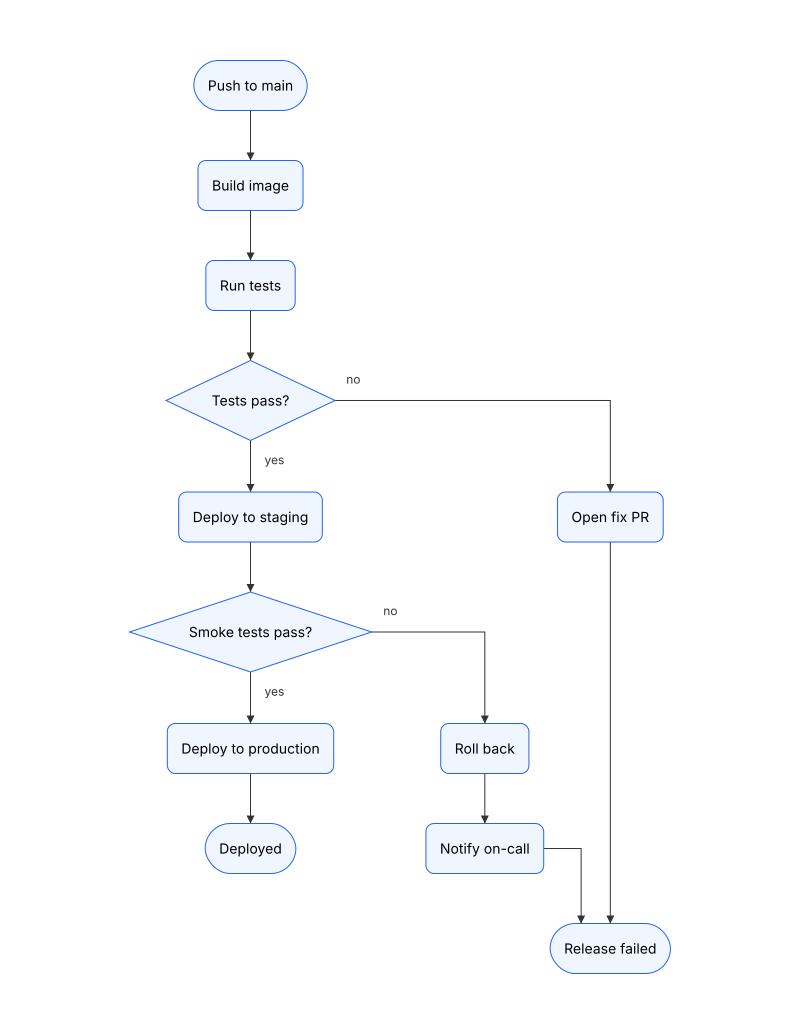
The deploy pipeline of a service called orders-api, drawn by an agent as a flowchart from the repository’s GitHub Actions workflow: a push to main is built and tested, deployed to staging and smoke-tested there, then rolled out to production. Each check is a decision with its yes and no exits labeled, and every failure ends in a rollback or a fix pull request. The agent wrote no coordinates. Revision 2 records pull request 218, which replaces the straight deploy to production with a canary: the workflow shifts 10% more traffic to the new release, checks the error rate, and repeats until the release carries all of it. Scroll to the Revision diff panel below to see both revisions, before and after, with the compare response from diagram_history. It lists the canary’s step, its two checks and their four edges as added; as changed, the two edges that now lead into and out of the canary and the steps the engine moved to make room for it; and the old production deploy as removed.
When to use it
When a team’s release process lives in a CI workflow and people keep asking what happens after they merge: which checks gate production, what a failed smoke test does, who gets paged. The YAML lists jobs and conditions; the flowchart shows the paths through them. Each pull request that changes the workflow becomes a revision, so reviewers see the new path before it runs for the first time.
What the agent does
On the first run the agent reads the workflow, makes a process for each job or step a reader needs to see and a decision for each check that chooses what runs next, joins them in the order the jobs need each other, labels every exit with its answer, and saves the diagram with diagram_create.
For each pull request that changes the workflow, the agent turns the change into typed operations and saves them with diagram_edit as a revision whose message names the pull request. For pull request 218 that is one edit: createNode for the canary’s step and its two checks, createEdge for their edges and the loop back, updateEdge to move the smoke tests’ yes exit onto the canary and to start the edge into “Deployed” at the last check, and deleteElement for the production deploy it replaces. The edges keep their IDs, so the compare names them as changed rather than as one removed and one added. diagram_history with compare lists what changed, and diagram_render draws the new revision for the pull request.
What the output includes
- One
diagramFamily: "flowchart"diagram per workflow, that every later run edits rather than redraws. - Decisions with labeled
yesandnoexits, a loop drawn back to the step it repeats, and pills for the trigger and the two outcomes. - A revision for each pull request that changes the workflow, its message starting with the pull request’s number.
- A compare JSON listing the steps, checks and edges each pull request adds, changes and removes.
What this example does not aim to do
It draws the workflow as written, not its runs. A run’s timings, retries and the job that failed belong in the CI system’s own run view. It also leaves out the scripts the workflow calls: a step that runs deploy.sh is drawn as the step, not as what the script does inside.
Rendered diagram
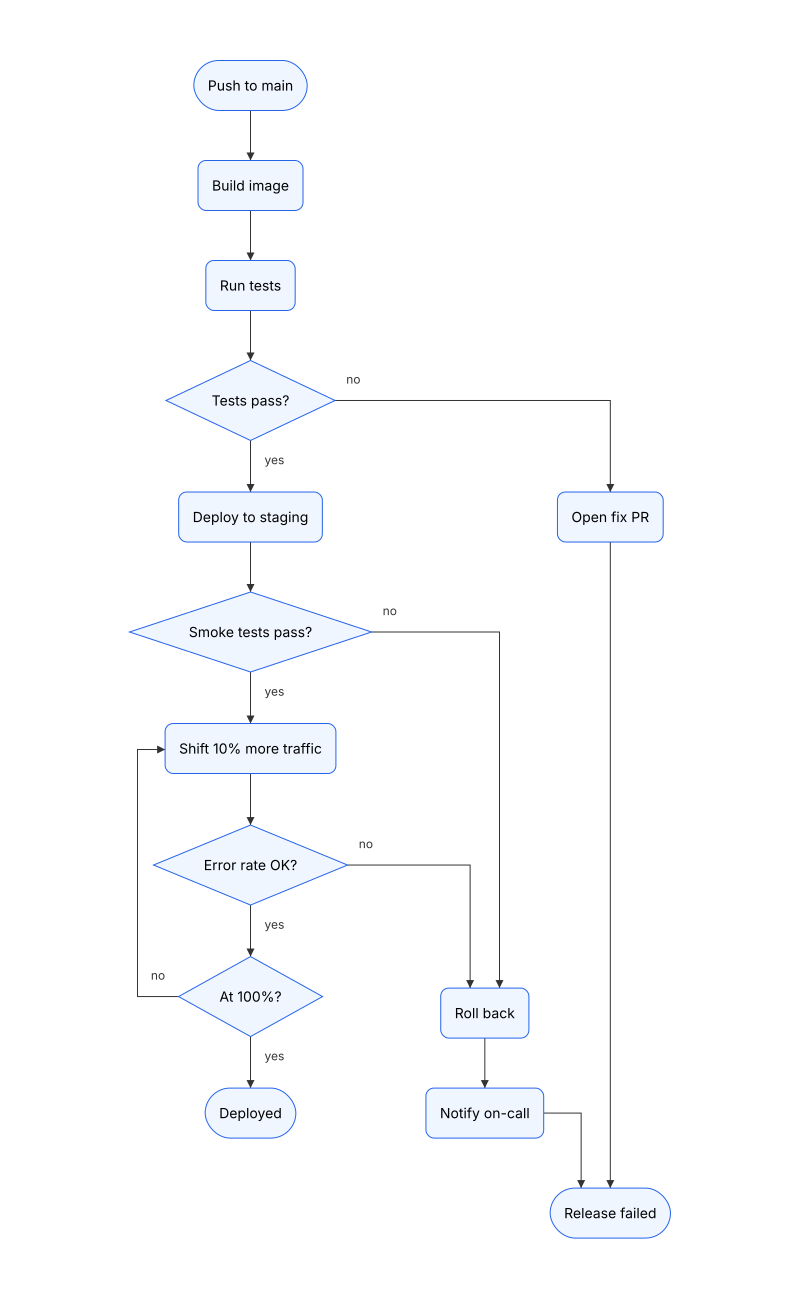
Revision 2 as Zindex saved it, from the edit to revision 1 that Revision diff shows. That edit moved no placed node Revision diff doesn't list, but the Playground draws the scene below from scratch, so its nodes can land elsewhere. Open the scene there to swap themes (clean / dark / blueprint / sketch).
Scene JSON
Raw
The DSP scene of revision 2, without the node positions Zindex saved with it. Open it in the
Playground, or send it as scene to
POST /v1/diagrams/preview, to draw it from scratch.
{
  "schemaVersion": "0.1",
  "diagramFamily": "flowchart",
  "scene": {
    "id": "deploy-pipeline-from-github-actions",
    "title": "orders-api deploy pipeline",
    "brief": "How a push to main reaches production for orders-api, drawn from .github/workflows/deploy.yml.\nIn run order, top to bottom: a process box for each job or step that does something, a decision for each check with labeled yes and no exits, pills for the trigger and the outcomes. Keep element IDs; change it with edits when the workflow changes, and name the pull request in the edit's message."
  },
  "elements": [
    {
      "id": "push",
      "kind": "node",
      "nodeType": "generic",
      "shape": "pill",
      "label": "Push to main"
    },
    {
      "id": "build",
      "kind": "node",
      "nodeType": "process",
      "label": "Build image"
    },
    {
      "id": "test",
      "kind": "node",
      "nodeType": "process",
      "label": "Run tests"
    },
    {
      "id": "testsOk",
      "kind": "node",
      "nodeType": "decision",
      "label": "Tests pass?"
    },
    {
      "id": "staging",
      "kind": "node",
      "nodeType": "process",
      "label": "Deploy to staging"
    },
    {
      "id": "smoke",
      "kind": "node",
      "nodeType": "decision",
      "label": "Smoke tests pass?"
    },
    {
      "id": "shift",
      "kind": "node",
      "nodeType": "process",
      "label": "Shift 10% more traffic"
    },
    {
      "id": "errOk",
      "kind": "node",
      "nodeType": "decision",
      "label": "Error rate OK?"
    },
    {
      "id": "full",
      "kind": "node",
      "nodeType": "decision",
      "label": "At 100%?"
    },
    {
      "id": "done",
      "kind": "node",
      "nodeType": "generic",
      "shape": "pill",
      "label": "Deployed"
    },
    {
      "id": "rollback",
      "kind": "node",
      "nodeType": "process",
      "label": "Roll back"
    },
    {
      "id": "notify",
      "kind": "node",
      "nodeType": "process",
      "label": "Notify on-call"
    },
    {
      "id": "failed",
      "kind": "node",
      "nodeType": "generic",
      "shape": "pill",
      "label": "Release failed"
    },
    {
      "id": "fix",
      "kind": "node",
      "nodeType": "process",
      "label": "Open fix PR"
    },
    {
      "id": "e1",
      "kind": "edge",
      "from": {
        "elementId": "push"
      },
      "to": {
        "elementId": "build"
      }
    },
    {
      "id": "e2",
      "kind": "edge",
      "from": {
        "elementId": "build"
      },
      "to": {
        "elementId": "test"
      }
    },
    {
      "id": "e3",
      "kind": "edge",
      "from": {
        "elementId": "test"
      },
      "to": {
        "elementId": "testsOk"
      }
    },
    {
      "id": "e4",
      "kind": "edge",
      "from": {
        "elementId": "testsOk"
      },
      "to": {
        "elementId": "staging"
      },
      "label": "yes"
    },
    {
      "id": "e5",
      "kind": "edge",
      "from": {
        "elementId": "testsOk"
      },
      "to": {
        "elementId": "fix"
      },
      "label": "no"
    },
    {
      "id": "e6",
      "kind": "edge",
      "from": {
        "elementId": "staging"
      },
      "to": {
        "elementId": "smoke"
      }
    },
    {
      "id": "e7",
      "kind": "edge",
      "from": {
        "elementId": "smoke"
      },
      "to": {
        "elementId": "shift"
      },
      "label": "yes"
    },
    {
      "id": "e8",
      "kind": "edge",
      "from": {
        "elementId": "smoke"
      },
      "to": {
        "elementId": "rollback"
      },
      "label": "no"
    },
    {
      "id": "e9",
      "kind": "edge",
      "from": {
        "elementId": "shift"
      },
      "to": {
        "elementId": "errOk"
      }
    },
    {
      "id": "e10",
      "kind": "edge",
      "from": {
        "elementId": "errOk"
      },
      "to": {
        "elementId": "full"
      },
      "label": "yes"
    },
    {
      "id": "e11",
      "kind": "edge",
      "from": {
        "elementId": "errOk"
      },
      "to": {
        "elementId": "rollback"
      },
      "label": "no"
    },
    {
      "id": "e12",
      "kind": "edge",
      "from": {
        "elementId": "full"
      },
      "to": {
        "elementId": "done"
      },
      "label": "yes"
    },
    {
      "id": "e13",
      "kind": "edge",
      "from": {
        "elementId": "full"
      },
      "to": {
        "elementId": "shift"
      },
      "label": "no"
    },
    {
      "id": "e14",
      "kind": "edge",
      "from": {
        "elementId": "rollback"
      },
      "to": {
        "elementId": "notify"
      }
    },
    {
      "id": "e15",
      "kind": "edge",
      "from": {
        "elementId": "notify"
      },
      "to": {
        "elementId": "failed"
      }
    },
    {
      "id": "e16",
      "kind": "edge",
      "from": {
        "elementId": "fix"
      },
      "to": {
        "elementId": "failed"
      }
    }
  ]
}
Agent workflow
Draw a team's deploy pipeline as a flowchart from its GitHub Actions workflow, then record each pull request that changes the workflow as a revision named for it, so reviewers see the new path to production before it first runs.
Inputs
- The workflow file on the default branch (.github/workflows/deploy.yml)
- The pull request's change to that file
- The diagram's Zindex key, orders-api-deploy, or its ID from .zindex.json (the diagram is created on the first run)
- A Zindex API key, or an MCP client signed in to Zindex
Outputs
- Revision 1: the pipeline drawn from the workflow, laid out by the engine
- One revision per pull request that changes the workflow, its message starting with the pull request's number
- A compare listing the steps, checks and edges the pull request adds, changes and removes
- Rendered SVG and PNG of the new revision, posted on the pull request
- 01
Create or read the diagram
On the first run, draw the workflow and save it with
diagram_create:diagramFamily: "flowchart", akeysuch asorders-api-deploy, and abriefwhose first line says what the diagram shows. Zindex mints the ID; the key is how later runs find the diagram, and the brief's first line is what a search shows. On later runs, read it withdiagram_getinstead. - 02
Read the workflow
Read
.github/workflows/deploy.yml. The trigger (on: pushtomain) and the outcomes, deployed and release failed, become pills. Each job, or each step inside a job that a reader needs to see, becomes aprocess. Each check whose result chooses what runs next becomes adecisionlabeled with a question: a job's success when another job runsif: failure(), and a test inside a step's loop, such as the canary's error rate. Edges followneeds, and each exit of a decision is labeledyesorno. A loop is an edge back to the step it repeats. - 03
Read the diagram's current revision
For each pull request that changes
.github/workflows/, calldiagram_get. The outline's first line gives the current revision number (MAIN_REVISION), the 'before' state for the compare, and its lines give each node with its type and label and each edge with its ends and label, so you can see which IDs already exist. - 04
Compute the operation batch
New jobs and steps become
createNode, new checks adecision, new pathscreateEdge, removed jobsdeleteElement, renamed onesupdateNode. A path that now leads somewhere else keeps its edge: move it withupdateEdgeand a newfromorto. Deleting a node deletes the edges at it, so move the edges you keep before the delete. A change to no job, condition or order (a runner image, a cache key, a timeout) isn't a change to the pipeline. - 05
Save the pull request as a revision
Call
diagram_editwith the ops,baseRevision= MAIN_REVISION and a message that starts with the pull request's number:PR 218: roll out to production as a canary. This creates PR_REVISION. The edit is all or nothing: if an operation has errors, it returnsVALIDATION_FAILEDand saves nothing. The response'schangednames the canary's new elements, the two edges moved onto it, the production deploy it replaced, and the saved nodes the engine moved to make room for it. - 06
Fix what the warnings report
The edit's
warningslist the flowchart rules the new revision breaks and what drawing it noticed, each with acode, theelementwhen there is one, and a one-linefix. The edit above returns none: each of its decisions has ayesand anoexit.FAMILY_FLOWCHART_DECISION_FEW_EXITSnames a decision with fewer than two exits, andFAMILY_FLOWCHART_EXIT_UNLABELEDan exit without its answer. Fix them with a follow-up edit. - 07
Compare the default branch's revision with the pull request's
Call
diagram_historywithcompare: { from: MAIN_REVISION, to: PR_REVISION }. It lists the element IDs the pull request adds, changes and removes, and the scene-level fields that changed, so the agent doesn't have to work out the change again. - 08
Render the new revision
Get SVG and PNG links to the new revision; they work without a key for 7 days. The image is drawn once and kept, and it prints its address,
zindex.ai/d/<id>@<revision>, and date, so it is traceable to its revision. - 09
Post the change on the pull request
Post one comment on the pull request: a one-line summary (
+1 step, +2 checks, a loop), the image and the compare. When the pull request changes, record the difference as another revision with the same number and update that comment rather than adding another.
MCP recipe
For agents using Model Context Protocol. The tool sequence below matches the workflow steps; copy the prompt as a system message.
Tool sequence
- 01
diagram_createCreate or read the diagram - 02
diagram_getRead the diagram's current revision - 03
diagram_editSave the pull request as a revision - 04
diagram_historyCompare the default branch's revision with the pull request's - 05
diagram_renderRender the new revision
Unique tools used: diagram_create, diagram_get, diagram_edit, diagram_history, diagram_render.
Copyable agent prompt
Drop this verbatim into a system prompt for an MCP-connected agent.
The Zindex MCP server at https://api.zindex.ai/mcp exposes
the tools the prompt references (connect a client),
and so does the npm package @zindexai/mcp, which forwards
to it.
You look after the flowchart of the team's deploy pipeline, drawn from its GitHub Actions workflow, so anyone can see how a push reaches production and what happens when a check fails. You draw it once from the workflow, then record each pull request that changes the workflow as a revision named for it.

The diagram's Zindex ID is `${SCENE_ID}` and its key is `orders-api-deploy`. The workflow is `.github/workflows/deploy.yml`.

How to draw it:
- `diagramFamily: "flowchart"`, with no `layout` on any node: the engine places every node and routes every edge.
- The trigger and the outcomes are pills (`nodeType: "generic"`, `shape: "pill"`): "Push to main", "Deployed", "Release failed".
- Each job, or each step inside a job that a reader needs to see, is a `process` with a short verb phrase for a label. Each check whose result chooses what runs next (a job's success, an `if:` on another job's result, a test inside a loop) is a `decision` labeled with a question.
- Edges run in order, from each job to the jobs that `need` it. Label every exit of a decision with its answer, `yes` or `no`. A loop is an edge back to the step it repeats.

Steps:

1. If you don't have the diagram's ID yet, call `diagram_find({ query: "orders-api-deploy" })`, which returns it. If there is none, build the scene from the workflow on the default branch and call `diagram_create({ key: "orders-api-deploy", scene, message })` with a brief that states these conventions, and use the ID it returns.

2. For each pull request that changes `.github/workflows/`, call `diagram_get({ id: "${SCENE_ID}" })`. Read the current revision number from the outline's first line; call this `MAIN_REVISION`. The outline lists every node and edge with its ID and label.

3. Read the changed workflow. New jobs or steps become `createNode`, new checks a `decision`, new paths `createEdge`, removed jobs `deleteElement`, renamed ones `updateNode`. When a path now leads somewhere else, move its edge with `updateEdge` and a new `from` or `to` rather than deleting it. Deleting a node deletes the edges at it, so move the edges you keep before you delete the node. Reuse the diagram's IDs.

4. Call `diagram_edit({ id: "${SCENE_ID}", baseRevision: MAIN_REVISION, message, ops })` with a message that starts with the pull request's number, such as `PR 218: roll out to production as a canary`. Call the new revision `PR_REVISION`. If the call returns `REVISION_CONFLICT`, the diagram changed after you read it: the error lists what changed, so re-plan against the new revision.

5. The edit's `warnings` list what the new revision breaks, each with a `code`, the `element` and a one-line `fix`. `FAMILY_FLOWCHART_DECISION_FEW_EXITS` names a decision with fewer than two exits, and `FAMILY_FLOWCHART_EXIT_UNLABELED` an exit without its answer. Fix them with a follow-up edit.

6. Call `diagram_history({ id: "${SCENE_ID}", compare: { from: MAIN_REVISION, to: PR_REVISION } })` for the elements the pull request adds, changes and removes, then `diagram_render({ id: "${SCENE_ID}" })` for SVG and PNG links valid for 7 days.

7. Post one comment on the pull request: a one-line summary (`+1 step, +2 checks, a loop`), the image and the compare. When the pull request changes, record the difference as another revision with the same number and update that comment rather than adding another.

Hard rules: name the pull request in every revision message. Never redraw the diagram or recreate an element to change it; the IDs carry its history. Draw what the workflow runs, not what its comments say. If the pull request changes no job, condition or order (a runner image, a cache key, a timeout), post 'No changes to the pipeline' so reviewers know the check ran, and record nothing.
HTTP API recipe
For agents/devs not using MCP. Send
Authorization: Bearer $ZINDEX_API_KEY on every call
except POST /v1/diagrams/validate and
POST /v1/diagrams/preview, which need no key. In the
paths, ${SCENE_ID} is the diagram's ID, or the
key you gave it in diagram_create. Full
reference: REST API, OpenAPI spec.
- 01
POST/v1/diagramsOn the first run, draw the workflow and save it with
diagram_create:diagramFamily: "flowchart", akeysuch asorders-api-deploy, and abriefwhose first line says what the diagram shows. Zindex mints the ID; the key is how later runs find the diagram, and the brief's first line is what a search shows. On later runs, read it withdiagram_getinstead.Example request body
{
  "key": "orders-api-deploy",
  "message": "Pipeline from .github/workflows/deploy.yml",
  "scene": {
    "schemaVersion": "0.1",
    "diagramFamily": "flowchart",
    "scene": {
      "title": "orders-api deploy pipeline",
      "brief": "How a push to main reaches production for orders-api, drawn from .github/workflows/deploy.yml."
    },
    "elements": [
      "..."
    ]
  }
}
Example response
{ "id": "dgm_oXSgS16StyHr", "key": "orders-api-deploy", "revision": 1, "hash": "sha256:7585979f4749ea96bc9be944173d7cac389a8a39c81671e7204d513eb8a962e4", "chain": "sha256:059e93fe243e0248c973cd27b7ff8cba9229cd05a57e79af9f16adcee6fa089a", "warnings": [], "created": true } - 02
GET/v1/diagrams/${SCENE_ID}For each pull request that changes
.github/workflows/, calldiagram_get. The outline's first line gives the current revision number (MAIN_REVISION), the 'before' state for the compare, and its lines give each node with its type and label and each edge with its ends and label, so you can see which IDs already exist.Example response
{ "id": "dgm_oXSgS16StyHr", "revision": 1, "text": "dgm_oXSgS16StyHr \"orders-api deploy pipeline\" r1 2026-11-06T15:50Z sha256:7585979f4749\nkey: orders-api-deploy\nbrief: How a push to main reaches production for orders-api, drawn from .github/workflows/deploy.yml.\n In run order, top to bottom: a process box for each job or step that does something, a decision for each check with labeled yes and no exits, pills for the trigger and the outcomes. Keep element IDs; change it with edits when the workflow changes, and name the pull request in the edit's message.\nrecent: r1 curl/8.7.1 \"Pipeline from .github/workflows/deploy.yml\"\noutline: 12 nodes, 12 edges\n push generic \"Push to main\"\n build process \"Build image\"\n test process \"Run tests\"\n testsOk decision \"Tests pass?\"\n staging process \"Deploy to staging\"\n smoke decision \"Smoke tests pass?\"\n prod process \"Deploy to production\"\n done generic \"Deployed\"\n rollback process \"Roll back\"\n notify process \"Notify on-call\"\n failed generic \"Release failed\"\n fix process \"Open fix PR\"\n e1: push -> build\n e2: build -> test\n e3: test -> testsOk\n e4: testsOk -> staging \"yes\"\n e5: testsOk -> fix \"no\"\n e6: staging -> smoke\n e7: smoke -> prod \"yes\"\n e8: smoke -> rollback \"no\"\n e12: prod -> done\n e14: rollback -> notify\n e15: notify -> failed\n e16: fix -> failed" } - 03
POST/v1/diagrams/${SCENE_ID}/revisionsCall
diagram_editwith the ops,baseRevision= MAIN_REVISION and a message that starts with the pull request's number:PR 218: roll out to production as a canary. This creates PR_REVISION. The edit is all or nothing: if an operation has errors, it returnsVALIDATION_FAILEDand saves nothing. The response'schangednames the canary's new elements, the two edges moved onto it, the production deploy it replaced, and the saved nodes the engine moved to make room for it.Example request body
{
  "baseRevision": 1,
  "message": "PR 218: roll out to production as a canary",
  "ops": [
    {
      "op": "createNode",
      "id": "shift",
      "nodeType": "process",
      "label": "Shift 10% more traffic"
    },
    {
      "op": "createNode",
      "id": "errOk",
      "nodeType": "decision",
      "label": "Error rate OK?"
    },
    {
      "op": "createNode",
      "id": "full",
      "nodeType": "decision",
      "label": "At 100%?"
    },
    {
      "op": "createEdge",
      "id": "e9",
      "from": {
        "elementId": "shift"
      },
      "to": {
        "elementId": "errOk"
      }
    },
    {
      "op": "createEdge",
      "id": "e10",
      "from": {
        "elementId": "errOk"
      },
      "to": {
        "elementId": "full"
      },
      "label": "yes"
    },
    {
      "op": "createEdge",
      "id": "e11",
      "from": {
        "elementId": "errOk"
      },
      "to": {
        "elementId": "rollback"
      },
      "label": "no"
    },
    {
      "op": "createEdge",
      "id": "e13",
      "from": {
        "elementId": "full"
      },
      "to": {
        "elementId": "shift"
      },
      "label": "no"
    },
    {
      "op": "updateEdge",
      "id": "e7",
      "to": {
        "elementId": "shift"
      }
    },
    {
      "op": "updateEdge",
      "id": "e12",
      "from": {
        "elementId": "full"
      },
      "label": "yes"
    },
    {
      "op": "deleteElement",
      "id": "prod"
    }
  ]
}
Example response
{ "id": "dgm_oXSgS16StyHr", "revision": 2, "hash": "sha256:75383f9113843866179e9a86e8cd967d6d49eee4e51560ed9138be73179b46c3", "chain": "sha256:4d2243b42fd9dea5e503d52e06d16e4ef4d6e57d9dfa773d05b4cbd4ddca67fd", "warnings": [], "changed": { "added": [ "shift", "errOk", "full", "e9", "e10", "e11", "e13" ], "updated": [ "done", "rollback", "notify", "failed", "e7", "e12" ], "removed": [ "prod" ] } } - 04
GET/v1/diagrams/${SCENE_ID}/compare?from=${MAIN_REVISION}&to=${PR_REVISION}Call
diagram_historywithcompare: { from: MAIN_REVISION, to: PR_REVISION }. It lists the element IDs the pull request adds, changes and removes, and the scene-level fields that changed, so the agent doesn't have to work out the change again.Example response
{ "id": "dgm_oXSgS16StyHr", "from": 1, "to": 2, "added": [ "shift", "errOk", "full", "e9", "e10", "e11", "e13" ], "changed": [ "done", "rollback", "notify", "failed", "e7", "e12" ], "removed": [ "prod" ], "scene": [], "authors": [ { "by": null, "client": "curl/8.7.1" } ] } - 05
GET/v1/diagrams/${SCENE_ID}/renderGet SVG and PNG links to the new revision; they work without a key for 7 days. The image is drawn once and kept, and it prints its address,
zindex.ai/d/<id>@<revision>, and date, so it is traceable to its revision.Example response
{
  "id": "dgm_oXSgS16StyHr",
  "title": "orders-api deploy pipeline",
  "revision": 2,
  "latest": 2,
  "savedAt": "2026-11-06T15:50:25.964Z",
  "hash": "sha256:75383f9113843866179e9a86e8cd967d6d49eee4e51560ed9138be73179b46c3",
  "chain": "sha256:4d2243b42fd9dea5e503d52e06d16e4ef4d6e57d9dfa773d05b4cbd4ddca67fd",
  "engine": "8.29.0+build.3500",
  "svg": "https://api.zindex.ai/v1/images/dgm_oXSgS16StyHr@2.svg?e=1794585025&s=...",
  "png": "https://api.zindex.ai/v1/images/dgm_oXSgS16StyHr@2.png?e=1794585025&s=...",
  "expires": "2026-11-13T15:50:25.000Z",
  "width": 800,
  "height": 1299
}
Operations
Raw The typed operations that build revision 2's scene from empty in one edit, not through the edit the diagram above was saved by. Save an
empty diagram with diagram_create, then send the
envelope's baseRevision, message and
ops to diagram_edit, or
POST /v1/diagrams/{id}/revisions. Each op
carries a stable id so subsequent runs can update the
same elements instead of regenerating.
{
  "schemaVersion": "0.1",
  "sceneId": "deploy-pipeline-from-github-actions",
  "baseRevision": 1,
  "message": "Build the orders-api deploy pipeline from .github/workflows/deploy.yml, with PR 218's canary rollout",
  "ops": [
    {
      "op": "createNode",
      "id": "push",
      "nodeType": "generic",
      "shape": "pill",
      "label": "Push to main"
    },
    {
      "op": "createNode",
      "id": "build",
      "nodeType": "process",
      "label": "Build image"
    },
    {
      "op": "createNode",
      "id": "test",
      "nodeType": "process",
      "label": "Run tests"
    },
    {
      "op": "createNode",
      "id": "testsOk",
      "nodeType": "decision",
      "label": "Tests pass?"
    },
    {
      "op": "createNode",
      "id": "staging",
      "nodeType": "process",
      "label": "Deploy to staging"
    },
    {
      "op": "createNode",
      "id": "smoke",
      "nodeType": "decision",
      "label": "Smoke tests pass?"
    },
    {
      "op": "createNode",
      "id": "shift",
      "nodeType": "process",
      "label": "Shift 10% more traffic"
    },
    {
      "op": "createNode",
      "id": "errOk",
      "nodeType": "decision",
      "label": "Error rate OK?"
    },
    {
      "op": "createNode",
      "id": "full",
      "nodeType": "decision",
      "label": "At 100%?"
    },
    {
      "op": "createNode",
      "id": "done",
      "nodeType": "generic",
      "shape": "pill",
      "label": "Deployed"
    },
    {
      "op": "createNode",
      "id": "rollback",
      "nodeType": "process",
      "label": "Roll back"
    },
    {
      "op": "createNode",
      "id": "notify",
      "nodeType": "process",
      "label": "Notify on-call"
    },
    {
      "op": "createNode",
      "id": "failed",
      "nodeType": "generic",
      "shape": "pill",
      "label": "Release failed"
    },
    {
      "op": "createNode",
      "id": "fix",
      "nodeType": "process",
      "label": "Open fix PR"
    },
    {
      "op": "createEdge",
      "id": "e1",
      "from": {
        "elementId": "push"
      },
      "to": {
        "elementId": "build"
      }
    },
    {
      "op": "createEdge",
      "id": "e2",
      "from": {
        "elementId": "build"
      },
      "to": {
        "elementId": "test"
      }
    },
    {
      "op": "createEdge",
      "id": "e3",
      "from": {
        "elementId": "test"
      },
      "to": {
        "elementId": "testsOk"
      }
    },
    {
      "op": "createEdge",
      "id": "e4",
      "from": {
        "elementId": "testsOk"
      },
      "to": {
        "elementId": "staging"
      },
      "label": "yes"
    },
    {
      "op": "createEdge",
      "id": "e5",
      "from": {
        "elementId": "testsOk"
      },
      "to": {
        "elementId": "fix"
      },
      "label": "no"
    },
    {
      "op": "createEdge",
      "id": "e6",
      "from": {
        "elementId": "staging"
      },
      "to": {
        "elementId": "smoke"
      }
    },
    {
      "op": "createEdge",
      "id": "e7",
      "from": {
        "elementId": "smoke"
      },
      "to": {
        "elementId": "shift"
      },
      "label": "yes"
    },
    {
      "op": "createEdge",
      "id": "e8",
      "from": {
        "elementId": "smoke"
      },
      "to": {
        "elementId": "rollback"
      },
      "label": "no"
    },
    {
      "op": "createEdge",
      "id": "e9",
      "from": {
        "elementId": "shift"
      },
      "to": {
        "elementId": "errOk"
      }
    },
    {
      "op": "createEdge",
      "id": "e10",
      "from": {
        "elementId": "errOk"
      },
      "to": {
        "elementId": "full"
      },
      "label": "yes"
    },
    {
      "op": "createEdge",
      "id": "e11",
      "from": {
        "elementId": "errOk"
      },
      "to": {
        "elementId": "rollback"
      },
      "label": "no"
    },
    {
      "op": "createEdge",
      "id": "e12",
      "from": {
        "elementId": "full"
      },
      "to": {
        "elementId": "done"
      },
      "label": "yes"
    },
    {
      "op": "createEdge",
      "id": "e13",
      "from": {
        "elementId": "full"
      },
      "to": {
        "elementId": "shift"
      },
      "label": "no"
    },
    {
      "op": "createEdge",
      "id": "e14",
      "from": {
        "elementId": "rollback"
      },
      "to": {
        "elementId": "notify"
      }
    },
    {
      "op": "createEdge",
      "id": "e15",
      "from": {
        "elementId": "notify"
      },
      "to": {
        "elementId": "failed"
      }
    },
    {
      "op": "createEdge",
      "id": "e16",
      "from": {
        "elementId": "fix"
      },
      "to": {
        "elementId": "failed"
      }
    }
  ]
}
Validation
Valid
Captured response from POST /v1/diagrams/validate, the
check diagram_validate runs. It checks the scene and
draws it. Every code it can return is in the validation rules.
- 0 errors
- 0 warnings
The scene validates with no errors or warnings.
Each entry has a code, the element it
concerns when there is one, and a one-line fix.
diagram_create and diagram_edit save
nothing when there are errors and return
VALIDATION_FAILED; warnings don't block a save. Both
return the same warnings for the revision they save, so an agent
reads them from the write itself.
Revision diff
Raw
What changed between two revisions of the diagram, as
diagram_history returns it with compare.
Every revision is kept, so any two can be compared, by revision
number or by date.
Scenario
Pull request 218 replaces the straight deploy to production with a canary rollout. Seven elements are new: the step that shifts 10% more traffic, its two checks, the error rate and whether all traffic has moved, and their four edges, the loop back to the shift among them. Two edges changed and kept their IDs: e7, the smoke tests' yes exit, now leads to the canary's first step, and e12, the edge into Deployed, now leaves the last check on its yes exit. The production deploy is removed. The compare also lists the steps the engine moved to make room for the canary. Reviewers see this list and both revisions on the pull request before the new workflow first runs.
- Revision 1 → 2
- +7 added
- -1 removed
- ~6 changed
+ Added
shifterrOkfulle9e10e11e13
− Removed
prod
~ Changed
donerollbacknotifyfailede7e12
Raw compare response
{
  "id": "dgm_LAPKC82HaCNx",
  "from": 1,
  "to": 2,
  "added": [
    "shift",
    "errOk",
    "full",
    "e9",
    "e10",
    "e11",
    "e13"
  ],
  "changed": [
    "done",
    "rollback",
    "notify",
    "failed",
    "e7",
    "e12"
  ],
  "removed": [
    "prod"
  ],
  "scene": [],
  "scenario": "Pull request 218 replaces the straight deploy to production with a canary rollout. Seven elements are new: the step that shifts 10% more traffic, its two checks, the error rate and whether all traffic has moved, and their four edges, the loop back to the shift among them. Two edges changed and kept their IDs: e7, the smoke tests' yes exit, now leads to the canary's first step, and e12, the edge into Deployed, now leaves the last check on its yes exit. The production deploy is removed. The compare also lists the steps the engine moved to make room for the canary. Reviewers see this list and both revisions on the pull request before the new workflow first runs."
}Agent resources
Machine-readable versions of this example. Agents should fetch these rather than scrape the rendered HTML.
-
deploy-pipeline-from-github-actions.scene.jsonCanonical DSP scene Open -
deploy-pipeline-from-github-actions.ops.jsonTyped-operation envelope that builds the scene Open -
deploy-pipeline-from-github-actions.workflow.jsonStructured agent workflow (goal, inputs, outputs, steps) Open -
deploy-pipeline-from-github-actions.diff.jsonSamplediagram_historycompare response Open -
deploy-pipeline-from-github-actions.svgRendered diagram: revision 2 as Zindex saved it Open -
deploy-pipeline-from-github-actions.before.svgRevision diff's before picture: revision 1 as Zindex saved it Open -
deploy-pipeline-from-github-actions.mdAgent-readable markdown summary Open -
/examples/index.jsonManifest of all examples (cross-linked) Open